

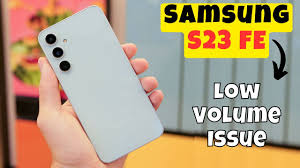
Is your Samsung S23 volume too low, even when the sound is set to maximum? If so, you are not alone. Many users report weak speaker output, low call volume, or muffled audio after updates or prolonged use. Unfortunately, this issue can affect calls, media playback, notifications, and overall phone usability.
However, the good news is that Samsung S23 volume too low problems are often fixable. In fact, with proper troubleshooting and professional repair when needed, sound quality can be fully restored. Therefore, this guide explains the most common causes, step-by-step solutions, and expert repair methods that work effectively.
Why Is Samsung S23 Volume Too Low? Common Causes Explained
Before applying any fix, it is important to understand why Samsung S23 volume too low issues occur. In most cases, the problem is caused by one or more of the following factors.
1. Software Bugs or System Glitches
After updates, temporary software bugs may affect audio drivers. As a result, speaker output becomes weak or inconsistent.
2. Incorrect Sound Settings
Sometimes, volume limiters, Dolby Atmos misconfiguration, or accessibility settings reduce audio output unintentionally.
3. Dust or Debris in Speaker Grill
Over time, dust accumulates inside the speaker grille. Consequently, sound becomes muffled or extremely low.
4. Moisture or Liquid Exposure
Even minor moisture exposure can damage speaker components. Therefore, sound output may drop significantly.
5. Hardware Speaker Damage
Drops, impacts, or long-term wear can weaken internal speaker units. In such cases, software fixes alone are not enough.
Samsung S23 Volume Too Low After Update: Why It Happens
Many users report Samsung S23 volume too low after update. This happens because system updates sometimes reset audio calibration or conflict with existing settings.
Moreover, cache errors and background app conflicts can interfere with sound output. Therefore, addressing post-update issues quickly prevents long-term speaker damage.
How to Fix Samsung S23 Volume Too Low: Step-by-Step Solutions
1. Check and Adjust All Volume Levels
First, go to Settings → Sounds and vibration → Volume. Then, increase media, call, notification, and system sound levels individually.
Additionally, disable Volume Limit if enabled.
2. Turn Off Bluetooth and Audio Accessories
Sometimes, audio routes through connected Bluetooth devices. Therefore, disconnect all accessories and test speaker output again.
3. Clean the Speaker Grill Safely
Use a soft brush or compressed air to remove dust. However, avoid sharp objects or liquids, as they can worsen damage.
4. Restart the Phone for Samsung S23 Volume Too Low
Although simple, restarting clears temporary glitches. As a result, sound often returns to normal instantly.
5. Clear Cache Partition
Boot into recovery mode and clear the cache partition. This removes corrupted system files that may cause low volume issues.
Advanced Software Fixes for Samsung S23 Volume Too Low Sound Issues
Enable Dolby Atmos Properly
Navigate to Settings → Sound quality and effects → Dolby Atmos. Then, test different modes for optimized output.
Check Accessibility Settings
Ensure that Hearing enhancements or sound balance options are not limiting volume unintentionally.
Update Apps and System Software
Outdated apps may conflict with audio services. Therefore, keeping everything updated improves performance.
When Samsung S23 Volume Too Low Needs Professional Repair
If all software fixes fail, then Samsung S23 volume too low is likely caused by hardware damage. In such cases, professional repair becomes necessary.
Signs You Need Expert Help
- Crackling or distorted sound
- Volume drops suddenly
- No sound during calls
- Muffled audio after liquid exposure
Ignoring these signs may lead to complete speaker failure.
Professional Speaker Repair vs DIY Fixes
Although DIY solutions seem tempting, they often cause more harm. For instance, improper cleaning or forced repairs can damage internal components.
On the other hand, professional repair ensures:
- Accurate diagnosis
- Proper speaker replacement
- Safe handling of internal circuits
- Long-lasting sound quality
Therefore, expert repair is always the safer choice.
Why Choose Milaaj For Samsung S23 Volume Too Low
When dealing with Samsung S23 volume too low, choosing a trusted repair center makes a significant difference. Milaaj mobiles and laptop repair Al Barsha offers professional solutions designed for speed, safety, and affordability.
Key Benefits of Choosing Milaaj
- Low-price repair solutions without compromising quality
- Fast turnaround time for urgent speaker issues
- High-quality replacement parts
- Convenient service location
- Expert technicians with Samsung experience
As a result, customers enjoy clear, powerful sound restored quickly and reliably.
How Experts Fix Samsung S23 Low Volume Issues
1. Professional Diagnosis
Technicians inspect speakers, audio ICs, and internal connectors to identify the root cause.
2. Precision Cleaning
Special tools remove internal dust and corrosion safely.
3. Speaker Replacement
If required, damaged speakers are replaced with high-quality parts for optimal performance.
4. Audio Calibration
After repair, sound output is recalibrated for clarity and balance.
How to Prevent Samsung S23 Volume Too Low Issues in the Future
Prevention is always better than repair. Therefore, follow these tips:
- Avoid exposure to moisture
- Clean speaker grills regularly
- Use protective cases
- Update software responsibly
- Avoid high-volume distortion over long periods
By doing so, you protect speaker components and maintain sound quality.
Samsung S23 Volume Too Low: Frequently Asked Questions
Why is my Samsung S23 volume suddenly low?
Usually, it is caused by software glitches, dust buildup, or speaker damage.
Can a software update fix low volume issues?
Yes, updates often fix bugs. However, some updates may temporarily cause sound issues.
Does water damage reduce speaker volume?
Yes, moisture causes corrosion, leading to muffled or weak sound.
Is speaker replacement expensive?
Professional repair is affordable, especially compared to device replacement.
Final Thoughts: Samsung S23 Volume Too Low
Experiencing Samsung S23 volume too low can be frustrating. However, the issue is rarely permanent. With proper troubleshooting, timely action, and professional repair, sound quality can be restored fully.
Instead of risking further damage with DIY fixes, choosing expert service ensures convenience, safety, speed, and long-lasting results. Therefore, if your Samsung S23 sound remains weak, professional repair is the most effective solution.
Other Services:
- Need other mobile phone repairs? Check out Milaaj’s mobile repair services in Dubai.
- Looking to upgrade? Learn about selling your used mobile in Dubai.
- Data loss concerns? Visit Milaaj’s data recovery services.
📍 Visit Any Milaaj Branch in Dubai
🔹 Bur Dubai
Milaaj Mobile and Laptop Repair Dubai
📞 055 258 8477
🔗 Google Maps
🔹 Al Barsha
Milaaj Mobiles and Laptop Repair Al Barsha
📞 052 596 2846
🔗 Google Maps
🔹 Al Barsha 3
Milaaj Mobiles and Gaming Store
📞 052 3405 814
🔗 Google Maps
🔹 Al Nuaimiya
Milaaj Mobiles and Laptops Ajman
📞 055 788 9654
🔗 Google Maps
Shop Locations: Al Barsha | Bur Dubai | Reef Mall, Salah Al Din | Al Nuaimiya, Ajman
Email: support@milaaj.com
Operating Hours: Monday – Sunday

Leave a Reply