

Have you ever had that sinking feeling when your laptop suddenly refuses to boot, or your external drive makes a weird noise or worse, absolutely no noise at all? If you’re facing this, you might be wondering about SSD vs HDD Data Recovery Dubai solutions. In the world of tech, data loss is the ultimate nightmare. Whether it’s years of family photos, a half-finished thesis, or critical business contracts, the panic is real.
As we move further into 2026, the technology we use to store our lives has shifted. Most of us have traded the slow, clicking Hard Disk Drives (HDDs) of the past for lightning-fast Solid State Drives (SSDs) and NVMe modules. But here is the catch: while SSDs are tougher and faster, SSD data recovery is a completely different beast compared to traditional HDD retrieval.
If your high-end NVMe drive has gone silent, you might think a quick software download will fix it. Unfortunately, that could be the mistake that kills your data forever. Today, we’re diving deep into why modern drives especially NVMes require a certified clean-room specialist and how the recovery process differs from the old-school spinning disks.
The Mechanical Dinosaur: How HDD Recovery Works
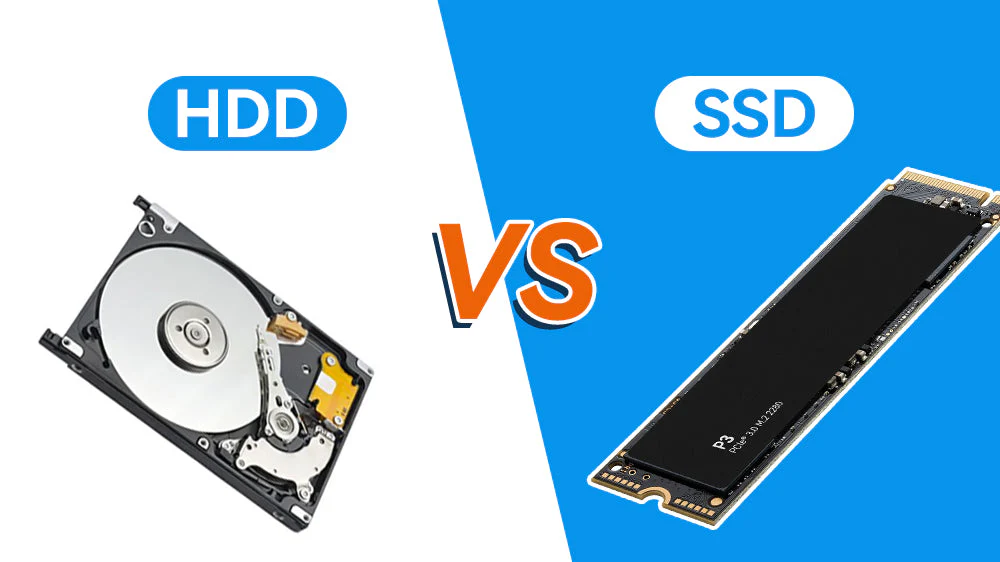
To understand why SSDs are so complex, we first have to look at the “old guard.” A Hard Disk Drive (HDD) is essentially a high-tech record player. Inside, there are magnetic platters spinning at thousands of rotations per minute, with a tiny “read/write head” hovering just nanometers above the surface.
Physical vs. Logical Failures in HDDs for SSD vs HDD Data Recovery Dubai
When an HDD fails, it’s often a mechanical drama. You might hear the infamous “click of death,” which usually means the read/write head has physically touched the platter or the motor has seized.
In these cases, a specialist opens the drive in a clean room to prevent a single speck of dust from landing on the platters. They might swap the head assembly with a matching “donor” part to get the drive spinning just long enough to clone the data. It’s delicate work, but because the data is physically etched into magnetic sectors, it stays exactly where it was put even if the power is cut.
The Silent Complexity: What Makes SSDs Different?
Now, let’s talk about that sleek NVMe drive inside your MacBook or gaming rig. Solid State Drives have no moving parts. Instead, they store data in “cells” within NAND flash memory chips. Think of it as a massive, incredibly fast grid of light switches.
The Controller: The “Brain” That Can Forget for SSD vs HDD Data Recovery Dubai
While an HDD is mechanical, an SSD is purely electronic. The most critical component is the SSD Controller. This chip acts as the conductor of an orchestra, deciding exactly where every bit of data goes to ensure the memory chips wear out evenly (a process called “wear leveling”).
When an SSD fails, it’s usually not a “crash” in the mechanical sense. Instead, the controller might fail, or the firmware the internal software that tells the drive how to act becomes corrupted. When this happens, the drive becomes a “brick.” It won’t show up in your BIOS, and no off-the-shelf software can talk to it because the translator (the controller) is dead.
Why NVMe Data Recovery is a “Level 3” Emergency
If you’re using a modern NVMe (Non-Volatile Memory Express) drive, the stakes are even higher. These drives are designed for extreme speed, using multiple lanes of data transfer. This speed comes with architectural complexity that makes recovery incredibly difficult for a standard repair shop.
1. The TRIM Command: The Silent Eraser
In an HDD, when you delete a file, the data stays on the platter until it’s overwritten. In an SSD, a feature called TRIM tells the drive to actively wipe those cells to keep the drive fast. This means “accidentally deleted” files on an NVMe drive can vanish permanently within seconds. Speedy repairing and immediate shutdown are your only hope here.
2. Encryption by Default for SSD vs HDD Data Recovery Dubai
Many modern NVMe drives (like those from Samsung or Western Digital) use hardware-level encryption. The data is scrambled the moment it hits the chips. If the controller chip dies, you aren’t just looking at “raw data” you’re looking at a puzzle where the key is trapped inside a broken chip.
3. Chip-Off Recovery and Clean-Room Standards
If the circuit board is fried, specialists may need to perform a “chip-off” recovery. This involves desoldering the NAND flash chips and reading them directly using specialized hardware. Even though there are no spinning platters, a Class 100 Clean Room is still vital. Why? Because microscopic static or contaminants during the desoldering and handling process can cause an electrical short that fries the memory cells instantly.
Milaaj Mobile and Laptop Repair Al Barsha: Your Data Recovery Partner
When you’re dealing with a failed server, a dead MacBook, or an unrecognized external SSD in Dubai, you can’t leave it to chance. Milaaj mobile and laptop repair Al Barsha has established itself as a premier destination for complex hardware issues and data retrieval.
Located conveniently in the heart of Al Barsha, they offer a specialized approach to modern tech failures. Here is why they are the preferred choice for residents and businesses alike:
- Speedy Repairing: They understand that in 2026, being without your data for a week isn’t an option. Their diagnostic process is streamlined to give you answers fast.
- Low Price Guarantee: Professional data recovery can be expensive, but Milaaj focuses on offering competitive, transparent pricing without hidden “diagnostic fees” that break the bank.
- Ultimate Convenience: With a central location near major hubs like Mall of the Emirates, dropping off your device is easy. They even offer pickup and delivery services for those with busy schedules.
- Premium Part Quality: Whether it’s a donor board for a laptop or high-grade components for a motherboard repair, they never settle for “cheap” alternatives that might compromise your data further.
- Expert Technicians: Their team handles everything from cracked iPhone screens to complex NAND-level data recovery, ensuring your device is in safe hands.
Comparison: HDD Recovery vs. SSD/NVMe Recovery
| Feature | HDD (Hard Disk Drive) | SSD / NVMe |
| Failure Mode | Mechanical (Motors, Heads) | Electronic (Controller, Firmware) |
| Warning Signs | Clicking, Beeping, Slowing | Sudden Death, No Detection |
| Recovery Method | Physical Part Swap, Platter Imaging | Firmware Emulation, Chip-Off |
| Impact of TRIM | Minimal (Data lingers) | High (Data is purged quickly) |
| Complexity | High (Mechanical Precision) | Ultra-High (Electronic/Encryption) |
FAQs: SSD vs HDD Data Recovery Dubai
1. My SSD isn’t showing up in Disk Management. Is my data gone?
Not necessarily! This usually indicates a controller or firmware failure. The data is likely still on the NAND chips, but the drive’s “translator” is broken. A professional service like Milaaj can often bypass the controller to reach the data.
2. Can I use “Free Recovery Software” on a failed NVMe drive?
We strongly advise against it. If the drive has a physical or firmware issue, running software forces the drive to keep trying to read damaged areas. This can lead to “cell exhaustion” or permanent firmware locking, making professional recovery impossible.
3. How much does SSD data recovery cost in Dubai?
The cost depends on the type of failure. Logical issues (deleted files) are cheaper, while physical/controller failures requiring clean-room work are more expensive. Milaaj offers free initial consultations to provide an accurate quote.
4. Is it true that SSDs have a “limited lifespan”?
Yes. SSDs have a “TBW” (Total Bytes Written) rating. Every time you write data, the cells degrade slightly. However, for most users, a modern NVMe drive will last 5–10 years before this becomes an issue. Sudden failure is more often caused by power surges or heat.
5. Why do I need a clean room if there are no moving parts?
During advanced repairs, such as NAND chip transplants or PCB (Printed Circuit Board) repair, airborne particles and static electricity are the enemies. A controlled environment ensures that no external factors damage the sensitive electronic components during the “surgery.”
Final Thoughts: SSD vs HDD Data Recovery Dubai
While technology has made our devices faster and more portable, it has also made the “rescue mission” more technical. The transition from HDD to NVMe means that the old “local shop” fixes are often outdated.
The best defense is a good offense: always keep a 3-2-1 backup (three copies, two different media, one offsite). But when the unthinkable happens and your backup fails, don’t panic and start clicking “format.”
Shut the device down immediately and take it to a specialist who understands the microscopic world of NAND flash. Whether you are in Al Barsha or anywhere in Dubai, trusting experts like Milaaj can be the difference between a total loss and a successful recovery.
Other Services:
- Need other Data Recovery repairs? Check out Milaaj’s data recovery repair services in Dubai.
- Looking to upgrade? Learn about selling your used iPhone in Dubai.
- Data loss concerns? Visit Milaaj’s data recovery services.
- For Apple users, check Apple trade-in options in Dubai.
📍 Visit Any Milaaj Branch in Dubai
🔹 Bur Dubai
Milaaj Mobile and Laptop Repair Dubai
📞 055 258 8477
🔗 Google Maps
🔹 Al Barsha
Milaaj Mobiles and Laptop Repair Al Barsha
📞 052 596 2846
🔗 Google Maps
🔹 Al Barsha 3
Milaaj Mobiles and Gaming Store
📞 052 3405 814
🔗 Google Maps
🔹 Al Nuaimiya
Milaaj Mobiles and Laptops Ajman
📞 055 788 9654
🔗 Google Maps
Shop Locations: Al Barsha | Bur Dubai | Reef Mall, Salah Al Din | Al Nuaimiya, Ajman
Email: support@milaaj.com
Operating Hours: Monday – Sunday

Leave a Reply