

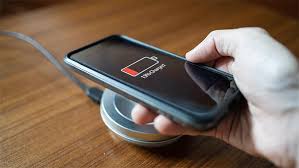
Wireless charging is one of the most convenient features on modern iPhones. However, many users suddenly face a frustrating problem: wireless charging not working on iPhone devices. When this happens, charging becomes unreliable, slow, or stops completely. As a result, daily routines are interrupted, and battery anxiety increases.
Fortunately, wireless charging not working on iPhone is a solvable issue. With the right troubleshooting steps, expert solutions, and professional repair support, you can restore safe and efficient wireless charging. Therefore, this detailed guide explains the real causes, proven fixes, and when expert help becomes necessary.
Understanding Why Wireless Charging Not Working on iPhone Happens
Before applying fixes, it is essential to understand why wireless charging not working on iPhone occurs in the first place. Generally, the issue may stem from software glitches, hardware damage, incompatible accessories, or environmental factors.
Moreover, wireless charging relies on precise alignment and uninterrupted power transfer. Even a small issue can disrupt the charging process. Therefore, identifying the root cause early helps prevent further damage.
Common Signs of iPhone Wireless Charging Failure
If your wireless charging not working on iPhone problem persists, you may notice:
- iPhone not detecting the wireless charging pad
- Charging starts and stops intermittently
- Slow or unstable charging speeds
- iPhone overheating during wireless charging
- No charging icon displayed on the screen
Consequently, these signs indicate deeper issues that require attention.
Software Reasons Wireless Charging Not Working on iPhone
iOS Bugs and Temporary System Glitches
Sometimes, wireless charging not working on iPhone is caused by minor iOS glitches. After updates, system bugs may interfere with power management.
Solution:
- Restart your iPhone
- Check for pending iOS updates
- Reset all settings if needed
As a result, many software-related charging issues resolve quickly.
Background Apps Causing Charging Interruption
Additionally, apps running in the background consume power faster than wireless charging supplies it. Consequently, it may appear that wireless charging not working on iPhone, even though the charger functions.
Solution:
- Close unused apps
- Enable Low Power Mode
- Avoid heavy apps while charging
Hardware Causes of Wireless Charging Not Working on iPhone
Damaged Wireless Charging Coil
The wireless charging coil inside the iPhone is delicate. Therefore, drops or pressure damage can disrupt its alignment. As a result, wireless power transfer fails completely.
Signs:
- Wired charging works but wireless does not
- Charging works only at certain angles
This situation usually requires professional inspection.
Back Glass Damage Blocking Wireless Charging
Cracked or damaged back glass can interfere with electromagnetic charging waves. Consequently, wireless charging not working on iPhone becomes more frequent.
Tip:
Even hairline cracks can affect charging efficiency.
Accessory Issues That Stop iPhone Wireless Charging
Incompatible Wireless Charging Pads
Not all wireless chargers meet Apple’s Qi standards. As a result, using low-quality pads often causes wireless charging not working on iPhone issues.
Solution:
- Use Qi-certified wireless chargers
- Avoid cheap or unbranded pads
Thick Phone Cases and Metal Accessories
Surprisingly, phone cases play a major role. Thick cases, magnetic mounts, or metal plates block wireless charging signals.
Solution:
- Remove the case while charging
- Avoid magnetic accessories
Overheating Problems Linked to Wireless Charging Failure
iPhone Overheats During Wireless Charging
Overheating triggers iOS safety features that pause charging. Consequently, wireless charging not working on iPhone appears suddenly.
Causes include:
- Charging in warm environments
- Using phone while charging
- Faulty charging pads
Fix:
Allow the device to cool before charging again.
Dust and Internal Damage Affecting Wireless Charging
Liquid Damage and Moisture Exposure
Although wireless charging does not use ports, internal corrosion affects charging circuits. Therefore, wireless charging not working on iPhone may occur after water exposure.
Warning:
Moisture damage worsens over time if untreated.
Internal Component Wear Over Time
With extended use, internal components degrade. As a result, older iPhones may struggle with wireless charging reliability.
Step-by-Step Fixes for Wireless Charging Not Working on iPhone
To fix wireless charging not working on iPhone, follow these proven steps:
- Restart your iPhone
- Update iOS software
- Remove phone case and accessories
- Try a different Qi-certified charger
- Align phone correctly on charging pad
- Clean the back glass gently
- Avoid using phone while charging
If the problem persists, professional repair becomes essential.
Why DIY Fixes Often Fail for Wireless Charging Issues
While online hacks promise quick solutions, they often cause more harm. Consequently, improper repairs may damage internal coils or logic boards.
Therefore, trusting expert repair services ensures safe, lasting results.
Professional Solutions for Wireless Charging Not Working on iPhone
Professional technicians use specialized tools to diagnose internal coil damage, circuit issues, and overheating causes accurately. As a result, repairs are precise and data-safe.
Benefits of Expert Repair:
- Accurate diagnostics
- No data loss
- Long-term reliability
- Warranty-backed repairs
Milaaj Mobile Repair: Trusted Solution for iPhone Wireless Charging Issues
If wireless charging not working on iPhone continues despite troubleshooting, Milaaj mobiles and laptop repair Al Barsha provides expert-level solutions with unmatched service quality.
Why Choose Milaaj Mobile Repair?
- Low Price: Affordable repair options without compromising quality
- Speed Repairing: Most wireless charging issues fixed the same day
- Convenience: Walk-in service with minimal wait time
- Part Quality: High-grade, compatible components used
- Data Safety: Zero data loss during repairs
Moreover, their technicians understand Apple hardware intricately, ensuring precise repairs every time.
Preventing Wireless Charging Issues on iPhone in the Future
To avoid wireless charging not working on iPhone again, follow these preventive tips:
- Use certified wireless chargers
- Keep your iPhone cool while charging
- Avoid charging on soft surfaces
- Remove thick cases before charging
- Handle device gently to protect internal coils
Consequently, these habits extend charging performance and device lifespan.
When to Seek Professional Help Immediately
You should seek professional repair if:
- Wireless charging never works
- Phone overheats excessively
- Back glass is cracked
- Device experienced water damage
- Charging stops suddenly
Ignoring these signs may lead to permanent hardware failure.
Final Thoughts
In conclusion, wireless charging not working on iPhone is a common but manageable problem. While software glitches and accessory issues can be resolved at home, hardware-related failures require expert attention.
Moreover, professional repair services offer reliability, affordability, speed, and long-term peace of mind. With timely action and expert support, your iPhone can regain smooth, safe wireless charging performance without risk.
Other Services:
- Need other iPhone repairs? Check out Milaaj’s iPhone repair services in Dubai.
- Looking to upgrade? Learn about selling your used iPhone in Dubai.
- Data loss concerns? Visit Milaaj’s data recovery services.
- For Apple users, check Apple trade-in options in Dubai.
📍 Visit Any Milaaj Branch in Dubai
🔹 Bur Dubai
Milaaj Mobile and Laptop Repair Dubai
📞 055 258 8477
🔗 Google Maps
🔹 Al Barsha
Milaaj Mobiles and Laptop Repair Al Barsha
📞 052 596 2846
🔗 Google Maps
🔹 Al Barsha 3
Milaaj Mobiles and Gaming Store
📞 052 3405 814
🔗 Google Maps
🔹 Al Nuaimiya
Milaaj Mobiles and Laptops Ajman
📞 055 788 9654
🔗 Google Maps
Shop Locations: Al Barsha | Bur Dubai | Reef Mall, Salah Al Din | Al Nuaimiya, Ajman
Email: support@milaaj.com
Operating Hours: Monday – Sunday




Leave a Reply