

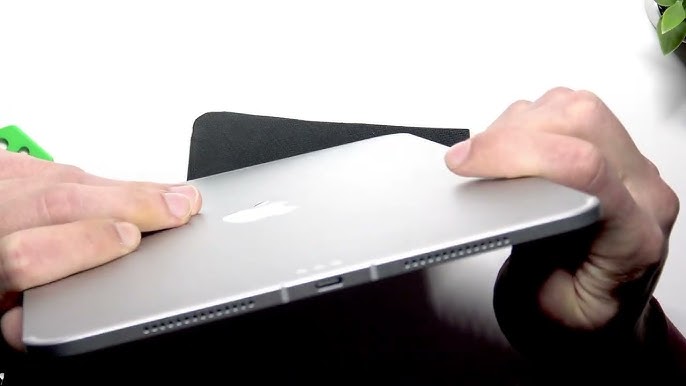
Apple iPads are powerful, reliable, and designed for everyday productivity. However, even the most well-maintained devices can develop charging issues over time. One of the most common yet overlooked causes is debris buildup inside the charging port. If your iPad is charging slowly, disconnecting frequently, or not charging at all, learning how to clean iPad charging port safely can often restore proper performance.
That said, cleaning the charging port incorrectly can cause serious damage. Therefore, understanding the correct steps and knowing when to stop DIY attempts is essential. In this detailed guide, we explain how to clean charging port safely, what tools to use, mistakes to avoid, and when professional repair is the better option.
Why Cleaning the iPad Charging Port Is Important
Over time, dust, lint, and pocket debris accumulate inside the charging port. As a result, the charging cable cannot make proper contact with the internal pins.
Common Symptoms of a Dirty iPad Charging Port
- iPad charges only at certain angles
- Charging disconnects randomly
- Charging speed is unusually slow
- “Accessory not supported” message appears
Therefore, before assuming battery failure, it is wise to learn how to clean charging port safely.
How Debris Affects iPad Charging Performance
Even small particles can block electrical contact. Moreover, compressed debris becomes harder over time, making charging unreliable. Consequently, ignoring port cleanliness can lead to permanent damage.
That is why understanding how to clean charging port safely helps prevent expensive repairs.
How to Clean iPad Charging Port Safely – Before You Start
Before cleaning, preparation is critical. Otherwise, accidental damage may occur.
Power Off Your iPad
First and foremost, always turn off your iPad completely. This prevents short circuits during cleaning.
Use Proper Lighting
Good lighting helps you clearly see debris. As a result, you avoid unnecessary poking.
Choose the Right Tools
Only use non-conductive, soft tools to clean safely.
Safe Tools to Clean iPad Charging Port
Using the correct tools is essential when learning how to clean charging port safely.
Recommended Tools
- Wooden toothpick
- Plastic SIM ejector
- Soft anti-static brush
- Compressed air (used gently)
Tools to Avoid for Clean iPad Charging Port Safely
- Metal pins or needles
- Sharp objects
- Liquid cleaners
- Cotton swabs (may leave fibers)
Therefore, using safe tools protects delicate charging pins.
Step-by-Step Guide: How to Clean iPad Charging Port Safely
Follow these steps carefully to avoid damage.
1: Inspect the Charging Port
First, shine a light into the port. Look for lint, dust, or compact debris.
2: Gently Loosen Debris
Next, use a wooden toothpick to gently scrape debris outward. Always move slowly and carefully.
3: Use Compressed Air Carefully
After loosening debris, lightly blow compressed air to remove particles. However, do not spray directly or forcefully.
4: Recheck the Port
Once cleaned, inspect again. If debris remains, repeat gently.
5: Test Charging for Clean iPad Charging Port Safely
Finally, power on your iPad and test charging with a certified cable.
By following these steps, you can successfully learn how to clean iPad charging port safely without harming the device.
Mistakes to Avoid While Cleaning iPad Charging Port
Although cleaning seems simple, many users make costly mistakes.
Using Metal Objects
Metal tools can scratch or short charging pins, causing permanent damage.
Blowing Moist Air
Never blow with your mouth, as moisture can corrode internal components.
Over-Cleaning for Clean iPad Charging Port Safely
Repeated aggressive cleaning can loosen charging connectors.
Therefore, moderation and caution are key when learning how to clean iPad charging port safely.
When Cleaning Doesn’t Fix Charging Issues
Sometimes, cleaning alone is not enough. For instance:
- Charging port pins may be damaged
- Internal charging connector may be loose
- Battery or power IC may be failing
In such cases, professional inspection is required.
DIY Cleaning vs Professional iPad Charging Repair
DIY Cleaning
- Suitable for minor dust buildup
- Cost-effective
- Limited to surface debris
Professional Repair for Clean iPad Charging Port Safely
- Fixes internal connector issues
- Uses advanced tools
- Prevents accidental damage
Therefore, knowing how to clean iPad charging port safely also means knowing when to stop.
Signs You Need Professional iPad Charging Repair
- iPad does not charge after cleaning
- Charging port feels loose
- Device overheats during charging
- Charging cable falls out easily
At this stage, professional help is the safest option.
How Professionals Clean and Repair iPad Charging Ports
Professional technicians follow a structured process:
Internal Inspection
They inspect port alignment, pins, and internal connectors.
Precision Cleaning for Clean iPad Charging Port Safely
Specialized tools remove debris safely without damaging components.
Port Repair or Replacement
If needed, damaged connectors are repaired or replaced.
As a result, charging performance is fully restored.
Why Choose Milaaj Mobile Repair for Clean iPad Charging Port Safely Issues
iPad Charging Port Cleaning & Repair at Milaaj Mobile Repair
At Milaaj mobiles and laptop repair Al Barsha, expert technicians specialize in safe charging port cleaning and repair. Every service focuses on protecting device integrity while restoring reliable charging.
Low Price, Honest Repair
Customers receive affordable solutions without unnecessary part replacements.
Fast Repair Turnaround
Most iPad charging port issues are resolved quickly, often the same day.
Convenient Service Experience
From diagnosis to delivery, the process is smooth and customer-friendly.
High-Quality Parts and Tools
Only premium tools and parts are used to ensure long-lasting results.
Why Professional Cleaning Is Sometimes Safer Than DIY
Although learning how to clean iPad charging port is useful, professional services prevent accidental damage. Moreover, technicians detect hidden issues early.
As a result, professional repair often saves time and money in the long run.
How to Prevent Charging Port Dirt in the Future
Prevention is always better than repair.
Best Practices
- Avoid charging in dusty environments
- Keep iPad in a clean case
- Avoid pocket lint exposure
- Inspect charging port monthly
By following these habits, you reduce the need to repeatedly clean.
FAQs About Clean iPad Charging Port Safely
Q1. Can I clean my iPad charging port at home safely?
Yes, if you use non-metal tools and gentle techniques. Avoid liquids and sharp objects.
Q2. Why is my iPad still not charging after cleaning the port?
Internal connector damage or battery issues may require professional repair.
Q3. How often should I clean my iPad charging port?
Only when charging issues appear over-cleaning can cause damage.
Q4. Is compressed air safe for cleaning iPad charging ports?
Yes, but use it lightly and from a distance to avoid internal damage.
Conclusion: Clean iPad Charging Port Safely
In conclusion, knowing how to clean iPad charging port safely can restore proper charging and prevent unnecessary repairs. While gentle DIY cleaning works for minor debris, aggressive or repeated attempts can cause damage.
Therefore, combine careful cleaning with professional support when needed. With timely action, correct tools, and expert care, your iPad can charge smoothly, safely, and reliably for years to come.
Other Services:
- Need other iPad repairs? Check out Milaaj’s iPad repair services in Dubai.
- Looking to upgrade? Learn about selling your used iPad in Dubai.
- Data loss concerns? Visit Milaaj’s data recovery services.
- For Apple users, check Apple trade-in options in Dubai.
📍 Visit Any Milaaj Branch in Dubai
🔹 Bur Dubai
Milaaj Mobile and Laptop Repair Dubai
📞 055 258 8477
🔗 Google Maps
🔹 Al Barsha
Milaaj Mobiles and Laptop Repair Al Barsha
📞 052 596 2846
🔗 Google Maps
🔹 Al Barsha 3
Milaaj Mobiles and Gaming Store
📞 052 3405 814
🔗 Google Maps
🔹 Al Nuaimiya
Milaaj Mobiles and Laptops Ajman
📞 055 788 9654
🔗 Google Maps
Shop Locations: Al Barsha | Bur Dubai | Reef Mall, Salah Al Din | Al Nuaimiya, Ajman
Email: support@milaaj.com
Operating Hours: Monday – Sunday




Leave a Reply