

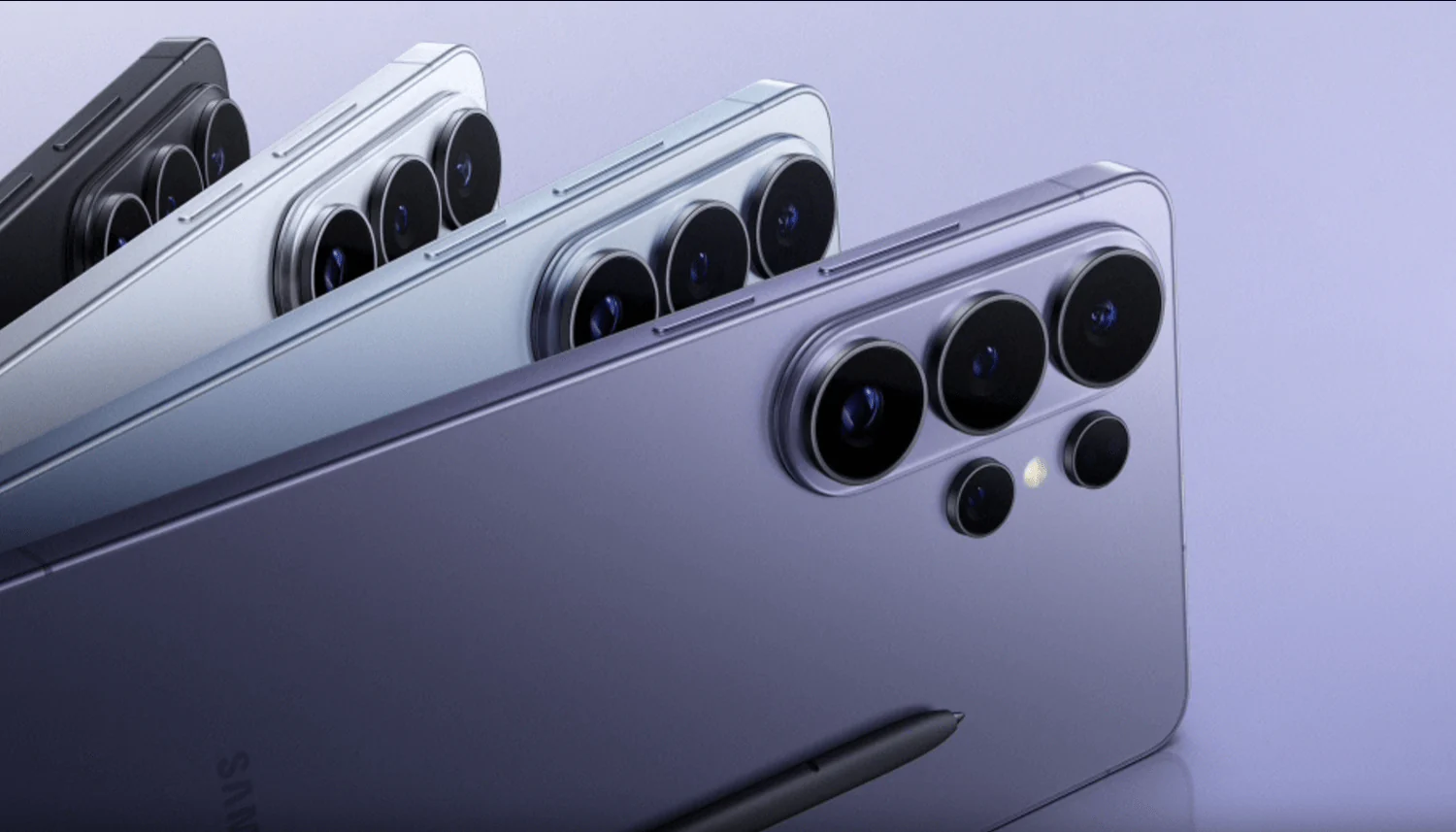
Photography has always been about chasing the perfect light. With the release of the Samsung Galaxy S26 Ultra on March 4, 2026, the rules have changed. If you have been struggling with grainy, blurry, or dark night photos, this device can make a big difference. The standout upgrade is the Galaxy S26 Ultra Camera f/1.4 Aperture, which is designed to improve low-light performance. This powerful hardware allows the phone to capture up to 47% more light than the previous model.
In a vibrant city like Dubai, a strong night camera is essential. Bright skyscrapers and deep shadows create challenging lighting conditions. Whether you are walking through Al Barsha night markets or photographing the Burj Khalifa from afar, the f/1.4 lens helps deliver clearer results. This guide explains the best settings and simple tips to capture sharp, colorful, and social-media-ready night photos every time.
The Power of the f/1.4 Aperture: Why It Matters
When we talk about the Galaxy S26 Ultra Camera f/1.4 Aperture: Best Low-Light Settings for Nightography, we are talking about the physical opening of the lens. In previous models like the S24 and S25 Ultra, the aperture was set at f/1.7. Moving to f/1.4 is a massive jump in the world of optics.
More Light, Less Noise
A wider aperture (represented by a lower number like f/1.4) acts like a bigger window for your camera’s sensor. Because more light enters the lens naturally, the camera doesn’t have to “crank up” the ISO sensitivity as much. High ISO is the primary cause of that “grainy” or “noisy” look in night photos. With the S26 Ultra, you get cleaner images with more natural textures because the hardware is doing the heavy lifting, rather than relying solely on software AI to brighten a dark frame.
Faster Shutter Speeds
One of the most annoying parts of night photography is motion blur.On older phones, the camera often needed a longer shutter time to capture enough light. As a result, even slight hand movements or subject motion could cause blur. However, the f/1.4 lens captures light much faster. This improvement allows quicker shutter speeds in low-light conditions. Therefore, you can take sharper photos of pets, children, or moving cars even after sunset.
Best Settings for Nightography on the S26 Ultra
To truly master the Galaxy S26 Ultra Camera f/1.4 Aperture: Best Low-Light Settings for Nightography, you need to move beyond just pointing and shooting. While the “Auto” mode is excellent, a few small tweaks can take your photos from “good” to “extraordinary.”
Use the New ‘Auto Night Control’ for Galaxy S26 Ultra Camera f/1.4
Samsung has introduced a clever new feature in the 2026 camera app. Instead of switching to a separate Night Mode, look for a small white moon icon (🌙A) in the corner of your viewfinder while in Photo mode.
- Pro Tip: If the icon is white, the AI thinks the light is okay. If you want a deeper, more detailed shot, tap the icon to force a longer exposure (like 🌙2 or 🌙4). This forces the camera to stack even more frames, taking full advantage of the f/1.4 brightness to reveal details in the shadows that the human eye might miss.
Master the EV (Exposure Value) Slider for Galaxy S26 Ultra Camera f/1.4
Because the f/1.4 lens lets in so much light, the AI can sometimes over-brighten a scene, making a night shot look like it was taken at dusk. To keep that moody, nighttime vibe, tap on your subject to lock focus and then slide the little “sun” icon downward. Lowering the exposure slightly will deepen the blacks and make neon lights or streetlamps “pop” without looking washed out.
Shoot in 24MP for the Perfect Balance for Galaxy S26 Ultra Camera f/1.4
The S26 Ultra features a new 24MP shooting option via the Camera Assistant. While the 200MP mode is great for daylight landscapes, the 24MP mode is the “sweet spot” for nightography. It uses pixel-binning to combine data from multiple pixels into one, resulting in a cleaner image with better dynamic range than the standard 12MP shot, but without the massive file size of a 200MP photo.
Advanced Low-Light Tips for Pro Users
If you really want to push the Galaxy S26 Ultra Camera f/1.4 Aperture: Best Low-Light Settings for Nightography to the limit, try these advanced techniques.
Pro Mode for Long Exposures for Galaxy S26 Ultra Camera f/1.4
If you have a tripod, switch to Pro Mode. Set your ISO to a low value (like 50 or 100) and manually set your shutter speed to 2 or 5 seconds. Because the f/1.4 aperture is so wide, a 5-second exposure on the S26 Ultra will look incredibly bright and detailed. This is the best way to capture light trails from traffic or the subtle colors of a starry sky over the desert.
Focus on the “Ambient Island” for Galaxy S26 Ultra Camera f/1.4
The S26 Ultra features a new “ambient island” design for its camera module, which helps reduce internal lens flare. When shooting toward bright streetlights, try to angle your phone slightly so the light hits the lens at an angle. The improved coatings on the f/1.4 lens work wonders at keeping “ghosting” effects to a minimum, ensuring your night sky stays black rather than being filled with green dots.
Milaaj Mobile and Laptop Repair Al Barsha: Keeping Your Lens Pristine
All the settings in the world won’t help if your camera lens is scratched or your sensor is misaligned. The Galaxy S26 Ultra is a precision instrument, and its f/1.4 lens is more sensitive to dust and damage than ever before. If you find your night photos look “foggy” or if the autofocus is struggling, you may need a professional look. Milaaj mobile and laptop repair Al Barsha is the leading destination in Dubai for specialized S26 Ultra care.
Why Choose Milaaj in Al Barsha?
- Low Price & Transparency: We provide high-end repairs without the “mall markup.” Whether it’s a cracked camera glass or a sensor issue, we offer a low price guarantee with clear, upfront quotes.
- Speed Repairing for Creators: We know you can’t be without your camera for long. Our technicians specialize in same-day service, often getting your S26 Ultra back in your hands in just a few hours.
- Genuine Part Quality: The f/1.4 aperture requires exact alignment. We use only genuine-grade parts and calibrated diagnostic tools to ensure your camera’s “Nightography” performance is restored to factory standards.
- Convenience & Location: Situated right in the heart of Al Barsha near Mall of the Emirates, we are easy to reach. We also offer free pickup and delivery throughout Dubai, so you don’t even have to leave your home or office.
- Certified Technicians: Our team is trained on the latest 2nm architecture and the Snapdragon 8 Elite Gen 5 ISP, ensuring your phone’s software and hardware are perfectly synced after a repair.
FAQs : Galaxy S26 Ultra Camera f/1.4
1. Does the f/1.4 aperture work on the Zoom lens too?
The f/1.4 aperture is exclusive to the 200MP main wide-angle lens. However, the 5x telephoto lens has also been upgraded to f/2.9 (from f/3.4), making it much better for low-light zooming than previous models.
2. Can I use Nightography for video?
Absolutely! The S26 Ultra features Enhanced Nightography Video. It uses the wider aperture and the NPU’s real-time noise reduction to keep 4K and 8K videos bright and steady even in dim environments.
3. Why are my night photos still blurry?
Even with an f/1.4 lens, movement can cause blur. Ensure you are holding the phone with both hands, or try the “Horizontal Lock” feature to keep the frame stable if you are moving while shooting.
4. What is the “Privacy Display” on the S26 Ultra?
While not related to the camera, the S26 Ultra features the world’s first hardware-level Privacy Display. It narrows the viewing angle so only you can see your screen, preventing “shoulder surfing” in public places.
5. Should I leave HDR on for night shots?
Generally, yes. The Auto HDR on the S26 Ultra is excellent at balancing the bright lights of a city with the dark sky, preventing the lights from “blowing out” and losing detail.
Summary: Galaxy S26 Ultra Camera f/1.4
The Galaxy S26 Ultra Camera f/1.4 Aperture: Best Low-Light Settings for Nightography is a game-changer for mobile photographers. By learning how to use the new Auto Night controls, you can improve your night photography. You should also adjust the exposure settings for better lighting balance. In addition, choosing the right resolution helps capture sharper details. As a result, you can take professional-quality photos that were once difficult to achieve on a smartphone.
Samsung has successfully moved the needle on hardware engineering, giving us a lens that truly “sees” in the dark. Whether you’re a casual user or a serious content creator, the S26 Ultra is the ultimate tool for capturing the beauty of Dubai after dark.
Is your Galaxy S26 Ultra camera showing a “warning” or is the lens glass cracked? Don’t settle for blurry shots! Contact Milaaj today for a professional fix and get back to capturing the night in perfect detail.
Other Services:
- Need other Samsung repairs? Check out Milaaj’s Samsung repair services in Dubai.
- Looking to upgrade? Learn about selling your used laptop in Dubai.
- Data loss concerns? Visit Milaaj’s data recovery services.
📍 Visit Any Milaaj Branch in Dubai
🔹 Bur Dubai
Milaaj Mobile and Laptop Repair Dubai
📞 055 258 8477
🔗 Google Maps
🔹 Al Barsha
Milaaj Mobiles and Laptop Repair Al Barsha
📞 052 596 2846
🔗 Google Maps
🔹 Al Barsha 3
Milaaj Mobiles and Gaming Store
📞 052 3405 814
🔗 Google Maps
🔹 Al Nuaimiya
Milaaj Mobiles and Laptops Ajman
📞 055 788 9654
🔗 Google Maps
Shop Locations: Al Barsha | Bur Dubai | Reef Mall, Salah Al Din | Al Nuaimiya, Ajman
Email: support@milaaj.com
Operating Hours: Monday – Sunday




Leave a Reply