

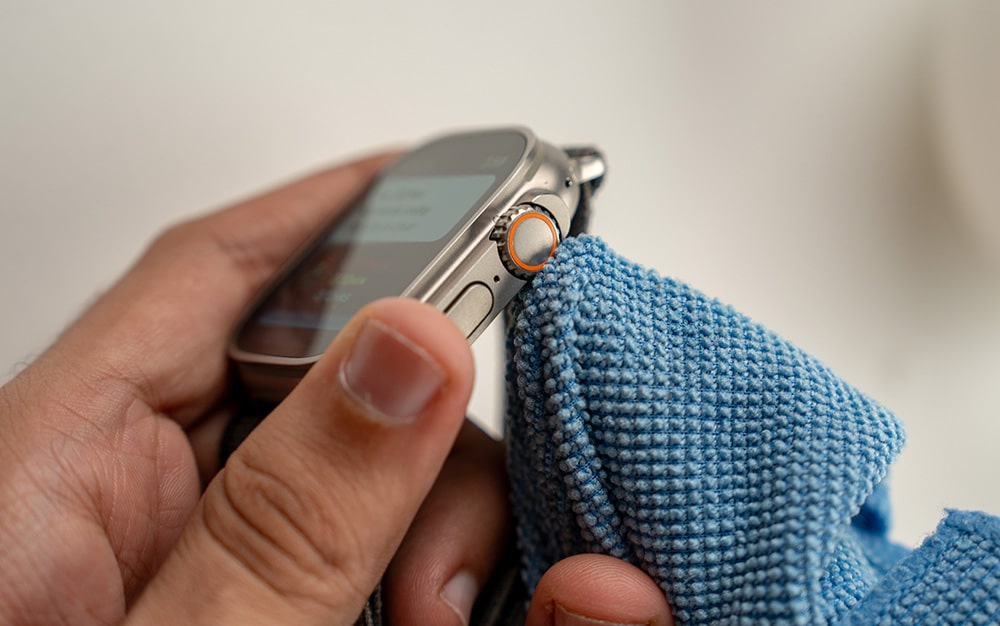
The Apple Watch Ultra 3’s Digital Crown sticking is built for the extremes whether you’re diving in the Arabian Gulf or hiking through the desert. In 2026, its S10 chip and 3,000-nit display make it the ultimate companion for the Dubai lifestyle. However, even a rugged masterpiece like the Ultra 3 has a “moving” vulnerability: the Digital Crown. If you have noticed that your crown feels “mushy,” offers resistance, or is completely jammed, you aren’t alone. In our dusty and humid climate, even the finest engineering can meet its match.
A sticking Digital Crown is often a sign that environmental elements have compromised the internal tracks. This guide explores why this happens, how you can perform a safe “home reset,” and when it’s time to seek a professional repair in Al Barsha to protect your IP6X dust resistance and 100m water resistance.
Why is My Apple Watch Ultra 3 Digital Crown Sticking?
The Digital Crown is a marvel of miniaturization, using optical sensors to track rotation. However, because it is a physical component with a small gap between the crown and the Grade 5 Titanium case, it is prone to debris.
1. The “Dubai Elements”: Sand and Salt for Apple Watch Ultra 3’s Digital Crown sticking
If you’ve spent a weekend at Kite Beach or went on a desert safari, fine particles of sand or salt can lodge themselves inside the mechanism. When salt water dries, it leaves behind microscopic crystals that act like “grit” in a machine. This is the most common cause of a “scratchy” or sticking feel.
2. Lotion, Sunscreen, and Sweat for Apple Watch Ultra 3’s Digital Crown sticking
In the heat of Al Barsha, sunscreen is a daily necessity. Over time, these oils combined with dried sweat from your HIIT sessions at the gym—can turn into a sticky residue. This “gunk” acts like a slow-drying glue, making the crown difficult to turn or press.
3. Structural Misalignment for Apple Watch Ultra 3’s Digital Crown sticking
While the Ultra 3 is tested to MIL-STD 810H standards, a significant impact can slightly shift the crown’s internal housing. If the crown is tilted even a fraction of a millimeter, it will rub against the titanium frame, causing constant resistance.
The 15-Second Home Fix: The Warm Water Rinse
Apple officially recommends a specific cleaning method for a sticking Digital Crown. Since the Ultra 3 is rated for high-speed water sports, it is perfectly safe to rinse under a tap provided you follow these steps:
- Prepare the Watch: Turn off your Apple Watch Ultra 3 and remove any leather bands (rubber or titanium bands are fine).
- The Fresh Water Rinse: Hold the Digital Crown under a lightly running stream of warm, fresh water from a faucet for 10 to 15 seconds. Do not use soap, detergents, or compressed air, as these can damage the acoustic membranes and seals.
- The “Turn and Press” Technique: As the water runs over the small gap, continuously turn and press the Digital Crown. This helps flush out the crystallized salt or dried lotion from the internal tracks.
- Dry Thoroughly: Use a non-abrasive, lint-free cloth to dry the surface. Afterward, use the “Water Eject” feature (found in the Control Center) to clear any moisture from the speaker grilles.
When Home Cleaning Fails: Hardware Warning Signs
If the warm water rinse doesn’t restore that satisfying, “clicky” haptic feel, you might be dealing with a hardware issue. Transitioning from a simple cleaning to a technical repair is necessary if you notice the following:
- Ghost Scrolling: The screen moves on its own even when you aren’t touching the crown.
- No Haptic Feedback: You turn the crown, but the S10 chip doesn’t trigger the haptic vibration.
- The “Click” is Gone: The crown turns, but you can no longer “press” it to return to the home screen.
- Visible Gaps: If the crown looks crooked or “wobbly,” the internal flex cable or the structural housing may be damaged.
Milaaj Mobile and Laptop Repair Al Barsha: Your Ultra 3 Specialists
When a $800+ piece of technology starts failing, you shouldn’t trust it to a “generalist” shop. The Apple Watch Ultra 3 is a highly integrated device with a sapphire crystal display and a complex seal system. Milaaj mobile and laptop repair Al Barsha is the trusted destination for Al Barsha residents who need precision Apple repairs.
Why Milaaj is the Trusted Choice for Watch Repairs:
- Low Price for Premium Care: We believe in fair, transparent pricing. We offer a low price for Digital Crown cleaning and sensor recalibration, often saving you hundreds compared to a full device replacement.
- Speed Repairing for the Active Life: We know you rely on your watch for fitness tracking and connectivity. Our speed repairing protocols mean most Digital Crown issues are diagnosed and resolved the same day.
- Convenience in the Heart of Al Barsha: Located in Al Barsha 1, we are easy to find. If you’re busy, take advantage of our Apple Watch pickup and delivery service. We’ll collect your watch, fix it, and bring it back to your door.
- Superior Part Quality: If the crown’s flex cable or internal sensor needs replacing, we use only Original Grade components. This ensures that your watch remains just as responsive as the day you unboxed it.
- Seal Integrity Testing: Opening an Ultra 3 requires specialized heat-press equipment. We ensure that your IP6X and 100m water resistance seals are perfectly restored after every repair.
FAQs About Apple Watch Ultra 3’s Digital Crown sticking
1. Can I use WD-40 or alcohol to unstick the crown?
Absolutely not. Chemical lubricants like WD-40 will dissolve the internal gaskets and adhesives that keep your watch waterproof. Alcohol can also degrade the protective coatings on the sapphire crystal and titanium case.
2. Is a sticking crown covered under Apple’s warranty?
If the stickiness is caused by a manufacturing defect, yes. However, if Apple finds evidence of “external debris” (like sand or lotion) or physical impact, they usually classify it as out-of-warranty damage.
3. How often should I clean my Digital Crown?
If you swim in the ocean or use your watch for heavy workouts, a quick fresh-water rinse once a week is a great preventative measure to avoid buildup.
4. What is “Crown Haptics” and can it fix the sticking?
Crown Haptics is a software feature that provides tactile clicks. If the crown feels smooth but you don’t “feel” it working, check Settings > Sounds & Haptics on your watch to ensure it’s turned on.
5. Why does my crown feel wobbly?
A wobbly crown usually indicates that the internal support bracket has been jarred loose. This requires a professional to open the device and tighten the internal assembly.
Summary: Apple Watch Ultra 3’s Digital Crown sticking
The Apple Watch Ultra 3 is designed to be the toughest watch on the planet, but it still requires a little maintenance to keep its moving parts in peak condition. Apple Watch Ultra 3’s Digital Crown sticking is a common side effect of living an active life in Dubai, but it shouldn’t be a permanent problem. By using the warm water rinse and staying mindful of environmental buildup, you can keep your “scrolling” smooth.
Don’t let a jammed crown prevent you from using your watch’s best features. Whether it’s a simple cleaning or a complex sensor replacement, professional help is just around the corner in Al Barsha.
Is your Apple Watch Ultra 3 Digital Crown still not turning smoothly after a rinse? Contact Milaaj today for a professional diagnostic! We’ll get your crown clicking perfectly again so you can get back to your adventures.
Other Services:
- Need other iPhone repairs? Check out Milaaj’s apple watch repair services in Dubai.
- Looking to upgrade? Learn about selling your used device in Dubai.
- For Apple users, check Apple trade-in options in Dubai.
📍 Visit Any Milaaj Branch in Dubai
🔹 Bur Dubai
Milaaj Mobile and Laptop Repair Dubai
📞 055 258 8477
🔗 Google Maps
🔹 Al Barsha
Milaaj Mobiles and Laptop Repair Al Barsha
📞 052 596 2846
🔗 Google Maps
🔹 Al Barsha 3
Milaaj Mobiles and Gaming Store
📞 052 3405 814
🔗 Google Maps
🔹 Al Nuaimiya
Milaaj Mobiles and Laptops Ajman
📞 055 788 9654
🔗 Google Maps
Shop Locations: Al Barsha | Bur Dubai | Reef Mall, Salah Al Din | Al Nuaimiya, Ajman
Email: support@milaaj.com
Operating Hours: Monday – Sunday




Leave a Reply