

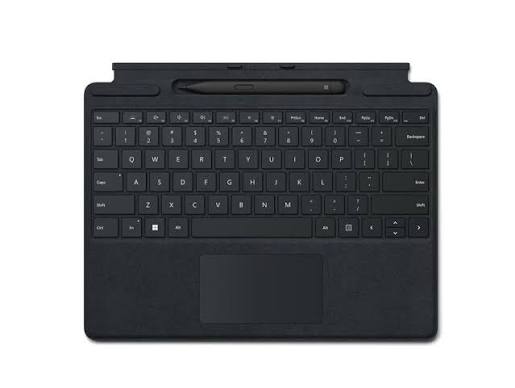
The Microsoft Surface Pro 11 has quickly become one of the most popular business devices in the UAE. Combining the portability of a tablet with the productivity of a laptop, it offers professionals a flexible solution for remote work, meetings, presentations, and everyday office tasks. Thanks to its powerful processor, AI-enhanced features, high-resolution display, and lightweight design, the Surface Pro 11 is now a common sight in Dubai’s corporate environments.
However, as adoption increases, a particular issue is receiving more attention from IT departments and business users alike: Microsoft Surface Pro 11 keyboard connector failure.
Many users initially assume their keyboard has stopped working entirely. In reality, the problem often originates from the connector system that links the Surface Pro 11 tablet to the detachable keyboard. Consequently, typing issues, intermittent connectivity, and complete keyboard failures are becoming increasingly common service requests.
If your Surface keyboard suddenly stops responding, disconnects randomly, or fails to function despite software troubleshooting, this guide explains everything you need to know about Microsoft Surface Pro 11 keyboard connector failure, including causes, warning signs, repair options, and prevention strategies.
Why the Microsoft Surface Pro 11 Is Popular in Dubai Offices
The Surface Pro 11 appeals to modern professionals because it combines versatility with premium performance.
Key advantages include:
- Lightweight and portable design
- Detachable keyboard functionality
- AI-powered productivity features
- Long battery life
- Touchscreen flexibility
- High-resolution display
- Seamless Microsoft ecosystem integration
As a result, businesses across Dubai have increasingly adopted Surface devices for hybrid work environments.
However, the detachable keyboard system introduces unique wear-and-tear challenges that traditional laptops do not face.
Therefore, reports of Microsoft Surface Pro 11 keyboard connector failure are not entirely surprising.
Understanding the Surface Pro 11 Keyboard Connector System
Unlike conventional laptops, the Surface Pro 11 relies on a detachable keyboard connection.
The system includes:
- Magnetic attachment points
- Data transfer connectors
- Power delivery contacts
- Alignment mechanisms
- Communication circuitry
Every time users attach or remove the keyboard, these components experience mechanical stress.
Consequently, frequent daily usage can gradually contribute to wear.
Moreover, professionals who frequently travel or move between meetings may disconnect and reconnect the keyboard dozens of times each day.
As a result, connector-related issues can develop over time.
Why Microsoft Surface Pro 11 Keyboard Connector Failure Is Becoming More Common
Frequent Attachment and Removal
One of the biggest advantages of the Surface Pro 11 is also one of its potential weaknesses.
Many users regularly switch between:
- Tablet mode
- Laptop mode
- Presentation mode
- Meeting mode
Therefore, the keyboard connector experiences repeated physical engagement.
Over months or years, this repetitive action can contribute to connector wear.
Office Mobility
Dubai professionals often work across:
- Corporate offices
- Co-working spaces
- Client locations
- Meeting rooms
- Home offices
Consequently, frequent transportation increases the likelihood of accidental strain on connector components.
Dust Accumulation
Although offices appear clean, microscopic dust particles accumulate over time.
Dust can affect:
- Connector pins
- Magnetic contact points
- Electrical conductivity
Therefore, routine maintenance becomes increasingly important.
Accidental Impacts
Surface devices frequently travel in backpacks and laptop bags.
As a result, drops and impacts may damage delicate connection systems even when the keyboard appears visually intact.
Common Symptoms of Keyboard Connector Failure
Intermittent Keyboard Functionality
One of the earliest signs is inconsistent keyboard operation.
For example:
- Keyboard works temporarily
- Certain keys stop responding
- Connection drops unexpectedly
Consequently, productivity suffers significantly.
Keyboard Not Detected
In some cases, the Surface Pro 11 fails to recognize the keyboard altogether.
Even reconnecting the keyboard may not restore functionality.
Random Disconnects
Users often report that the keyboard disconnects during active use.
Therefore, typing sessions become frustrating and unreliable.
Trackpad Issues
The connector system also affects trackpad functionality.
Common symptoms include:
- Cursor lag
- Unresponsive trackpad
- Intermittent gestures
As a result, navigation becomes difficult.
Connector Error Messages
Occasionally, Windows may display hardware-related notifications indicating connection problems.
Therefore, software alerts should not be ignored.
Hardware Causes of Keyboard Connector Failure
Worn Connector Pins
Connector pins handle data and power transmission.
Over time, repeated usage can cause:
- Physical wear
- Misalignment
- Reduced conductivity
Consequently, connection reliability declines.
Magnetic Alignment Problems
The magnetic system helps maintain proper positioning.
However, impacts or wear may affect alignment accuracy.
As a result, communication between the keyboard and device may become unstable.
Internal Connector Damage
Physical stress can affect internal circuitry associated with the keyboard connection.
Therefore, some failures require professional hardware repair rather than simple cleaning.
Liquid Exposure
Even minor liquid exposure can create corrosion.
Common sources include:
- Coffee spills
- Water bottles
- Office beverages
- Cleaning solutions
Consequently, connector-related failures may develop gradually after a spill.
Software Issues That Mimic Connector Problems
Not every keyboard problem originates from hardware.
Sometimes software-related issues create similar symptoms.
Examples include:
Driver Conflicts
Corrupted drivers may interfere with keyboard communication.
Windows Updates
Occasionally, system updates introduce temporary compatibility issues.
Firmware Errors
Surface firmware manages hardware communication.
Therefore, firmware glitches may affect keyboard functionality.
However, if software troubleshooting fails, hardware inspection becomes necessary.
How Professionals Diagnose Microsoft Surface Pro 11 Keyboard Connector Failure
Accurate diagnosis is essential.
Professional technicians typically evaluate:
- Connector integrity
- Pin condition
- Keyboard functionality
- Internal circuitry
- Driver configuration
- Firmware status
- Physical alignment
Consequently, diagnostics help identify whether repair or replacement is required.
Can Microsoft Surface Pro 11 Keyboard Connector Failure Be Repaired?
The answer is often yes.
Depending on the underlying cause, repair options may include:
Connector Cleaning
Dust and debris removal can sometimes restore proper functionality.
Pin Repair
Damaged pins may be repaired or replaced.
Internal Board Repairs
Technicians may perform component-level repairs when circuitry is affected.
Connector Replacement
In severe cases, replacing the connector assembly may be necessary.
Therefore, professional evaluation remains the best first step.
Why Ignoring Keyboard Problems Is Risky
Many users continue working despite intermittent failures.
However, this approach can worsen the situation.
For example:
- Connector wear may increase
- Pins may become further damaged
- Productivity losses accumulate
- Repair complexity may rise
Consequently, addressing issues early often reduces costs.
How Dubai Office Environments Contribute to Wear
Heavy Daily Usage
Business users often spend hours typing every day.
Therefore, connector systems experience substantial use.
Frequent Travel
Mobile professionals regularly transport devices between locations.
As a result, mechanical stress increases.
Shared Workspaces
Hot-desking and shared office environments often require repeated setup and disconnection.
Consequently, connectors experience additional wear.
Long Working Hours
Extended usage naturally accelerates component aging.
Therefore, connector failures may appear sooner than expected.
Tips to Prevent Keyboard Connector Failure
Handle Attachments Gently
Avoid forcing the keyboard into position.
Keep Connectors Clean
Regular cleaning helps maintain reliable electrical contact.
Use Protective Cases
Protective cases reduce damage during transportation.
Avoid Liquid Exposure
Keep beverages away from your workspace whenever possible.
Store Properly During Travel
Use padded sleeves or protective bags when transporting your Surface device.
Consequently, preventive care can significantly extend connector lifespan.
Professional Surface Pro Repair Services in Dubai
If you are experiencing Microsoft Surface Pro 11 keyboard connector failure, professional diagnostics can quickly identify the root cause. Milaaj mobile and laptop repair Al Barsha provides expert repair services for Microsoft Surface devices, including keyboard connectivity issues, connector repairs, motherboard diagnostics, charging problems, screen repairs, and performance troubleshooting.
Moreover, customers benefit from affordable pricing that helps reduce repair costs compared to device replacement. In addition, fast repair turnaround times minimize downtime for professionals and businesses. Furthermore, high-quality replacement parts help ensure dependable long-term performance. Meanwhile, convenient service options simplify the repair process and reduce disruption to daily work routines. As a result, customers receive reliable repairs, experienced technical support, and excellent value for money.
Repair vs Replacement: Which Is Better?
Many users assume replacement is necessary when the keyboard stops working.
However, repairs are often the more practical solution.
Benefits of repair include:
- Lower cost
- Faster turnaround
- Reduced downtime
- Data preservation
- Environmental sustainability
Therefore, professional diagnostics should always come before replacement decisions.
Final Thoughts
The growing number of reports involving Microsoft Surface Pro 11 keyboard connector failure highlights an important challenge facing modern detachable devices. While the Surface Pro 11 remains an excellent productivity tool, its detachable keyboard system experiences unique wear that traditional laptops do not.
Fortunately, many connector-related problems are repairable when diagnosed early. Whether the issue involves worn pins, dust buildup, alignment problems, liquid damage, or internal circuitry faults, professional repair services can often restore full functionality without requiring a complete device replacement.
Therefore, if your Surface keyboard begins disconnecting, stops responding, or behaves inconsistently, seeking professional assistance promptly can help minimize repair costs, reduce downtime, and extend the lifespan of your device.
Frequently Asked Questions
1. What causes Microsoft Surface Pro 11 keyboard connector failure?
Common causes include connector wear, dust buildup, physical stress, liquid exposure, and damaged pins.
2. Can a Surface Pro 11 keyboard connector be repaired?
Yes. Many connector issues can be repaired through cleaning, component replacement, or board-level repairs.
3. Why does my Surface keyboard disconnect randomly?
Random disconnects often indicate connector wear, alignment issues, or internal communication faults.
4. Can dust cause keyboard connection problems?
Yes. Dust accumulation can interfere with electrical contacts and reduce connection reliability.
5. Is connector repair cheaper than replacement?
In many cases, repairing the connector is significantly more affordable than replacing the entire device.
6. Can software updates affect keyboard functionality?
Yes. Driver, firmware, and operating system issues can occasionally create keyboard-related problems.
7. How can I prevent connector damage?
Handle attachments carefully, keep connectors clean, and use protective accessories during travel.
8. Does liquid damage affect keyboard connectors?
Absolutely. Even small spills can cause corrosion and connectivity issues.
9. How long does connector repair take?
Repair times depend on the specific fault and the availability of replacement components.
10. Should I replace my Surface if the keyboard stops working?
Not necessarily. Professional diagnostics can determine whether repair is a more cost-effective solution.
Other Services:
- Need other Mac Book repairs? Check out Milaaj’s Laptop repair services in Dubai.
- Looking to upgrade? Learn about selling your used laptop in Dubai.
- Data loss concerns? Visit Milaaj’s data recovery services.
- For Apple users, check Apple trade-in options in Dubai.
📍 Visit Any Milaaj Branch in Dubai
🔹 Bur Dubai
Milaaj Mobile and Laptop Repair Dubai
📞 055 258 8477
🔗 Google Maps
🔹 Al Barsha
Milaaj Mobiles and Laptop Repair Al Barsha
📞 052 596 2846
🔗 Google Maps
🔹 Al Barsha 3
Milaaj Mobiles and Gaming Store
📞 052 3405 814
🔗 Google Maps
🔹 Al Nuaimiya
Milaaj Mobiles and Laptops Ajman
📞 055 788 9654
🔗 Google Maps
Shop Locations: Al Barsha | Bur Dubai | Reef Mall, Salah Al Din | Al Nuaimiya, Ajman
Email: support@milaaj.com
Operating Hours: Monday – Sunday




Leave a Reply