

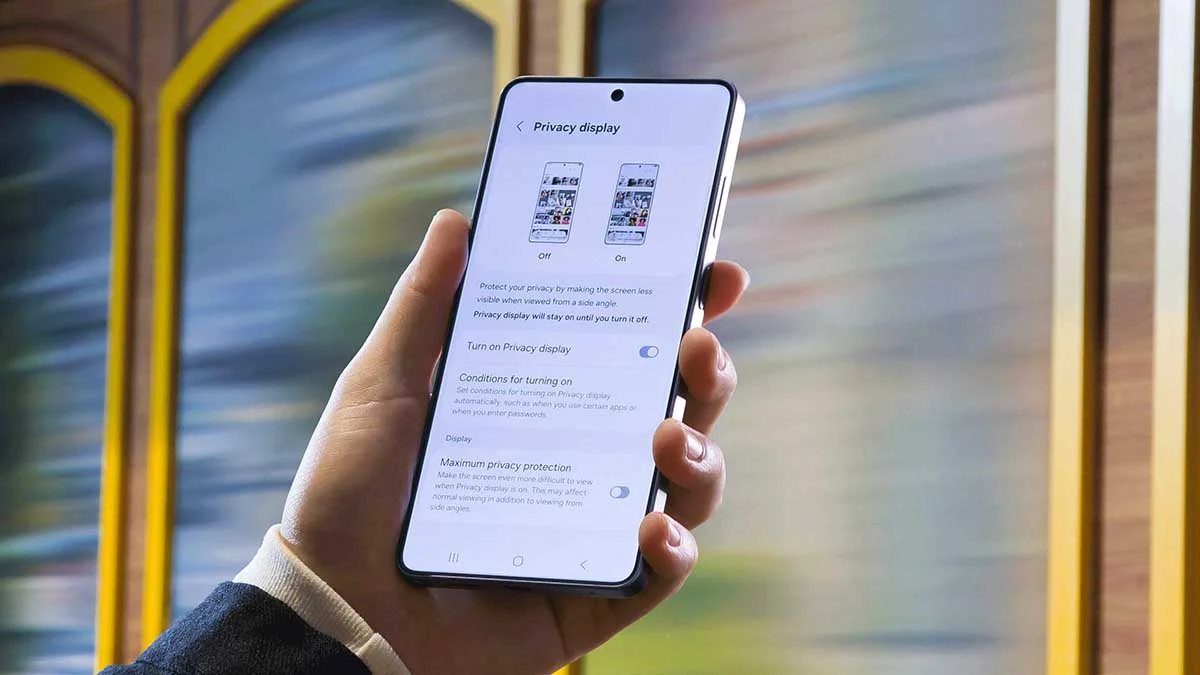
The launch of the Samsung Galaxy S26 Ultra on February 25, 2026, brought a revolutionary feature that many users have wanted for years: a built-in, hardware-level privacy filter. This “Privacy Display” uses Flex Magic Pixel technology to ensure that the person sitting next to you on the Dubai Metro can’t see your banking details or private messages. However, as thousands of users in the UAE unbox their new flagships, a common complaint has surfaced. If you’ve noticed your screen looks duller than your friend’s S25, you are likely asking: Is Your S26 Ultra Screen Dim? How to Fix Privacy Display Image Quality.
It can be jarring to go from a 2,600-nit screen to a brand-new 3,000-nit panel only for it to feel “darker.” The truth is, your screen isn’t broken; it’s likely just working too hard to protect your privacy. In this guide, we will explore why this dimming occurs and the professional steps you can take to restore that vibrant, punchy Samsung look without compromising your security.
Understanding the “Flex Magic Pixel” Trade-off
To effectively address the question, Is Your S26 Ultra Screen Dim? How to Fix Privacy Display Image Quality, we must first understand how this new glass works. Unlike traditional OLEDs, the S26 Ultra uses a specialized pixel architecture that can physically narrow the light emission angle.
How Privacy Mode Impacts Brightness
When you toggle the Privacy Mode in your settings, the Snapdragon 8 Elite Gen 5 processor instructs the display to restrict light from escaping at wide angles. While this effectively “blacks out” the view for onlookers, it inherently reduces the total light output reaching your eyes. Even though the panel is capable of 3,000 nits, the concentrated “beam” of light can make the screen appear 20% to 30% dimmer than a standard “Wide-Angle” display mode.
The Role of Gorilla Armor 2
Samsung also introduced Gorilla Armor 2 this year. While this glass is incredible at reducing reflections making it perfect for the bright sun at Jumeirah Beach—it has a slightly different refractive index. If your settings aren’t perfectly calibrated, the combination of the anti-reflective coating and the privacy pixels can create a “hazy” or “dim” appearance.
Professional Fixes for a Dim S26 Ultra Screen
If your screen feels lackluster, don’t worry. You don’t need a repair just yet. Most of the time, the solution lies in fine-tuning the balance between the ProVisual Engine and your display settings.
1. The “Narrow vs. Wide” Toggle
The most common reason for a dim screen is that Privacy Mode is permanently active. Go to Settings > Display > Privacy View. Here, you can choose “Adaptive.” This uses the front-facing AI sensors to detect if someone is looking over your shoulder. If you are alone, the screen will switch to “Wide” mode, immediately boosting the brightness and color vibrancy to its full 3,000-nit potential.
2. Calibrating “Extra Brightness”
Samsung hidden the “Extra Brightness” toggle under the Adaptive Brightness menu. If you find Is Your S26 Ultra Screen Dim? How to Fix Privacy Display Image Quality is still a concern, turn off Adaptive Brightness temporarily. This unlocks the manual slider, allowing you to push the pixels to their maximum luminance. Just be mindful of the battery drain!
3. Adjusting the Vividness Slider
In the 2026 software update, Samsung added a “Vividness” scale within the Screen Mode settings. Because the Privacy Display can sometimes make colors look “flat,” pushing the Vividness slider to the second or third notch can compensate for the hardware-level light filtering, bringing back those deep, saturated hues Samsung is famous for.
When to Seek Professional Help: Milaaj Mobile and Laptop Repair Al Barsha
Sometimes, a dim screen isn’t a setting issue; it’s a hardware calibration fault or a faulty NPU (Neural Processing Unit) failing to regulate power to the pixels. If you’ve tried all the software resets and your screen still feels like it’s stuck in “Power Saving Mode,” it’s time to visit the experts. Milaaj mobile and laptop repair Al Barsha is Dubai’s leading specialist for the new S26 series hardware.
Why Choose Milaaj Al Barsha for Your S26 Ultra?
- Speed Repairing: We know that your S26 Ultra is essential for your work and personal life. We offer express diagnostics and same-day screen calibrations, ensuring you don’t have to leave your phone with us for days.
- Low Price & High Value: The Privacy Display is an expensive component, and official service center quotes can be shocking. We provide a low price guarantee for Al Barsha residents, offering professional-grade fixes at a fraction of the cost.
- Ultimate Convenience: Don’t let a trip to the shop disrupt your day. We offer free pickup and delivery across Dubai. If your screen is flickering or dim, we’ll collect it from your office and return it perfectly fixed.
- Premium Part Quality: If a screen replacement is necessary, we use only OEM-certified Privacy Display panels. Third-party screens often lack the Flex Magic Pixel hardware, meaning you would lose the privacy feature entirely. We ensure your phone stays “Ultra.”
- Expert Technical Team: Our technicians are specifically trained in the 2nm architecture and the complex power management systems of the S26 Ultra, ensuring your repair is handled with surgical precision.
Preventing Image Quality Degradation
Once you’ve solved the Is Your S26 Ultra Screen Dim? How to Fix Privacy Display Image Quality issue, you want to keep it that way. The S26 Ultra is a powerhouse, but it needs a little care to maintain its visual edge.
- Avoid Thick Screen Protectors: Many cheap tempered glass protectors are not compatible with the Privacy Display. They can cause “moiré patterns” or further dim the light. Always use protectors labeled “S26 Ultra Privacy Compatible.”
- Clean the AI Sensor: The sensor next to the front camera dictates when Privacy Mode activates. If it’s covered in fingerprints, it might stay in “Narrow Mode” constantly, thinking there is an onlooker nearby.
- Update Your Firmware: Samsung is expected to release a “Display Patch” in late March 2026 to further optimize the brightness curve of the Privacy Display. Ensure your software is always up to date.
Frequently Asked Questions (FAQs)
1. Does the Privacy Display drain more battery?
Yes, slightly. When Privacy Mode is active, the phone uses more power to “steer” the light. If you are low on battery, turning off Privacy View will help your S26 Ultra last longer.
2. Why does my screen look “grainy” at low brightness?
This is a common trait of the new 2nm display drivers when combined with the privacy layer. If the grain is excessive, it could be a hardware defect. Visit Milaaj mobile and laptop repair Al Barsha for a free screen health check.
3. Can I use the S26 Ultra Privacy Display in direct sunlight?
Absolutely. While the privacy layer dims the screen slightly, the 3,000-nit peak brightness is designed to overpower the harsh Dubai sun. If it’s too dim to see outside, check if “Power Saving Mode” is limiting your brightness.
4. Is the Privacy Display available on the base S26?
No. For the 2026 lineup, the hardware-level Privacy Display and Flex Magic Pixel technology are exclusive to the S26 Ultra. The base S26 and S26+ use standard (though still excellent) AMOLED panels.
5. Will a factory reset fix my dim screen?
If the issue is caused by a software glitch or a conflicting “Blue Light Filter” setting, a factory reset might help. However, we recommend trying the “Reset All Settings” option first to avoid losing your data.
Summary: Brightening Your Future with the S26 Ultra
The Galaxy S26 Ultra is a monumental step forward for mobile privacy, but every new technology has a learning curve. By understanding how to manage the Is Your S26 Ultra Screen Dim? How to Fix Privacy Display Image Quality challenge, you can enjoy the best of both worlds: total visual security and the most vibrant display on the market.
Whether it’s a simple setting adjustment or a professional calibration at Milaaj, your screen should never be a source of frustration. With 3,000 nits of power at your fingertips, it’s time to let your S26 Ultra truly shine.
Is your S26 Ultra screen still acting up or showing signs of damage? Contact Milaaj today for a specialized diagnostic and get your display back to its brilliant best!
Other Services:
- Need other mobile repairs? Check out Milaaj’s mobile repair services in Dubai.
- Looking to upgrade? Learn about selling your used laptop in Dubai.
- Data loss concerns? Visit Milaaj’s data recovery services.
📍 Visit Any Milaaj Branch in Dubai
🔹 Bur Dubai
Milaaj Mobile and Laptop Repair Dubai
📞 055 258 8477
🔗 Google Maps
🔹 Al Barsha
Milaaj Mobiles and Laptop Repair Al Barsha
📞 052 596 2846
🔗 Google Maps
🔹 Al Barsha 3
Milaaj Mobiles and Gaming Store
📞 052 3405 814
🔗 Google Maps
🔹 Al Nuaimiya
Milaaj Mobiles and Laptops Ajman
📞 055 788 9654
🔗 Google Maps
Shop Locations: Al Barsha | Bur Dubai | Reef Mall, Salah Al Din | Al Nuaimiya, Ajman
Email: support@milaaj.com
Operating Hours: Monday – Sunday
Leave a Reply