

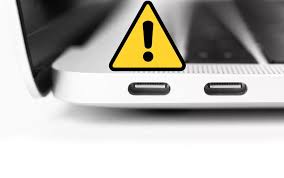
MacBooks are known for their sleek design, powerful performance, and efficient charging technology. However, many users eventually encounter MacBook USB-C charging issues, which can disrupt work, reduce productivity, and create unnecessary stress. Whether your MacBook charges slowly, stops charging randomly, or fails to recognize the charger at all, understanding the root cause is essential.
Therefore, this detailed guide explains MacBook USB-C charging issues, why they happen, common mistakes to avoid, and how professional technicians fix them safely and effectively. Moreover, you’ll learn when DIY solutions work and when expert repair is the smarter choice.
Understanding MacBook USB-C Charging Issues
First and foremost, it’s important to understand how USB-C charging works on MacBooks. Unlike older MagSafe chargers, USB-C ports handle both power delivery and data transfer. As a result, they are more versatile but also more sensitive.
Consequently, even minor problems such as dust buildup, cable damage, or software glitches can cause MacBook USB-C charging issues. Additionally, hardware-related faults may worsen over time if left untreated.
Common Symptoms of MacBook USB-C Charging Problems
Before fixing the issue, you should identify the symptoms. Typically, users report:
- MacBook not charging at all
- Charging stops and starts intermittently
- USB-C charger gets unusually hot
- Battery percentage stuck or decreasing while plugged in
- “Not Charging” or “Power Source: Adapter” warnings
Clearly, these signs indicate underlying MacBook USB-C charging issues that require immediate attention.
Why MacBook USB-C Charging Issues Happen
1. Damaged or Low-Quality USB-C Cable
To begin with, charging cables wear out over time. Frayed wires, bent connectors, or cheap third-party cables often fail to deliver stable power. As a result, your MacBook may not charge properly.
Moreover, non-certified cables can cause inconsistent voltage delivery, leading to long-term battery damage.
2. Dirty or Blocked USB-C Charging Port
Equally important, dust, lint, or debris inside the USB-C port can block the charging connection. Consequently, the charger may feel loose or fail to connect securely.
Over time, this buildup can lead to permanent MacBook USB-C charging issues if not cleaned properly.
3. Software or macOS Glitches
Sometimes, the problem isn’t hardware-related at all. Instead, macOS bugs or outdated software may prevent your MacBook from recognizing the charger. Therefore, system errors often cause temporary charging failures.
4. Faulty Power Adapter
Additionally, a damaged power adapter can lead to unstable charging. Even if the cable appears fine, internal adapter issues may stop power delivery altogether.
5. Battery Health Degradation
Over time, MacBook batteries naturally degrade. When battery health drops significantly, the device may stop charging or display inaccurate charging status messages.
Thus, aging batteries are a common cause of MacBook USB-C charging issues, especially in older models.
6. Logic Board or Power IC Damage
In more severe cases, internal components such as the power IC or logic board may be damaged. This often happens due to liquid spills, power surges, or prolonged overheating.
At this stage, professional repair becomes essential.
DIY Fixes for Minor MacBook USB-C Charging Issues
Before seeking professional help, you can try these safe steps:
Restart Your MacBook
Sometimes, a simple restart clears temporary software glitches.
Try a Different USB-C Cable or Adapter
Using an original or certified charger helps rule out accessory-related problems.
Clean the USB-C Port Gently
Use compressed air or a soft brush. Never insert metal objects.
Update macOS
Keeping your system updated often resolves charging recognition issues.
However, if these steps don’t work, continuing DIY attempts may worsen the problem.
Mistakes That Make USB-C Charging Issues Worse
Unfortunately, many users unknowingly cause further damage by:
- Using sharp objects to clean the charging port
- Pulling the cable at an angle
- Charging with cheap, uncertified accessories
- Ignoring overheating warnings
- Continuing to use a damaged port
As a result, minor MacBook USB-C charging issues can turn into expensive hardware repairs.
When Professional Repair Is the Best Solution
If charging problems persist despite basic fixes, professional diagnostics are essential. Expert technicians can identify whether the issue lies in:
- The USB-C charging port
- Battery health
- Power IC or logic board
- Internal connectors
Therefore, professional repair ensures accuracy, safety, and long-lasting results.
How Experts Fix MacBook USB-C Charging Issues Safely
Professional repair specialists follow a structured approach:
- Advanced Diagnostics – Identifying exact hardware or software faults
- Safe Port Cleaning or Replacement – Using precision tools
- Battery Health Testing – Replacing degraded batteries if needed
- Component-Level Repair – Fixing power IC or logic board issues
- Post-Repair Testing – Ensuring stable charging performance
As a result, your MacBook regains reliable and efficient charging functionality.
Milaaj Mobile Repair – Trusted MacBook Charging Repair in Al Barsha
When DIY fixes fail, Milaaj mobiles and laptop repair Al Barsha offers professional and reliable solutions for MacBook USB-C charging issues.
Why Choose Milaaj?
- Low-price repairs without compromising quality
- Fast repair turnaround, often same day
- Convenient service location in Al Barsha
- High-quality replacement parts
- Experienced technicians with Apple expertise
Moreover, all repairs are handled carefully to protect your data and device integrity.
How to Prevent Future MacBook USB-C Charging Issues
To avoid repeated problems, follow these best practices:
- Always use certified USB-C chargers
- Keep ports clean and dry
- Avoid charging on soft surfaces that trap heat
- Disconnect chargers properly
- Monitor battery health regularly
By doing so, you can significantly extend your MacBook’s lifespan.
FAQs: MacBook USB-C Charging Issues Explained
❓ Why is my MacBook plugged in but not charging?
This often happens due to battery health issues, power adapter faults, or software glitches.
❓ Can dust really stop USB-C charging?
Yes. Even small debris can block proper contact and cause charging failures.
❓ Is it safe to keep using a loose USB-C port?
No. Continued use can damage internal connectors and the logic board.
❓ How long does USB-C charging repair take?
Most professional repairs are completed within a few hours, depending on the issue.
❓ Will charging repair affect my data?
No. Professional technicians fix charging components without touching stored data.
Final Thoughts
In conclusion, MacBook USB-C charging issues can result from cables, ports, software glitches, battery wear, or internal component damage. While minor problems can be resolved at home, persistent issues require professional expertise.
Therefore, timely repair, proper maintenance, and expert support ensure your MacBook charges safely, efficiently, and reliably for years to come.
Other Services:
- Need other Mac Book repairs? Check out Milaaj’s MacBook repair services in Dubai.
- Overheating issues? Explore MacBook repair in Dubai for similar cooling solutions.
- Looking to upgrade? Learn about selling your used laptop in Dubai.
- Data loss concerns? Visit Milaaj’s data recovery services.
- For Apple users, check Apple trade-in options in Dubai.
📍 Visit Any Milaaj Branch in Dubai
🔹 Bur Dubai
Milaaj Mobile and Laptop Repair Dubai
📞 055 258 8477
🔗 Google Maps
🔹 Al Barsha
Milaaj Mobiles and Laptop Repair Al Barsha
📞 052 596 2846
🔗 Google Maps
🔹 Al Barsha 3
Milaaj Mobiles and Gaming Store
📞 052 3405 814
🔗 Google Maps
🔹 Al Nuaimiya
Milaaj Mobiles and Laptops Ajman
📞 055 788 9654
🔗 Google Maps
Shop Locations: Al Barsha | Bur Dubai | Reef Mall, Salah Al Din | Al Nuaimiya, Ajman
Email: support@milaaj.com
Operating Hours: Monday – Sunday
Leave a Reply