

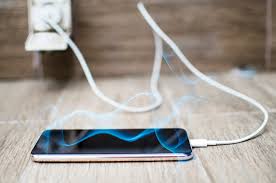
Smartphones are designed to handle daily use efficiently; however, many users worry when they notice their device warming up during charging. If you are asking, why does my phone heat while charging, you are certainly not alone. Although slight warmth is normal, excessive heat can signal underlying issues that should never be ignored.
Therefore, understanding why your phone heats while charging is essential to protect battery health, ensure user safety, and maintain long-term performance. Moreover, with proper troubleshooting and professional guidance, this issue can often be resolved quickly and safely. In this detailed guide, we explain the real causes, common mistakes, expert solutions, and when professional repair becomes necessary.
Is It Normal When a Phone Heats While Charging?
First and foremost, it is important to understand that minor heat during charging is normal. Charging generates electrical resistance, which naturally produces warmth. However, when your device becomes hot to the touch, drains battery faster, or slows down, it is no longer normal.
In other words, phone heating while charging should raise concern when:
- The phone becomes uncomfortable to hold
- Charging speed drops suddenly
- Battery drains quickly after charging
- The device shuts down automatically
Therefore, identifying the root cause early helps prevent permanent damage.
Common Reasons Why Phones Heat While Charging
1. Using Low-Quality or Fake Chargers
One of the most common reasons phones heat while charging is the use of uncertified chargers. Cheap or fake adapters fail to regulate voltage properly. Consequently, excess current flows into the battery, causing overheating.
Moreover, damaged charging cables increase resistance, which further generates heat.
2. Fast Charging Generates More Heat
Although fast charging is convenient, it pushes higher power into the battery. As a result, fast charging often causes phones to heat while charging, especially in older devices or worn batteries.
However, fast charging should still stay within safe temperature limits. If not, something else is wrong.
3. Background Apps Running During Charging
Another major reason phones heat while charging is heavy background activity. Apps such as games, video streaming, GPS, or video calls consume power while the phone tries to charge simultaneously.
Therefore, the battery works harder, which leads to increased temperature.
4. Poor Ventilation and Heat Trapping
Charging your phone on soft surfaces like beds or sofas traps heat. Similarly, using thick cases while charging blocks airflow.
As a result, heat cannot escape, causing the phone to heat excessively while charging.
5. Battery Degradation Over Time
Batteries naturally degrade with age. When battery health drops, it struggles to hold charge efficiently. Consequently, older batteries heat up faster while charging due to chemical inefficiency.
Therefore, overheating during charging often indicates battery replacement is needed.
6. Software Bugs and OS Issues
Sometimes, the issue is not hardware but software. Background processes, firmware bugs, or corrupted updates can cause excessive power consumption.
Thus, phones may heat while charging due to software errors, especially after system updates.
7. Water or Moisture Damage
Even minor moisture exposure can damage charging circuits. As a result, electrical flow becomes unstable, causing overheating while charging.
Unfortunately, water-damaged phones often worsen if left untreated.
Risks of Phone Heating While Charging
Although occasional warmth is harmless, continuous overheating can lead to serious problems:
- Battery swelling or leakage
- Reduced battery lifespan
- Charging port damage
- Sudden shutdowns
- Fire or safety hazards
Therefore, ignoring phone heating while charging can turn a small issue into a costly repair.
Immediate Steps to Reduce Phone Heating While Charging
1. Remove the Phone Case
First, remove thick or protective cases during charging to improve airflow.
2. Use Original or Certified Chargers
Always use manufacturer-approved chargers and cables. This significantly reduces voltage instability and overheating.
3. Stop Using the Phone While Charging
Avoid gaming, video calls, or navigation while charging. Instead, let the phone charge uninterrupted.
4. Charge in a Cool Environment
Charging in hot rooms or direct sunlight worsens overheating. Therefore, choose a cool, ventilated area.
5. Turn On Airplane Mode
Turning on airplane mode reduces background processes and lowers charging heat significantly.
Advanced Fixes If the Phone Still Heats While Charging
Check Battery Health
If your phone supports battery health monitoring, check it immediately. Low health indicates replacement is required.
Update or Reinstall Software
Installing the latest updates fixes power management bugs. In some cases, resetting system settings helps.
Inspect Charging Port
Dust, lint, or corrosion inside the charging port causes resistance and heat buildup. Professional cleaning is often necessary.
Disable Fast Charging Temporarily
If overheating reduces after disabling fast charging, the battery or charging IC may be failing.
When Professional Repair Is Necessary
If your phone continues to heat while charging despite following all safety steps, professional diagnosis is strongly recommended. Persistent overheating usually indicates:
- Battery failure
- Charging IC damage
- Power management chip issues
- Water damage inside the device
Attempting DIY repairs in these cases can cause further damage.
Why Choose Professional Repair Instead of DIY?
Professional repair ensures:
- Accurate diagnostics
- Safe battery replacement
- Protection of user data
- Long-lasting repair results
Unlike DIY fixes, expert repair addresses the root cause rather than temporary symptoms.
Milaaj Mobile Repair – Trusted Charging Issue Solutions
If your phone heats excessively while charging, Milaaj mobiles and laptop repair Al Barsha offers reliable and affordable solutions. Their technicians specialize in battery replacement, charging IC repair, and internal cleaning using high-quality parts.
Moreover, customers benefit from:
- Low-cost pricing
- Fast repair turnaround
- Premium replacement parts
- Safe data protection
- Convenient service location
As a result, devices regain normal charging behavior without unnecessary replacements.
How to Prevent Phone Heating While Charging in the Future
- Use certified chargers only
- Avoid charging overnight regularly
- Keep software updated
- Replace aging batteries promptly
- Avoid charging in hot environments
By following these tips, you significantly reduce future overheating risks.
Frequently Asked Questions (FAQs)
Is phone heating while charging dangerous?
Yes, excessive heating can damage internal components and reduce battery life if ignored.
Can fast charging cause phone heating?
Yes, fast charging produces more heat, especially if the battery or charger is faulty.
Should I stop charging if my phone becomes hot?
Absolutely. Disconnect the charger and allow the phone to cool before further use.
Does replacing the battery fix overheating issues?
In many cases, yes. Battery replacement often resolves charging-related heating problems.
Can software updates cause phone heating while charging?
Yes, buggy updates may increase background activity and power usage.
Is professional repair necessary for charging heat issues?
If basic troubleshooting fails, professional repair is the safest and most effective option.
Final Thoughts
In conclusion, why does my phone heat while charging is a question with multiple answers, ranging from charger quality and battery age to software and hardware issues. While minor warmth is normal, consistent overheating is not.
Therefore, acting early, using proper accessories, and choosing professional repair services when needed ensures safety, performance, and long device lifespan. With the right care and expert support, your phone can charge efficiently, safely, and reliably every day.
Other Services:
- Need other iPhone repairs? Check out Milaaj’s iPhone repair services in Dubai.
- Looking to upgrade? Learn about selling your used iPhone in Dubai.
- Data loss concerns? Visit Milaaj’s data recovery services.
- For Apple users, check Apple trade-in options in Dubai.
📍 Visit Any Milaaj Branch in Dubai
🔹 Bur Dubai
Milaaj Mobile and Laptop Repair Dubai
📞 055 258 8477
🔗 Google Maps
🔹 Al Barsha
Milaaj Mobiles and Laptop Repair Al Barsha
📞 052 596 2846
🔗 Google Maps
🔹 Al Barsha 3
Milaaj Mobiles and Gaming Store
📞 052 3405 814
🔗 Google Maps
🔹 Al Nuaimiya
Milaaj Mobiles and Laptops Ajman
📞 055 788 9654
🔗 Google Maps
Shop Locations: Al Barsha | Bur Dubai | Reef Mall, Salah Al Din | Al Nuaimiya, Ajman
Email: support@milaaj.com
Operating Hours: Monday – Sunday

Leave a Reply