


Accidents happen quickly—whether it’s a spilled drink, a sudden splash, or an unexpected drop into water. When it does, the biggest fear for most users is losing precious files, photos, documents, and memories stored on the device. Fortunately, you can still recover data from liquid-damaged devices if you take the right steps early. Although liquid damage is one of the most common causes of sudden data loss, many people don’t realize that data often remains recoverable long after the device stops turning on.
This detailed guide explains why data can sometimes survive water exposure, how to handle your device safely, which steps you should avoid, and the most effective ways to recover data from liquid-damaged devices without causing further harm. Additionally, we’ll explore professional repair methods, advanced recovery tools, and situations where expert assistance becomes essential.
Why You Can Often Recover Data from Liquid-Damaged Devices
Many people assume that data is automatically gone when the device touches water. However, that is not always true. In fact, you can often recover data from liquid-damaged devices because many internal storage components—such as NAND chips—are more resilient than other circuits.
Below are the main reasons data may still be saved:
1. Storage Chips Are More Resistant Than Other Components
Although water quickly corrodes circuits and connectors, the chip that stores your data may still be intact. Consequently, the chance to recover data from liquid-damaged devices remains high.
2. Damage Is Often Localized
Water doesn’t always spread evenly. Sometimes only the charging port, battery, or screen gets affected, while the motherboard remains partially functional.
3. Short Circuits Don’t Automatically Destroy Data
Even when your device won’t turn on, the data stored inside may still be recoverable through specialized chip-level extraction tools.
4. Professional Tools Can Bypass Dead Components
Recovery experts use advanced methods to retrieve your files without relying on the device’s original power system.
Immediate Steps to Take to Recover Data from Liquid-Damaged Devices
Before starting the recovery process, how you handle the device in the first few minutes matters greatly. The right actions increase your chances of saving the phone—and your data. Meanwhile, the wrong actions can permanently destroy the information stored on it.
1. Turn the Device Off Immediately
If your phone or laptop is still on, turn it off. This prevents short circuits and helps protect the internal storage. Therefore, it becomes easier to recover data from liquid-damaged devices safely.
2. Disconnect All Power Sources
Remove charging cables or accessories. For laptops, unplug the power adapter. This step prevents electric flow that can worsen corrosion.
3. Do Not Charge the Device
Charging a wet device is extremely dangerous. It increases heat, accelerates corrosion, and may permanently damage the storage chip—making it harder to recover data from liquid-damaged devices later.
4. Dry the Outside Surface Only
Gently wipe the device with a cloth. Do not shake it, as water may spread to internal components.
Mistakes That Make Data Recovery More Difficult
Even with good intentions, some common actions severely reduce the chances of recovering your files.
1. Don’t Use Rice
Despite being popular, rice cannot dry internal components or stop corrosion. Instead, it gives false hope while water continues damaging the motherboard.
2. Don’t Use Hair Dryers or Heat Guns
Heat accelerates corrosion and can melt delicate components. This makes it far harder to recover data from liquid-damaged devices.
3. Don’t Turn the Device Back On Repeatedly
Trying to switch the device on again may cause irreversible motherboard failure.
4. Don’t Open the Device If You Are Not Trained
Opening the phone without proper tools can tear cables, damage connectors, or scratch the motherboard.
How to Recover Data from Liquid-Damaged Smartphones and Tablets
Whether you’re using an iPhone, iPad, Samsung device, or Android tablet, the recovery steps are similar. Below are practical methods to begin the process safely.
1. Try Backups First (If the Device Still Turns On)
If your device powers on—even briefly—immediately check for backups.
Check iCloud / Google Drive
- Open Settings
- Look for sync status
- Confirm if recent files were uploaded
Check Local Backups
- iTunes or Finder backup for iPhones
- Google backup for Android
- Laptop or PC backups
If backups exist, you won’t need to recover data from liquid-damaged devices manually.
2. Use Data Recovery Software (Only for Semi-Functional Devices)
If your device turns on but freezes or restarts due to liquid damage, PC-based tools may still scan internal storage.
However, this only works if:
- The phone is recognized by the computer
- Data access is not locked
- The storage chip remains readable
Even then, proceed carefully, as unstable devices can fail mid-recovery.
3. Extract Data Using DFU/Recovery Tools (iPhones)
If water impacts the phone’s system files but not the storage, DFU mode may temporarily stabilize the device.
Nevertheless, this step must be done cautiously. If the device heats up, stop immediately.
Advanced Professional Methods to Recover Data from Liquid-Damaged Devices
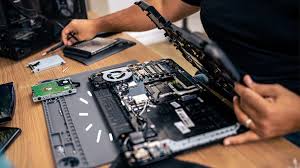
When the device doesn’t turn on, is severely corroded, or shows no signs of life, professional intervention becomes necessary. Experts use powerful tools and micro-soldering techniques to recover data from liquid-damaged devices even when the motherboard appears beyond repair.
1. Board-Level Cleaning and Chip Testing
Technicians use ultrasonic cleaners with special solutions to remove corrosion safely. After cleaning, they test vital components to determine whether the storage chip is still intact.
2. Component-Level Repairs
Specialists may repair or replace damaged parts including:
- Power IC
- Charging IC
- Backlight circuits
- Audio IC
- Logic board connectors
Once these components are restored, the device may turn on long enough to recover data from liquid-damaged devices fully.
3. Direct NAND / UFS Chip Extraction
This is the most advanced and reliable recovery technique.
How it works:
- Technicians remove the storage chip from the motherboard
- They read the raw data using specialized tools
- They rebuild file structures manually
- They extract recoverable files safely
This method works even when the device is fully dead.
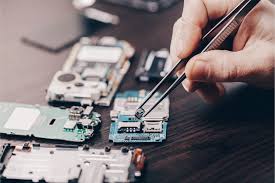
4. Microsoldering for Broken Traces
If circuits on the motherboard are burned, broken, or corroded, micro-soldering repairs the damaged paths. This allows the device to boot temporarily, enabling full recovery.
When You Need Professional Data Recovery Services
Although basic steps help, you should seek expert assistance when:
- The device does not turn on
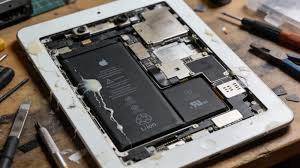
- You see rust, corrosion, or green spots
- The device heats up instantly
- Liquid entered through charging ports or vents
- Backup is unavailable
- You must recover business or sensitive data
In such cases, specialized tools and expert diagnostics are essential.
You can seek assistance from Milaaj Mobiles and Laptop Repair Al Barsha, a trusted service center known for advanced data recovery and liquid-damage repair using professional micro-soldering equipment and high-precision diagnostic tools.
How to Protect Your Data from Future Liquid Damage
Recovering data is possible, but prevention is always better. Below are simple tips that reduce the risk of future data loss.
Enable automatic backups
Use iCloud, Google Drive, OneDrive, or Samsung Cloud.
Use waterproof or splash-resistant cases
They protect ports and buttons from exposure.
Avoid using devices near water sources
Bathrooms, kitchen sinks, pools, and beaches are high-risk areas.
Keep devices away from drinks
Even small spills can cause internal damage.
Turn off the device immediately if it gets wet
Fast action increases the success rate of recovery.
FAQs About Recover data from liquid damaged devices
1. Can data be recovered from a liquid-damaged device?
Yes. Even if the device cannot turn on, data can often be recovered using board-level repair, chip-off techniques, or advanced data extraction tools.
2. What should I do immediately after liquid damage to increase the chance of data recovery?
Turn off the device, avoid charging it, do not power it on, and bring it to a professional repair center as quickly as possible.
3. Is it safe to use rice to dry a liquid-damaged device?
No. Rice does not remove moisture effectively and can leave dust inside the device. Professional drying and cleaning methods are safer.
4. How do technicians recover data from severely water-damaged devices?
Experts use ultrasonic cleaning, micro-soldering, chip-off data extraction, and logic board diagnostics to restore access to your data.
5. Can I recover my photos and files at home?
If the device turns on, you may back up immediately. However, if it doesn’t power on or behaves abnormally, attempting DIY repair may cause permanent data loss.
6. How much does data recovery from liquid-damaged devices cost?
The cost depends on the severity of the damage and whether chip-level repair is required.
Conclusion: Recover data from liquid damaged devices
Accidents involving moisture happen unexpectedly, but your data doesn’t have to be lost forever. With the right actions, it is absolutely possible to recover data from liquid-damaged devices, even when the phone or laptop refuses to turn on. By avoiding risky DIY methods and following proper drying and backup steps, you improve your chances significantly.
However, when corrosion affects the motherboard or prevents the device from powering up, professional intervention is essential. Through chip-level repair, microsoldering, and advanced extraction tools, experts can often save your files even from severely water-damaged devices.
By acting quickly—and seeking help when necessary—you can safeguard your valuable photos, documents, and memories after liquid damage.
Other Services:
- Need other iPhone repairs? Check out Milaaj’s iPhone repair services in Dubai.
- Looking to upgrade? Learn about selling your used iPhone in Dubai.
- Data loss concerns? Visit Milaaj’s data recovery services.
- For Apple users, check Apple trade-in options in Dubai.
📍 Visit Any Milaaj Branch in Dubai
🔹 Bur Dubai
Milaaj Mobile and Laptop Repair Dubai
📞 055 258 8477
🔗 Google Maps
🔹 Al Barsha
Milaaj Mobiles and Laptop Repair Al Barsha
📞 052 596 2846
🔗 Google Maps
🔹 Al Barsha 3
Milaaj Mobiles and Gaming Store
📞 052 3405 814
🔗 Google Maps
🔹 Al Nuaimiya
Milaaj Mobiles and Laptops Ajman
📞 055 788 9654
🔗 Google Maps
Shop Locations: Al Barsha | Bur Dubai | Reef Mall, Salah Al Din | Al Nuaimiya, Ajman
Email: support@milaaj.com
Operating Hours: Monday – Sunday

Leave a Reply