
Samsung Galaxy Note20 repair Dubai
Samsung Galaxy Note20 repair, with the right checks
For Samsung Galaxy Note20 repair in Dubai, identify the standard 6.7-inch Note20 rather than the larger Ultra before requesting parts. Milaaj Repairs can assess cracked screens, missed S Pen strokes, unreliable USB-C charging and camera or startup faults. Explain whether pen writing, remote actions or finger touch fails, since those are different checks even after the same incident. Bring the pen if it reproduces the complaint, share earlier repair history and verify important backups where safe. Confirm a branch assessment or pickup, then review the findings, matching part option and written estimate before approving work.
Repair services
Repair options for your Galaxy Note20
Choose the symptom that matches your phone. A clear diagnosis helps distinguish a damaged part from a cable, app or software problem.
Display, touch & S Pen input
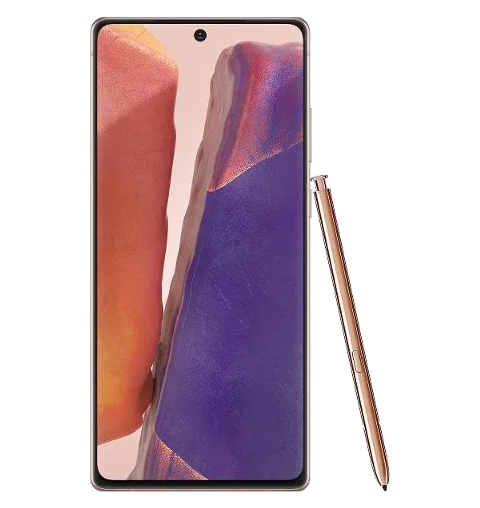
Identify the standard 6.7-inch Note20 and distinguish lines, lost picture and missed finger or pen input when discussing screen service.
- Confirm the model and matching display option.
- Describe finger touch and S Pen input separately.
- Include frame condition and the original input task in final checks.
Battery drain & power loss
Describe daily drain, abrupt shutdown and unusual heat separately, with charging stability and earlier battery work included in the history.
- Separate gradual runtime loss from abrupt shutdown.
- Share tested accessories and any earlier battery work.
- Stop charging a swollen or unusually hot handset.
USB-C charging & file access
Explain USB-C cable movement, interrupted power and failed computer access independently instead of assuming the same part causes them all.
- Identify suitable cables and adapters already tried.
- Do not force the connector or insert metal tools.
- Check affected power and data functions independently.
Pen, camera & fingerprint checks
List S Pen remote behavior, camera views and fingerprint trouble individually so the quote and final checks cover the actual complaints.
- Name the camera view, pen function or authentication task.
- Explain impact and earlier repair or accessory changes.
- Repeat the originally failed function during agreed collection checks.
Liquid-exposure assessment
Report exposure and unbacked-up notes before repeated power attempts or any procedure that could affect locally stored information.
- Disconnect external power and avoid repeated startup attempts.
- Do not use heat, rice or objects inside the connector.
- Discuss inspection findings and viability; recovery is not guaranteed.
Android, apps & startup
For freezes or startup loops, record the recent app, update or incident and discuss backup before a reset is selected.
- Record the app, update or event preceding the failure.
- Verify notes and other important backups before reset.
- Require approval before any procedure that can erase information.
Know your model
Model-specific checks before choosing a repair
A correct model number matters when quoting parts. These Galaxy Note20 functions deserve separate checks, so a repair is assessed against the fault you reported rather than a quick power-on test.
6.7-inch standard Note20 display
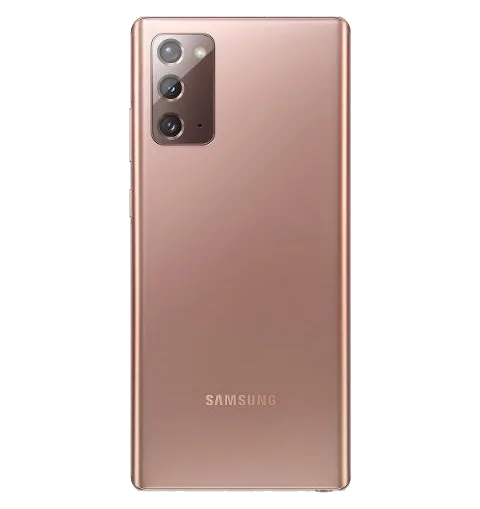
The standard Note20 has a 6.7-inch display and needs its own matching assembly, not the Note20 Ultra panel. Share the model identifier and describe picture defects, missed touch and housing damage separately. Ask which part option and final tests address the original complaint rather than choosing a screen from the Note name alone.
Writing and remote Air actions are different
The Note20 supports S Pen Air actions through Bluetooth connectivity. A pen that writes normally can still have a remote-function complaint, and a remote fault does not establish that the display is defective. Bring the pen and identify the supported app, action and connection behavior so assessment considers each reported function on its own evidence.
Pen handling and housing after impact
If the pen no longer comes out normally or the housing around its compartment looks damaged, avoid forcing it with tools. Describe the incident and whether the pen or frame changed shape. Ask how the condition affects safe handling and the proposed work before treating a mechanical fit problem as a software or display fault.
Notes and backup before software work
An ordinary photo backup may not cover the handwritten notes or app files you need from the Note20. Verify important content separately while access remains and explain anything stored only on the handset. Before approving reset or data-bearing hardware replacement, discuss the effect on those files and agree on the priority of the assessment.
Diagnosis before replacement
What your repair quote depends on
A quote should cover the actual fault, the agreed part option and any related damage. Ask for the total charge, estimated completion time and warranty terms before approving work.
| What you notice | What needs checking | Before you approve |
|---|---|---|
| Cracked screen or missed touches | Display, touch response and frame condition | Confirm the screen option and post-repair display checks. |
| Battery drain or shutdowns | Battery condition, charging and background activity | Ask whether replacement addresses the diagnosed cause. |
| Loose cable or no charging | Cable, charger, USB-C port and internal circuitry | Confirm whether cleaning, connector repair or replacement is proposed. |
| Blurred images or fingerprint recognition errors | Affected camera, front sensors and compatibility | Discuss calibration, service messages and final testing. |
| Liquid exposure or restart loops | Connector contamination, corrosion, software and board faults | Explain your data priorities before approving a restore or repair. |
How repair works
From first enquiry to final checks in four steps
A straightforward process: describe the fault, review the diagnosis, approve the repair and check the result before collection.
1
Book your assessment
Message or call with your exact model, the symptoms and what happened. Choose a shop visit or confirm a pickup slot for your address.
2
Diagnosis & quote
Inspection identifies the affected functions. Review the proposed work, replacement-part option, cost, availability and expected completion time before giving approval.
3
Repair & calibration
The agreed repair addresses the diagnosed fault. Discuss any required configuration or calibration and ask to be contacted before a change that could affect stored data.
4
Test & collect
Check the repaired function and any related cameras, charging or connections. Keep the receipt and written repair terms, then confirm collection or return delivery.
Your repair checklist
Protect your data and check the result
A little preparation makes the handover clearer. Keep your account private and tell the team which information and functions matter most to you.
Before handing it over
If the phone works, complete an Smart Switch or cloud backup and record the symptoms. Bring or describe the charging accessories if power is the problem.
- Check that your backup actually completed.
- Keep your Samsung and Google account password private.
- Confirm any device settings or owner actions needed for service.
If the phone will not start
Explain whether saving photos and other files is your priority. Restoring normal operation and recovering data are different outcomes.
- Avoid repeated charging attempts after liquid exposure.
- Discuss data priorities before a reset or restore.
- Request contact before work that could erase stored information.
Before you collect
Ask the team to demonstrate the repaired function and explain any remaining limitations. Reproduce an intermittent fault if you can.
- Check touch, brightness, cameras and fingerprint recognition with the owner present.
- Review charging, calls, speakers and connectivity where affected.
- Keep the receipt, warranty period and exclusions in writing.

Dubai pickup & delivery
Repair support that fits your day
Need to arrange Samsung Galaxy Note20 repair from home or work? Share the fault, your Dubai area and a convenient contact time. Confirm the collection slot, receiving branch and return arrangements when booking. For office or apartment pickup, agree on building access and an accessible handover point.
Find Milaaj
Choose a branch or arrange Dubai pickup
Milaaj lists these Dubai and Ajman branches. Confirm which branch can accept your Samsung Galaxy Note20, whether the required part is available and the best handover time before travelling.
Al Barsha HQ
The Iridium, Al Barsha 1, Dubai. Monday to Sunday, 9:00 AM to 11:30 PM.
Al Barsha 3
Hessa Street, Ground Floor, Gate 1 to 20, Al Barsha Third, Dubai. Monday to Sunday, 9:00 AM to 11:30 PM.
Bur Dubai
Shop No. 2, 37D Street, Al Souq Al Kabeer, Dubai. Monday to Sunday, 9:00 AM to 11:30 PM.
Ajman – Al Nuaimiya
Shop 2, Al Nuaimiya 2, King Faisal St. Monday to Sunday, 9:00 AM to 11:30 PM.
Find your nearest Milaaj branch
Tap a branch below to open directions.
FAQs
Samsung Galaxy Note20 repair: your questions answered
Is this Note20 page for the Ultra too?
This page covers the standard 6.7-inch Note20. The Ultra is a different model, so confirm the exact identifier and matching part before approving an estimate.
- Confirm the exact model, assessed fault and proposed part option.
- Keep the approved scope, receipt and written service terms.
Why can my S Pen write but not control the camera remotely?
Writing and supported remote Air actions are different functions. Bring the pen and describe the failed camera action and connection behavior before choosing a display or pen replacement.
- Bring the pen used when the complaint occurs.
- Ask for checks appropriate to the functions this exact model supports.
Can you investigate missed handwriting in one screen area?
Show the area using pen and finger input only where safe. The original writing task should be included in assessment and agreed checks after repair.
- Bring the pen used when the complaint occurs.
- Ask for checks appropriate to the functions this exact model supports.
What if the pen is difficult to remove after a drop?
Do not force it out with tools. Explain damage to the pen or compartment and ask for safe inspection before attempting further movement or software fixes.
- Bring the pen used when the complaint occurs.
- Ask for checks appropriate to the functions this exact model supports.
Should I reset the Note20 if my work notes are not backed up?
Discuss the missing backup first. A reset can affect local information, so verify notes separately and understand the proposed procedure before authorizing it.
- Identify information that has no verified saved copy.
- Agree on approval before procedures that could affect local data.
Can Note20 pickup be arranged in Dubai?
Ask about your address and safe handover point. Confirm the receiving branch, contact time, quote approval and return arrangements, mentioning damage or moisture before collection.
- Confirm the receiving branch and handover contact.
- Agree on quote approval and safe return arrangements.
Book your repair
Ready to get your Samsung Galaxy Note20 assessed?
Tell Milaaj what happened and which functions have stopped working. Ask about repair options, the estimate and pickup availability. Your repair quote and schedule are confirmed after assessment.