

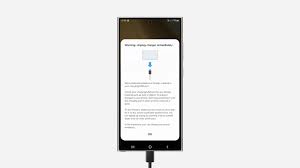
It’s the nightmare scenario for any tech lover in Dubai: you plug in your brand-new Samsung Galaxy S26 after a long day at the office, but the charging lightning bolt never appears. Or perhaps you see that dreaded “Moisture Detected” warning despite your phone being nowhere near the pool. If you’re searching for a Samsung S26 charging port fix, you know in a city that moves as fast as Dubai, a dead phone isn’t just an inconvenience; it’s a complete halt to your productivity and social life.
If your device is refusing to power up, don’t panic just yet. While the Samsung S26 is a marvel of engineering with its ultra-fast 60W charging capabilities, the USB-C port remains a high-traffic area susceptible to dust, lint, and hardware fatigue. The good news is that most “no charge” issues can be diagnosed and solved in under 30 minutes with the right approach.
This guide explores the common culprits behind charging failures. It also explains how you can get your flagship back to 100% without the stress.
1. The “Hidden Wall” of Dust and Lint
The most frequent reason for a Samsung S26 not charging isn’t a broken component; it’s physics. Because the USB-C port is open to the elements, it acts like a tiny vacuum for pocket lint and desert dust. Over time, this debris gets compressed by your charging cable, creating a physical barrier that prevents the connectors from making a solid electrical contact.
How to Clean Your Port Safely
- Visual Inspection: Use a bright torch to look inside the port. If you see grey or black fuzz covering the metal pins, you’ve found the culprit.
- The Gentle Air Blast: Try using a can of compressed air to blow out loose particles. Avoid using your mouth, as moisture can trigger a “Liquid Detected” sensor.
- The Professional Touch: If the debris is stubborn, resist the urge to use a needle or safety pin. Metal tools can short-circuit the sensitive pins. Instead, a wooden toothpick or a dedicated antistatic brush is much safer.
2. Software Glitches and the USB Settings Cache
Sometimes, the hardware is perfectly fine, but the “brain” of the phone the Android software is confused. If your S26 recently underwent a system update to One UI 8, a software bug might be interfering with the handshake between the charger and the battery.
To resolve this, you can clear the USB Settings cache:
- Go to Settings > Apps.
- Tap the Filter and Sort icon and toggle on Show system apps.
- Search for USB Settings.
- Tap Storage > Clear Data and Clear Cache.
- Perform a Force Restart by holding the Volume Down and Power buttons for 10 seconds.
3. The “Moisture Detected” Phantom Warning
Dubai’s humidity can sometimes trick the Samsung S26’s sensitive moisture sensors. If you see a waterdrop icon, the phone will block wired charging to prevent short-circuiting. Consequently, you might be left with a perfectly functional phone that refuses to take a charge.
If the port is truly dry but the warning persists, try using a hair dryer on a cool, low setting from at least 12 inches away. If that fails, a temporary workaround is to use a wireless charger. This method bypasses the USB-C port entirely and allows the sensor time to reset.
4. Faulty Accessories: The Silent Saboteurs for Samsung S26 charging port fix
Before assuming your phone is broken, look at the cable. The Samsung S26 requires a high-amperage cable to support its 60W fast charging. Cheap, third-party cables often lack the necessary shielding or wire gauge, leading to “Slow Charging” or no charge at all. Furthermore, check your power brick for any signs of overheating or discoloration. Always test your device with an official Samsung-approved 45W or 60W adapter to rule out accessory failure.
Milaaj Mobile and Laptop Repair Al Barsha: Your 30-Minute Fix
When DIY cleaning and software resets don’t do the trick, the problem likely lies in a bent pin or a loose motherboard connection. In these cases, you need a specialist. That way, they can perform a surgical repair without damaging your water-resistance seals.
Milaaj mobile and laptop repair Al Barsha is the leading destination for express Samsung repairs in Dubai. We understand that your time is valuable. This is why we’ve streamlined our process to handle S26 charging issues in record time.
- Speedy Repairing: Our technicians can replace a damaged USB-C sub-board in as little as 30 minutes, getting you back on the road instantly.
- Low Price Guarantee: We offer the most competitive rates in Al Barsha for flagship repairs, ensuring you get premium service without the premium price tag.
- Ultimate Convenience: Located conveniently in Al Barsha, we offer a “while-you-wait” service so you can enjoy a coffee while we revive your device.
- Premium Part Quality: We only use genuine or high-grade OEM components, ensuring that your ultra-fast charging and data transfer speeds are fully restored.
- Expertise You Can Trust: Our team is trained in the latest Samsung architecture, ensuring that even the most complex motherboard-level issues are handled with precision.
FAQs: Samsung S26 charging port fix
1. Is it safe to use a wireless charger if my port is broken?
Yes, wireless charging is a great temporary solution. However, it is slower and generates more heat than wired charging. For long-term battery health, it’s best to get the physical port fixed.
2. Can I fix a bent pin in my charging port myself?
We strongly advise against this. The pins in a USB-C port are incredibly small and fragile. Attempting to bend them back with a tool usually results in snapping the pin, which turns a simple repair into a much more expensive component replacement.
3. How much does a Samsung S26 charging port repair cost in Dubai?
Prices vary based on the extent of the damage (e.g., just the port versus the entire sub-board). At Milaaj, we provide a free diagnostic and a transparent quote before any work begins.
4. Will a port repair void my Samsung warranty?
Repairs done by third-party shops generally void the official manufacturer warranty. However, for out-of-warranty devices or those needing immediate service that can’t wait weeks for an official center, Milaaj provides an independent warranty on all parts and labor.
5. Why does my phone say “Slow Charging” even with a new cable?
This often happens if the port is partially clogged or if you are using a power brick that doesn’t support Samsung’s specific “Super Fast Charging” protocol.
Final Thoughts: Samsung S26 charging port fix
A malfunctioning charging port can be incredibly frustrating, but it’s rarely a “death sentence” for your Samsung S26. By following the cleaning and software steps outlined above, you can often solve the problem in minutes. But if the hardware has truly failed, don’t settle for a slow or unreliable fix.
Trust the experts at Milaaj to provide a fast, affordable, and high-quality solution. Whether it’s a simple cleaning or a full port replacement, we ensure your flagship device remains the powerful tool you need it to be.
Other Services:
- Need other iPhone repairs? Check out Milaaj’s iPhone repair services in Dubai.
- Looking to upgrade? Learn about selling your used iPhone in Dubai.
- Data loss concerns? Visit Milaaj’s data recovery services.
- For Apple users, check Apple trade-in options in Dubai.
📍 Visit Any Milaaj Branch in Dubai
🔹 Bur Dubai
Milaaj Mobile and Laptop Repair Dubai
📞 055 258 8477
🔗 Google Maps
🔹 Al Barsha
Milaaj Mobiles and Laptop Repair Al Barsha
📞 052 596 2846
🔗 Google Maps
🔹 Al Barsha 3
Milaaj Mobiles and Gaming Store
📞 052 3405 814
🔗 Google Maps
🔹 Al Nuaimiya
Milaaj Mobiles and Laptops Ajman
📞 055 788 9654
🔗 Google Maps
Shop Locations: Al Barsha | Bur Dubai | Reef Mall, Salah Al Din | Al Nuaimiya, Ajman
Email: support@milaaj.com
Operating Hours: Monday – Sunday



Leave a Reply