

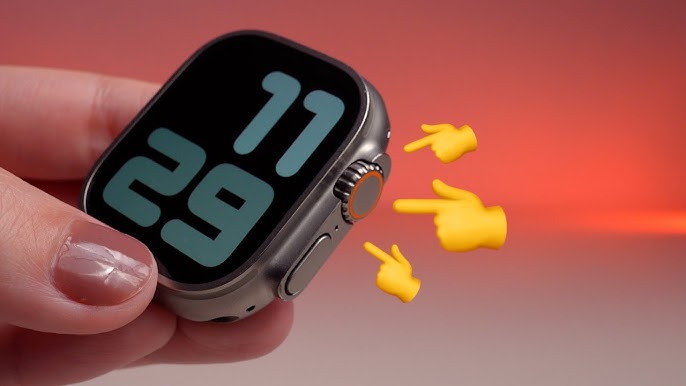
Your Apple Watch is likely your most-used companion, keeping you connected from the moment you wake up in Dubai until you hit the gym in Al Barsha. But what happens when that smooth, tactile scrolling suddenly stops? If you find your Apple Watch Digital Crown stuck or unresponsive, you aren’t just losing a button; you’re losing the primary way to navigate your apps, zoom into maps, and even eject water after a swim.
In 2026, with the advanced haptics of the Series 11 and the rugged build of the Ultra 3, the Digital Crown remains a mechanical marvel. However, because it is a physical moving part, it is prone to the “Dubai elements” fine desert dust, sea salt from the Arabian Gulf, and even everyday buildup from sunscreen or lotions. Before you assume you need a brand-new watch, let’s walk through the simple, home-based fixes that usually solve the problem.
Why is My Apple Watch Digital Crown Stuck?
When you encounter an Apple Watch Digital Crown stuck or unresponsive situation, the culprit is usually one of two things: physical debris or a temporary software glitch. Because the Crown has a tiny gap between the rotating wheel and the watch housing, it acts as a magnet for microscopic particles.
Common Physical Culprits:
- Dust and Sand: If you’ve recently spent a weekend at Kite Beach or went on a desert safari, fine particles can lodge themselves inside the mechanism.
- Lotion and Sunscreen: In our sunny climate, we apply these daily. Over time, they can dry into a sticky residue that acts like “glue” inside the Crown.
- Dried Sweat: High-intensity workouts at your local Al Barsha gym can lead to salt buildup from sweat, which crystallizes and hinders the rotation.
The Software “Ghost”:
Sometimes, the Crown feels like it is turning fine, but the screen doesn’t move. This is often a software lag in watchOS 12. The hardware is sending the signal, but the processor is too busy to react, making the Crown appear unresponsive.
How to Fix a Stuck Digital Crown at Home
If your Apple Watch Digital Crown stuck or unresponsive issues are starting to get on your nerves, try these steps in order. Apple actually recommends a specific cleaning method that is safe for almost every model.
Step 1: The Warm Water Rinse for Apple Watch Digital Crown Stuck
Since the Apple Watch (Series 2 and later) is water-resistant, you can use fresh water to dissolve whatever is stuck.
- Turn off your Apple Watch and remove any leather bands.
- Hold the Digital Crown under a lightly running stream of warm, fresh water from a faucet for 10–15 seconds.
- Crucially: As the water runs over the small gap, continuously turn and press the Digital Crown. This helps flush out the “gunk” from the internal tracks.
- Dry the watch thoroughly with a non-abrasive, lint-free cloth.
Step 2: The “Press and Spin” Technique for Apple Watch Digital Crown Stuck
If the Crown feels “sticky” but not totally jammed, try the dry method. Gently but firmly press the Crown inward while rapidly spinning it back and forth. This manual friction can sometimes break up dried salt or lotion without needing water.
Step 3: Check for Cases or Screen Protectors for Apple Watch Digital Crown Stuck
In 2026, many of us use full-body protective cases. Sometimes, these cases can shift slightly, putting pressure on the side of the Crown and preventing it from rotating. Remove your case and see if the responsiveness returns.
What if the Crown Rotates but the Screen is Unresponsive?
If the physical movement is smooth but the watch isn’t reacting, you are likely facing a software freeze. This is a common part of the Apple Watch Digital Crown stuck or unresponsive troubleshooting process.
Perform a Force Restart for Apple Watch Digital Crown Stuck
A standard restart might not be enough. To force a hardware-level reboot:
- Hold down the Digital Crown and the Side Button simultaneously.
- Keep holding them for at least 10 seconds.
- Let go only when the Apple logo appears on the screen.
Check “Crown Haptics” Settings for Apple Watch Digital Crown Stuck
If you’ve lost that satisfying “clicky” feel when you turn the wheel, it might just be a setting. On your iPhone, open the Watch App > Sounds & Haptics and ensure that Crown Haptics is toggled on.
Milaaj Mobile and Laptop Repair Al Barsha: Your Watch Rescue Center
Sometimes, the “home fix” isn’t enough. If the Digital Crown is physically bent from a drop, or if internal corrosion has claimed the sensor, you need professional intervention. Milaaj mobile and laptop repair Al Barsha is the neighborhood’s most trusted name for precision Apple Watch surgery.
Why Residents Choose Milaaj in Al Barsha:
- Low Price & Transparency: We provide a low price guarantee on all Apple Watch hardware repairs. We’ll give you a clear quote for the Crown repair before we ever open the device.
- Speed Repairing: We know you track your steps and calories religiously. Our technicians specialize in same-day Digital Crown repairs, often getting your watch back to you in just a few hours.
- Ultimate Convenience: Located right in the heart of Al Barsha, we are easy to reach. Can’t make it to us? We offer free pickup and delivery throughout Dubai—from Al Barsha to Marina and beyond.
- Uncompromising Part Quality: We only use original-spec components for our repairs. Whether it’s a new Crown mechanism or a sensor gasket, we ensure the part quality keeps your watch water-resistant and factory-accurate.
- Expert Calibration: Replacing a Crown isn’t just about the “screw.” We use specialized software to recalibrate the haptic engine, ensuring that every scroll feels exactly like it did on day one.
FAQs about Apple Watch Digital Crown Stuck
1. Is it safe to use soap to clean my Apple Watch Crown?
No! Apple strictly advises against using soaps, detergents, or abrasive materials. Plain, warm fresh water is the safest way to dissolve residue without damaging the acoustic membranes or seals.
2. Can I use compressed air to fix a stuck Crown?
We do not recommend it. Compressed air can force dust or liquid deeper into the sensitive internal sensors, potentially causing more damage than it fixes.
3. My Crown is unresponsive after swimming in the sea. What should I do?
Salt water is highly corrosive. After any swim in the ocean, you must rinse your watch in fresh water while turning the Crown. If it is already stuck, follow the “Warm Water Rinse” step immediately.
4. What is the cost of a Digital Crown repair in Dubai?
While official “out-of-warranty” replacements can be nearly the price of a new watch, local experts like Milaaj offer significantly more affordable rates for targeted hardware fixes.
5. Why does my Crown “click” but nothing happens on the screen?
This often points to a failure of the flex cable connecting the Crown to the logic board. This is a hardware issue that usually requires a professional part replacement.
Summary: Apple Watch Digital Crown Stuck
Dealing with an Apple Watch Digital Crown stuck or unresponsive is a frustrating break in your digital flow, but it is rarely a death sentence for your device. Most of the time, a simple 15-second warm water rinse or a quick software force-restart will have you back to scrolling through your messages in no time.
However, if the physical damage is apparent or the sticky feeling won’t go away, don’t force it forcing a jammed Crown can snap the internal pins. Trust the experts who live and work in your neighborhood. With the right care, your Apple Watch will continue to track your health and keep you on schedule for years to reach.
Is your Apple Watch Digital Crown completely jammed or failing to respond to your touch? Contact Milaaj today for a professional diagnostic and get your wearable back to 100% functionality!
Other Services:
- Need other iPhone repairs? Check out Milaaj’s apple watch repair services in Dubai.
- Looking to upgrade? Learn about selling your used device in Dubai.
- For Apple users, check Apple trade-in options in Dubai.
📍 Visit Any Milaaj Branch in Dubai
🔹 Bur Dubai
Milaaj Mobile and Laptop Repair Dubai
📞 055 258 8477
🔗 Google Maps
🔹 Al Barsha
Milaaj Mobiles and Laptop Repair Al Barsha
📞 052 596 2846
🔗 Google Maps
🔹 Al Barsha 3
Milaaj Mobiles and Gaming Store
📞 052 3405 814
🔗 Google Maps
🔹 Al Nuaimiya
Milaaj Mobiles and Laptops Ajman
📞 055 788 9654
🔗 Google Maps
Shop Locations: Al Barsha | Bur Dubai | Reef Mall, Salah Al Din | Al Nuaimiya, Ajman
Email: support@milaaj.com
Operating Hours: Monday – Sunday




Leave a Reply