

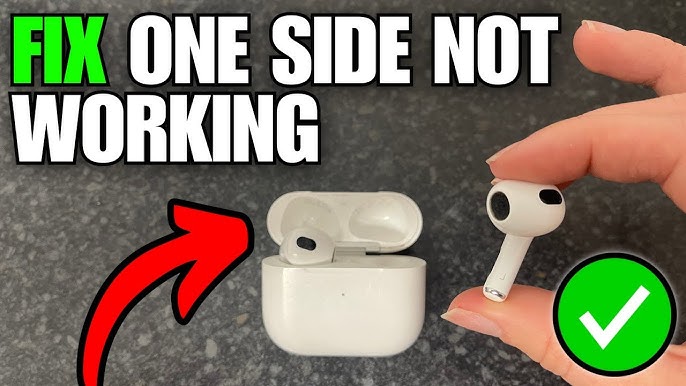
There is nothing quite as jarring as popping in your favorite pair of Apple AirPods, hitting play on a high-energy playlist, and being met with… total silence in one ear. Whether you are using the classic 2nd Gen, the AirPods Pro 2, or the latest AirPods 4, the “one side not working” phenomenon is one of the most common frustrations for Apple users in Dubai. It disrupts your business calls on Sheikh Zayed Road and ruins your podcast during a workout at Al Barsha Pond Park.
If you’ve found yourself shaking your head or tapping your earbud in hopes of a miracle, don’t worry. Before you assume your expensive tech is ready for the bin, there are several professional-grade troubleshooting steps you can take. In this guide, we will explore why AirPods One Side Not Working? Professional Reset & Repair Tips are your best bet for a quick fix and when it’s time to call in the experts.
Why Does One AirPod Stop Working?
Understanding the “why” is the first step toward the “how.” Because AirPods are complex pieces of micro-engineering, the failure of a single bud can stem from several different sources.
1. Connection and Sync Errors for AirPods One Side Not Working
Sometimes, the H1 or H2 chip inside your AirPods simply loses its “handshake” with your iPhone. This is often a software glitch where the charging case recognizes one bud but fails to register the other. In these cases, a simple software reset usually does the trick.
2. Debris and Wax Buildup for AirPods One Side Not Working
Living in the UAE means dealing with high humidity and fine dust. Over time, earwax and environmental debris can clog the acoustic mesh. If the mesh is completely blocked, it might seem like the AirPod is dead, when in reality, the sound simply cannot escape the speaker.
3. Battery Failure or Deep Discharge
Each AirPod has its own tiny battery. If one bud wasn’t seated correctly in the charging case, it might have drained to 0% while the other stayed at 100%. If a battery is left at 0% for too long in the Dubai heat, it can enter a “deep discharge” state where it refuses to wake up without professional intervention.
Professional Reset Tips: The First Line of Defense
Before seeking a hardware repair, you should always perform a “Clean Reset.” This is the standard procedure used by technicians to rule out software bugs. Follow these steps carefully:
The “Deep Reset” Procedure
- Forget the Device: Go to Settings > Bluetooth on your iPhone. Tap the “i” icon next to your AirPods and select “Forget This Device.”
- Case Preparation: Place both AirPods in the charging case and keep the lid open.
- The Setup Button: Locate the small circular button on the back of the case. Press and hold it for about 15 seconds.
- Watch the Light: The status light should flash amber, then finally white. This indicates a successful factory reset.
- Reconnect: Bring the open case close to your iPhone and follow the on-screen setup instructions.
When a Reset Isn’t Enough: Advanced Repair Tips
If you’ve performed a reset three times and the left or right bud is still silent, you are likely dealing with a physical or electrical issue. This is where AirPods One Side Not Working? Professional Reset & Repair Tips shift from software to hardware.
Check the Charging Contacts for AirPods One Side Not Working
Take a close look at the bottom of the AirPod stem and the bottom of the charging case interior. You will see small metallic “teeth.” If these are oxidized or covered in lint, the bud won’t charge. Use a dry Q-tip or a soft-bristled brush to gently clean these points. Avoid using water or any metallic tools that could short the circuit.
Inspect for Physical Damage for AirPods One Side Not Working
Did the silent AirPod recently take a tumble onto a tiled floor? A hard impact can disconnect the ribbon cable that links the battery to the driver. If you hear a rattling sound when you shake the bud, something has come loose internally.
Milaaj Mobile and Laptop Repair Al Barsha: Your Audio Experts
When DIY tips aren’t enough, you need a repair shop that specializes in the delicate “no-mark” opening of Apple accessories. Milaaj mobile and laptop repair Al Barsha has built a reputation as Dubai’s premier destination for high-end audio restoration. We understand that your AirPods are an investment, and we treat them with the precision they deserve.
Why Residents Trust Milaaj:
- Low Price Guarantee: We believe in fixing, not just replacing. Our diagnostic services are affordable, and our battery swaps are offered at a low price compared to buying a new pair.
- Speed Repairing: Most “one side not working” issues are resolved within 2 to 4 hours. We aim for same-day service so you can get back to your routine.
- Ultimate Convenience: Located conveniently in Al Barsha, we offer free pickup and delivery across Dubai. If you’re stuck at the office in Business Bay, we’ll come to you.
- Top-Tier Part Quality: If a driver or battery needs replacing, we use only OEM-grade parts. This ensures the Active Noise Cancellation (ANC) and spatial audio remain perfectly balanced.
- Advanced Diagnostics: We use specialized software to test the frequency response and battery health of each bud individually, ensuring the root cause is found.
Frequently Asked Questions About AirPods One Side Not Working
1. Why does my left AirPod die faster than the right one?
This is usually because the “primary” microphone is set to one side. The bud acting as the mic drains faster. You can change this in Settings > Bluetooth > AirPods > Microphone.
2. Can I replace just one AirPod if it’s broken?
Yes, you can buy a single replacement bud, but it’s often more cost-effective to have your existing bud repaired. Milaaj can often fix a “dead” bud for a fraction of the replacement cost.
3. Will cleaning the mesh with a needle fix the sound?
Never use a needle. You will almost certainly puncture the delicate driver membrane. Use a soft toothbrush or specialized cleaning putty designed for electronics.
4. How do I know if the charging case is the problem?
If both AirPods work when put into a friend’s case but one fails in yours, the charging pin in your case is likely damaged. We offer case-specific repairs for both USB-C and Lightning models.
5. Is water damage repairable for AirPods?
Yes, if caught early. We use ultrasonic cleaning to remove internal corrosion. If your AirPod took a dip, bring it to us immediately do not try to charge it!
Summary: AirPods One Side Not Working
Dealing with an imbalanced audio experience is frustrating, but AirPods One Side Not Working? Professional Reset & Repair Tips show that there is almost always a solution. Whether it’s a simple firmware reset, a deep cleaning of the acoustic mesh, or a professional battery replacement, you don’t have to settle for mono sound.
At Milaaj, we take pride in being the local experts who understand the nuances of Apple’s audio ecosystem. We combine speed, affordability, and high-quality craftsmanship to ensure your AirPods stay in your ears and out of the landfill.
Is one of your AirPods still silent after a reset? Contact Milaaj today for a free diagnostic and get your sound back to 100%!
Other Services:
- Need other iPhone repairs? Check out Milaaj’s apple airpods repair services in Dubai.
- Looking to upgrade? Learn about selling your used device in Dubai.
- For Apple users, check Apple trade-in options in Dubai.
📍 Visit Any Milaaj Branch in Dubai
🔹 Bur Dubai
Milaaj Mobile and Laptop Repair Dubai
📞 055 258 8477
🔗 Google Maps
🔹 Al Barsha
Milaaj Mobiles and Laptop Repair Al Barsha
📞 052 596 2846
🔗 Google Maps
🔹 Al Barsha 3
Milaaj Mobiles and Gaming Store
📞 052 3405 814
🔗 Google Maps
🔹 Al Nuaimiya
Milaaj Mobiles and Laptops Ajman
📞 055 788 9654
🔗 Google Maps
Shop Locations: Al Barsha | Bur Dubai | Reef Mall, Salah Al Din | Al Nuaimiya, Ajman
Email: support@milaaj.com
Operating Hours: Monday – Sunday
Leave a Reply