

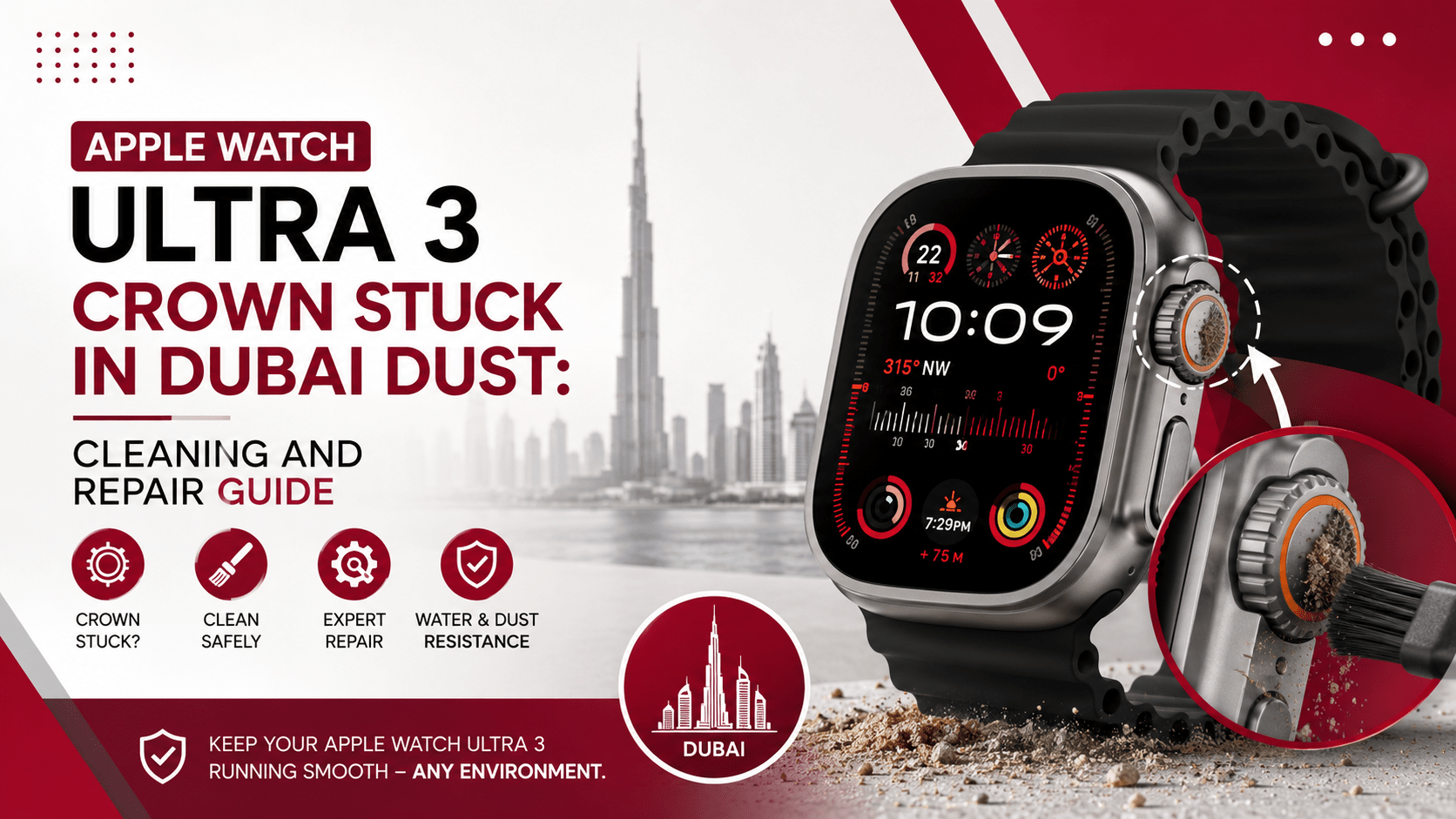
If you live, work, or adventure in Dubai, you already know that desert sand and fine atmospheric dust get everywhere. From your shoes to your car engine, nothing escapes the relentless silica particles blown across the Emirates. However, when those microscopic grains wedge themselves into the tight tolerances of your premium wearable, frustration sets in quickly. Having your Apple Watch Ultra 3 crown stuck in Dubai dust: cleaning and repair guide bookmark ready can save you time, money, and unnecessary stress.
The Apple Watch Ultra 3 stands as a triumph of modern wearable technology. Engineered with a rugged titanium case, sapphire crystal display, and specialized seals, Apple designed this smartwatch to endure extreme environments—from deep-sea diving to desert trekking. Yet, despite its extreme durability, the mechanical mechanism behind the Digital Crown remains susceptible to fine particles.
When desert dust wedges between the rotating stem and the watch enclosure, the crown becomes stiff, gritty, or completely jammed. Furthermore, forcing the dial while sand sits inside can scratch internal components or ruin the haptic encoder. In this detailed article, we walk you through why this happens, how to safely flush out the grime at home, what mistakes to avoid, and when you should seek expert technical repair in Dubai.
Why Dubai Desert Dust Jams the Apple Watch Ultra 3 Digital Crown
To understand why your smartwatch wheel stops turning, you must first look at how the Digital Crown functions. Unlike simple touchscreens, the Digital Crown relies on a combination of mechanical rotation and optical sensors inside the titanium housing.
+-------------------------------------------------------------------+
|                  DIGITAL CROWN ANATOMY & DUST FLOW                |
+-------------------------------------------------------------------+
|                                                                   |
|   [ Titanium Crown Cap ] <--- Outer dial you turn with fingers    |
|             |                                                     |
|      ========== ( Microscopic Gap - Dust Entry Point ) ========== |
|             |                                                     |
|   [ O-Ring Gaskets ]     <--- Prevents water entry, traps dust    |
|             |                                                     |
|   [ Optical Encoder ]    <--- Reads rotation impulses             |
|             |                                                     |
|   [ Haptic Engine ]      <--- Delivers subtle tactile clicks      |
|                                                                   |
+-------------------------------------------------------------------+
Dubai’s desert sand is not standard beach sand. Desert sand consists of ultrafine, wind-blown silica grains along with urban dust particles suspended in humid coastal air. When sweat, body oils, or saltwater mix with this fine desert dust, it forms a sticky compound inside the crown’s recessed channel.
- Tight Tolerances: The gap between the Digital Crown wheel and the titanium casing measures less than a fraction of a millimeter. This tiny clearance gives the watch its sleek, water-sealed fit, but it also means tiny grains of sand get trapped easily.
- Sticky Environmental Residues: When you combine desert dust with outdoor heat, sunscreen, and natural skin oils, the debris hardens into a mortar-like paste around the crown shaft.
- Internal Friction Points: As dust accumulates around the internal O-ring seal, the crown loses its smooth rotational feel. Consequently, the watch stops registering scroll inputs, or the physical click button feels completely unresponsive.
If you are currently experiencing an Apple Watch Ultra 3 crown stuck in Dubai dust: cleaning and repair guide steps like the ones outlined below will help you safely restore smooth movement.
Immediate Diagnostic Checklist: Is It Just Dust or Real Hardware Damage?
Before turning on running water or scheduling a repair session, you need to determine the underlying cause of the issue. Sometimes a unresponsive crown stems from software glitches, while other times it indicates physical obstruction or internal seal failure.
1. The Physical Inspection
Take a close look at the space around the Digital Crown under a bright light or magnifying lens. Do you notice visible sand grains, dried salt rings, or powdery dust around the titanium collar? If the wheel feels gritty when you attempt a gentle turn, physical debris is almost certainly the culprit.
2. The Click & Scroll Test
Try pressing the crown inward toward the screen. Does it still give a crisp tactile click, or does it feel spongy and jammed?
- Gritty Rotation + Tactile Click: Debris is trapped in the outer collar ring.
- No Rotation + No Click: Sand has wedged beneath the stem or physical spring mechanism.
- Smooth Rotation + No On-Screen Response: This points toward a software freeze or optical encoder sensor issue rather than a dust clog.
3. Software Check & Forced Restart
Occasionally, watchOS might freeze, making the screen appear unresponsive to crown inputs even if the wheel turns freely. Press and hold both the Side Button and the Digital Crown simultaneously for 10 seconds until the Apple logo appears. If the issue persists after rebooting, proceed directly to our home cleaning instructions.
Safe Step-by-Step DIY Cleaning Guide for Apple Watch Ultra 3
When dealing with an Apple Watch Ultra 3 crown stuck in Dubai dust: cleaning and repair guide instructions must strictly follow safe liquid and handling protocols. Fortunately, Apple engineered the Ultra series with impressive water resistance (rated to 100 meters under ISO standard 22810). Therefore, fresh running water remains your safest and most effective cleaning tool.
Step 1: Power Off the Device and Remove the Band
Safety always comes first. Power off your Apple Watch Ultra 3 completely by holding down the Side Button until the power slider appears, then slide it off. Disconnect the watch from its magnetic charger. Additionally, remove your watch strap—especially if you wear a porous Trail Loop, Alpine Loop, or leather band—so you can hold the device securely without moisture accumulating under the fabric.
Step 2: Flush Under Lightly Running Fresh Water
Head over to your bathroom or kitchen sink. Turn on the tap so lukewarm, fresh tap water runs out in a low-pressure, steady stream.
Important Warning: Do not use hot water, boiling water, or high-pressure spray hoses. High-pressure water can overcome internal rubber gaskets, causing liquid ingress into the battery or motherboard compartment.
Hold your Apple Watch Ultra 3 so the stream of warm water flows directly over the small gap between the Digital Crown and the titanium case.
Step 3: Continually Turn and Press the Crown
While keeping the crown directly under the running water, slowly rotate the wheel back and forth. Press the crown inward repeatedly to encourage water to flush out trapped sand particles from behind the stem collar.
- Continue this process for 15 to 30 seconds.
- You should feel the gritty friction diminish as water washes the fine Dubai sand particles out of the housing channel.
Step 4: Dry the Device Thoroughly
Once the crown moves smoothly again, shut off the tap. Take a clean, soft, lint-free microfiber cloth and dry the exterior surfaces. Pay extra attention to the gap surrounding the Digital Crown. Rotate and click the crown while wrapping it gently in the cloth to absorb any remaining droplets trapped inside the rim.
Allow the watch to air-dry naturally for about 10 to 15 minutes before powering it back on.
Step 5: Clear Speaker and Mic Ports via Water Lock
Once you power the watch back on, swipe up (or press the side button depending on your watchOS version) to open Control Center. Tap the Water Lock icon (the water drop symbol). Next, press and hold the Digital Crown until the device emits a series of low-frequency sound tones. These sonic vibrations push remaining water droplets out of the speaker cavity and microphone ports.
By using this Apple Watch Ultra 3 crown stuck in Dubai dust: cleaning and repair guide procedure, most users successfully clear away everyday sand build-up without spending a single Dirham.
Critical Mistakes to Avoid When Cleaning Your Apple Watch
When your expensive smartwatch stops functioning properly, panic might tempt you to try improvised quick fixes. However, using improper tools or chemical solvents can permanently destroy the seals, coating, or internal sensors of your Apple Watch Ultra 3.
+-------------------------------------------------------------------+
|                   WHAT NOT TO USE ON YOUR WATCH                   |
+-------------------------------------------------------------------+
|  [X] Compressed Air / Air Dusters (Blows dust deeper inside)      |
|  [X] Needles, Pins, or Toothpicks (Scratches optical sensors)     |
|  [X] Soaps, Detergents, & Solvents (Erodes liquid-proof seals)   |
|  [X] Hairdryers / Direct Heat (Warps internal gaskets)            |
+-------------------------------------------------------------------+
1. Never Use Compressed Air Cans
High-pressure compressed air dusters generate powerful atmospheric pressure. When aimed at the tiny gap around the crown stem, air pressure forces micro-sand grains deeper into the optical encoder module. Even worse, extreme pneumatic pressure can rupture internal water-resistant membranes.
2. Avoid Sharp Metal Tools or Toothpicks
Inserting safety pins, sewing needles, or wooden toothpicks into the crown groove is a dangerous idea. Metal needles easily scratch the bead-blasted titanium finish and damage internal rubber seals. Meanwhile, wooden toothpicks can splinter, leaving wooden fibers trapped alongside the existing desert sand.
3. Skip Chemical Cleaners, Soaps, and Solvents
Avoid household glass cleaners, isopropyl alcohol baths, dish soap, or acetone. Soaps lower the surface tension of water, allowing liquid to penetrate deep water seals. Solvents degrade the protective oleophobic coating on the sapphire glass display and break down internal rubber O-rings over time. Stick strictly to pure, fresh tap water.
4. Do Not Apply External Direct Heat
Never use hairdryers, heat guns, or microwave environments to speed up drying. High temperatures degrade lithium-ion batteries, loosen waterproof adhesives, and warp precision internal components.
What to Do When Cleaning Doesn’t Work: Professional Repair Options
What happens when you follow all flushing steps, yet your crown remains completely immobile? Or what if the wheel turns, but the watch fails to register scrolling or clicking?
If your Apple Watch Ultra 3 crown stuck in Dubai dust: cleaning and repair guide DIY steps fail to resolve the problem, you are likely dealing with one of three mechanical issues:
- Internal Mechanical Jam: Coarse sand grains have bypassed the outer seal ring and wedged inside the gear assembly or tactile spring mechanism.
- Damaged Optical Encoder: Gritty sand stripped or scratched the optical sensor surface while forced under pressure, rendering it incapable of reading motion inputs accurately.
- Corrosion or Liquid Residue: Sweat, salt, or moisture previously mixed with dust, resulting in internal corrosion around the crown assembly.
When DIY steps fall short, opening the device requires specialized tools, controlled environments, and expert technical skill. Attempting to pry open a titanium Apple Watch casing yourself without professional tools will ruin the water seals, void warranties, and damage the display panel.
Fast & Professional Watch Repair in Dubai: Milaaj Mobile Repair
When DIY methods cannot dislodge stubborn sand, you need a reliable local technical repair partner who understands high-end wearables. For residents and visitors across Dubai, Milaaj mobile and laptop repair Al Barsha provides specialized hardware diagnosis and precision watch repair services tailored to premium Apple devices.
Why Choose Professional Repair in Al Barsha?
- Precision Micro-Cleaning & Ultrasound Dust Removal: Technicians utilize specialized tools, gentle micro-suction equipment, and ultrasonic cleaning baths designed specifically for delicate smartwatch components without compromising delicate internal logic boards.
- Speed Repairing & Turnaround: You don’t have to wait weeks to get your favorite timepiece back on your wrist. Express diagnostic and repair services ensure your Apple Watch Ultra 3 gets serviced quickly, often on the same day.
- Genuine & High-Grade Replacement Parts: If sand grit has permanently damaged your crown shaft or optical encoder module, expert repair centers install premium, OEM-grade replacement parts to restore original performance.
- Resealing for Water & Dust Resistance: Whenever a watch casing gets serviced, proper resealing is vital. Specialized technicians replace damaged gaskets and apply water-resistant seals so you can return to swimming, sports, and outdoor activities with confidence.
- Low Price & Transparent Estimates: Honest repair facilities provide clear upfront quotes without hidden charges, delivering exceptional value compared to full unit replacement costs.
- Convenience: Conveniently located in Al Barsha, Dubai, you can drop off your device while running errands or visiting nearby landmarks like the Mall of the Emirates.
If you tried our Apple Watch Ultra 3 crown stuck in Dubai dust: cleaning and repair guide tips and still experience friction or unresponsive buttons, letting certified technicians service your wearable is the smartest move.
How to Protect Your Apple Watch Ultra 3 from Dubai Sand in the Future
Prevention always beats repair. While you can’t eliminate dust from the Dubai environment, a few simple habit adjustments will keep your smartwatch running smoothly for years to come:
- Rinse After Desert Safaris & Dune Bashing: Whenever you return from quad biking, desert camping, or beach trips, spend 10 seconds rinsing your watch under warm tap water before sand settles into a hardened crust.
- Avoid Sand Contact During Lotion Application: Apply sunscreen or body oils first, let them absorb fully into your skin, and then put your watch back on. Lotion mixed with sand forms a thick paste that easily gums up mechanical dials.
- Perform Weekly Maintenance Flushes: If you workout outdoors regularly, make a habit of flushing the crown under low-pressure fresh water once a week to wash away sweat crystals and micro-dust before they cause friction.
Frequently Asked Questions (FAQs)
Q1: Is it safe to submerge my Apple Watch Ultra 3 in water to clean the crown?
Yes, the Apple Watch Ultra 3 features 100-meter water resistance rating. Holding the watch under lightly running, warm fresh tap water for 15–30 seconds while spinning the crown is the official, safe method to clean out dust and debris.
Q2: Can I use WD-40 or lubricant sprays to unstick the Digital Crown?
No, never apply WD-40, oil lubricants, or petroleum-based products to your watch. These chemical compounds break down the rubber O-ring seals, attract even more dust, and permanently ruin internal optical sensors.
Q3: Why is my Digital Crown turning smoothly now, but the screen doesn’t scroll?
If the physical crown rotates smoothly but the watch display does not react, sand grains may have scratched or blinded the internal optical encoder sensor inside the watch, or the device may require a software restart. Try a force restart first; if that fails, professional sensor repair is required.
Q4: How much does it cost to repair a stuck Apple Watch Ultra crown in Dubai?
Repair costs depend on whether the issue requires deep cleaning, seal replacement, or full optical encoder installation. Professional independent repair centers in Al Barsha offer competitive, low-price solutions that are significantly more affordable than purchasing a replacement watch.
Q5: How long does a professional crown repair take?
Most cleaning and crown shaft repair services can be completed on the same day within a few hours, allowing you to pick up your fully functional watch without long delays.
Final Thoughts
Living in a vibrant desert city like Dubai means enjoying incredible outdoor activities, but it also requires extra care for delicate electronics. Having your Apple Watch Ultra 3 crown stuck in Dubai dust: cleaning and repair guide knowledge on hand ensures you can tackle jam issues calmly and correctly.
Start with a gentle warm water flush while gently turning and clicking the dial. Avoid dangerous shortcuts like compressed air or harsh chemicals. If dust or sand remains stubborn, trust professional repair technicians in Al Barsha to restore your premium wearable safely and affordably. Proper care keeps your Apple Watch Ultra 3 ready for every adventure!
Other Services:
- Need other iPhone repairs? Check out Milaaj’s apple watch repair services in Dubai.
- Looking to upgrade? Learn about selling your used device in Dubai.
- For Apple users, check Apple trade-in options in Dubai.
📍 Visit Any Milaaj Branch in Dubai
🔹 Bur Dubai
Milaaj Mobile and Laptop Repair Dubai
📞 055 258 8477
🔗 Google Maps
🔹 Al Barsha
Milaaj Mobiles and Laptop Repair Al Barsha
📞 052 596 2846
🔗 Google Maps
🔹 Al Barsha 3
Milaaj Mobiles and Gaming Store
📞 052 3405 814
🔗 Google Maps
🔹 Al Nuaimiya
Milaaj Mobiles and Laptops Ajman
📞 055 788 9654
🔗 Google Maps
Shop Locations: Al Barsha | Bur Dubai | Reef Mall, Salah Al Din | Al Nuaimiya, Ajman
Email: support@milaaj.com
Operating Hours: Monday – Sunday
Leave a Reply