

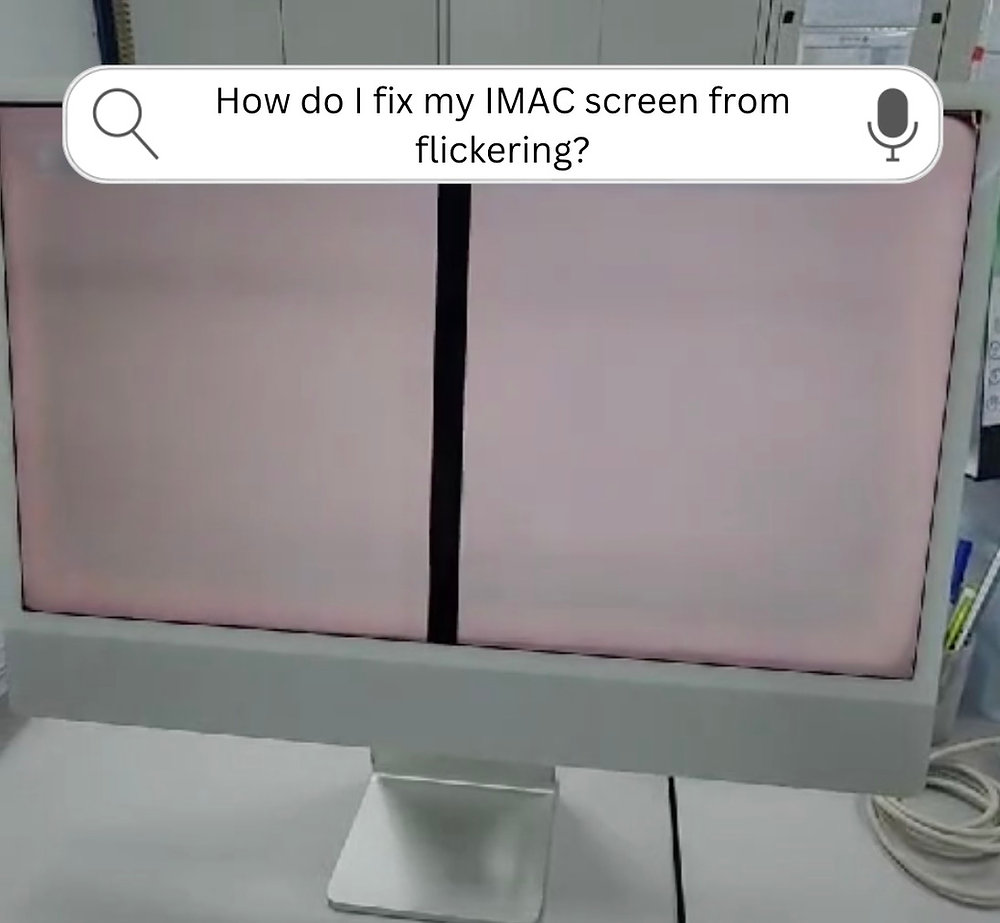
The iMac M4 is a masterpiece of modern computing. With its 4.5K Retina display, vibrant colors, and the sheer power of the M4 chip, it is the crown jewel of many home offices in Dubai. However, even the most advanced Apple hardware isn’t immune to the occasional glitch. If you have noticed your screen stuttering, blinking, or showing strange lines, you are likely dealing with iMac M4 screen flickering.
The big question is: where is the fault? Is it a failing 143W power adapter struggling to provide consistent juice, or has the Tandem OLED technology (if applicable) or the high-resolution panel developed a hardware defect? In 2026, troubleshooting these high-performance machines requires a mix of software savvy and an understanding of Apple’s latest internal architecture. This guide will help you determine if your iMac needs a simple settings tweak or a professional hardware intervention.
Identifying the Culprit: Power Supply vs. Display Panel
When your screen starts to act up, the symptoms often hold the key to the diagnosis. Understanding the difference between a power-related flicker and a display-panel failure can save you hours of unnecessary troubleshooting.
Symptoms of a Failing Power Supply (PSU) for iMac M4 screen flickering
In the iMac M4, the power supply is often external or integrated into a very slim internal board. If the 143W power adapter or the internal power regulation rails are failing, you might notice:
- Random Reboots: The flickering is accompanied by the computer suddenly shutting down or restarting.
- Brightness Dips: The screen doesn’t just flicker; it dims significantly before returning to normal, suggesting an inconsistent voltage flow to the 500-nit backlight.
- Buzzing Noises: You hear a faint electronic buzzing or clicking coming from the back of the iMac or the power brick when the flickering occurs.
Symptoms of a Faulty Display Panel for iMac M4 screen flickering
If the issue is rooted in the 4.5K Retina display panel itself, the behavior is usually more “visual” and less “systemic”:
- Persistent Lines: Flickering is accompanied by vertical or horizontal lines that stay in the same place.
- Image Retention: You see “ghosts” of previous windows flickering behind your current task.
- Temperature Sensitivity: The flickering gets worse as the iMac warms up, indicating a hardware expansion issue in the display controller or the panel’s ribbon cables.
Quick Software Fixes for iMac M4 Screen Flickering
Before assuming your hardware is broken, you must rule out the “digital” gremlins. In 2026, macOS Tahoe and newer updates have introduced complex display features that can sometimes cause sync issues.
1. Disable True Tone and Night Shift for iMac M4 screen flickering
Apple’s True Tone technology uses sensors to adjust the color temperature of your screen based on ambient light. If these sensors are confused by flickering LED bulbs in your room, they can cause the screen to “shimmer.” Try turning these off in System Settings > Displays to see if the flickering stops.
2. The “Stillcolor” and Dithering Check for iMac M4 screen flickering
Some users are sensitive to Temporal Dithering a technique the M4 display controller uses to simulate billions of colors. This can look like a constant, microscopic flicker. In 2026, many professionals use tools like Stillcolor to disable this and provide a more stable, static image.
3. Safe Mode Diagnostic for iMac M4 screen flickering
Restart your iMac M4 and hold the power button until you see “Loading startup options.” Select your disk, hold the Shift key, and click Continue in Safe Mode. If the flickering disappears here, the problem is a third-party app or a corrupted driver, not your hardware.
Milaaj Mobile and Laptop Repair Al Barsha: Your iMac Experts
If your iMac continues to flicker after a software reset, it’s time to call in the professionals. The internal layout of the M4 series is incredibly compact, with the M4 chip, unified memory, and power rails all integrated into a logic board the size of a smartphone. Milaaj mobile and laptop repair Al Barsha specializes in the precision diagnostics required for these 2026 flagship models.
Why Milaaj is the Preferred Choice for iMac Repairs:
- Unmatched Part Quality: If your display panel is truly failing, we replace it with Original Grade 4.5K Retina panels. We ensure that your color accuracy (P3) and 500-nit brightness are perfectly restored.
- Low Price for Premium Hardware: Official Apple repairs can often cost as much as a new machine. We offer a low price alternative by focusing on component-level repairs, such as fixing the internal power regulator rather than replacing the entire logic board.
- Speed Repairing for the Dubai Professional: We know your iMac is your workstation. Our speed repairing protocol ensures that most iMac diagnostics and power supply fixes are completed within 24 to 48 hours.
- Ultimate Convenience: Located in Al Barsha 1, we are easy to find. If you can’t transport your 24-inch iMac, take advantage of our iMac pickup and delivery service. We’ll safely transport your device to our lab and return it in perfect condition.
- Specialized Tools for M4 Systems: We use advanced oscilloscopes and thermal cameras to check the power delivery to your 2nm architecture chips, ensuring every voltage rail is stable.
FAQs About iMac M4 screen flickering
1. Can a loose power cable cause screen flickering?
Absolutely. In the iMac M4, the power cable uses a magnetic or high-tension connector. If it isn’t seated perfectly, or if the “brick” is overheating on a carpet, it can cause the screen to flicker as the power fluctuates.
2. Is screen flickering covered under warranty?
If your iMac is less than a year old and has no physical or liquid damage, Apple may cover it. However, if the flicker is caused by an electrical surge (common in some older Dubai buildings) or accidental impact, a professional repair at Milaaj is your best bet.
3. What is “Nano-texture glass” flickering?
If you have the Nano-texture glass option, the flickering might actually be an optical illusion caused by specific lighting. Try moving your iMac to a different spot in the room to see if the “shimmer” changes.
4. Can an external monitor cause my iMac screen to flicker?
Yes. If you are using a low-quality Thunderbolt 4 cable to connect a second screen, it can create “noise” on the shared power bus, causing both screens to flicker. Always use high-quality, certified cables.
5. Why does my screen flicker only when I use certain apps?
This is usually a GPU-related software bug. High-demand apps like Final Cut Pro or 3D rendering tools put stress on the M4 GPU. Ensure your apps and macOS are fully updated.
Summary: iMac M4 screen flickering
The iMac M4 screen flickering issue can be a minor annoyance or a sign of a looming hardware failure. By distinguishing between the systemic signs of a power supply issue and the localized visual errors of a display panel, you can make an informed decision on how to proceed.
Whether it’s a simple cable swap or a complex repair of the M4 logic board, don’t let a flickering screen hinder your productivity. Your iMac is a high-performance tool designed for the ambitious lifestyle of Dubai it deserves to shine bright and steady.
Is your iMac M4 screen still stuttering after trying these fixes? Don’t risk further damage to your internal components. Contact Milaaj today for a free diagnostic and experience the gold standard in Apple hardware repair!
Other Services:
- Need other Mac Book repairs? Check out Milaaj’s iMac repair services in Dubai.
- Looking to upgrade? Learn about selling your used laptop in Dubai.
- Data loss concerns? Visit Milaaj’s data recovery services.
- For Apple users, check Apple trade-in options in Dubai.
📍 Visit Any Milaaj Branch in Dubai
🔹 Bur Dubai
Milaaj Mobile and Laptop Repair Dubai
📞 055 258 8477
🔗 Google Maps
🔹 Al Barsha
Milaaj Mobiles and Laptop Repair Al Barsha
📞 052 596 2846
🔗 Google Maps
🔹 Al Barsha 3
Milaaj Mobiles and Gaming Store
📞 052 3405 814
🔗 Google Maps
🔹 Al Nuaimiya
Milaaj Mobiles and Laptops Ajman
📞 055 788 9654
🔗 Google Maps
Shop Locations: Al Barsha | Bur Dubai | Reef Mall, Salah Al Din | Al Nuaimiya, Ajman
Email: support@milaaj.com
Operating Hours: Monday – Sunday




Leave a Reply