

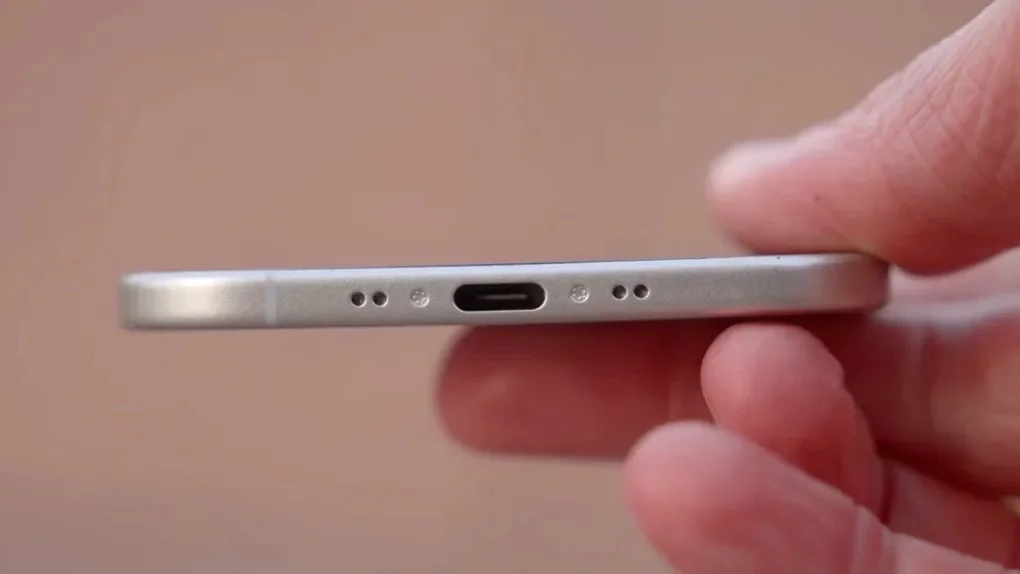
The iPhone 17 Air has quickly become one of the most talked-about smartphones of the year. With its ultra-slim profile, premium titanium construction, advanced AI-powered features, and powerful performance, it represents Apple’s vision of the future. However, despite all the excitement surrounding the device, many users have started discussing a potential concern: iPhone 17 Air charging port problems in Dubai.
While the titanium body delivers exceptional durability and a premium feel, some users are discovering that charging-related issues can still occur. In a city like Dubai, where heat, dust, humidity, and constant smartphone usage are part of everyday life, even a flagship device can experience wear and tear.
If your iPhone 17 Air charges intermittently, struggles to connect to a cable, charges slowly, or stops charging entirely, this guide will explain everything you need to know. More importantly, it will help you understand whether the charging port has become a weak point and what you can do to prevent costly repairs.
Understanding the iPhone 17 Air Design
Apple designed the iPhone 17 Air to be thinner and lighter than previous models. The titanium frame improves structural strength while reducing overall weight. As a result, users enjoy a premium device that feels both luxurious and durable.
However, creating such a slim smartphone requires significant engineering compromises. Internal components are packed more tightly than ever before. Consequently, charging connectors, flex cables, and port assemblies have less room for movement and protection.
Although the titanium exterior is highly resistant to dents and scratches, the charging port remains one of the most frequently used physical components on the device.
Therefore, it naturally becomes one of the areas most susceptible to damage.
Why Are iPhone 17 Air Charging Port Problems in Dubai Becoming More Common?
Several environmental factors contribute to iPhone 17 Air charging port problems in Dubai.
Fine Desert Dust Accumulation
Dubai’s environment contains extremely fine sand particles that can easily enter charging ports.
Over time, dust accumulates inside the connector cavity. As a result, charging cables may no longer sit securely inside the port.
Many users initially assume their charging cable is faulty when the real issue is hidden debris inside the port.
High Temperatures
Dubai’s summer temperatures frequently exceed 40°C.
Excessive heat can impact charging performance by triggering Apple’s thermal protection systems. Consequently, devices may charge slowly or stop charging temporarily until temperatures return to safe levels.
Repeated exposure to high heat may also accelerate wear on charging components.
Frequent Charging Habits
Modern smartphone users rely heavily on their devices throughout the day.
Because of this, charging occurs more frequently than ever before. Constant insertion and removal of charging cables naturally creates wear on the charging port assembly.
Common Signs of Charging Port Problems
Recognizing the warning signs early can prevent more serious damage.
Intermittent Charging
One of the most common symptoms is inconsistent charging.
You may notice the charging indicator appearing and disappearing repeatedly.
In many cases, the cable only works when positioned at a specific angle.
Slow Charging Speeds
Another sign of iPhone 17 Air charging port problems in Dubai is unusually slow charging.
Even when using an original charger, the battery may take significantly longer to reach full capacity.
Accessory Connection Failures
The charging port also handles data transfer.
If your device suddenly stops connecting to computers, CarPlay systems, or external accessories, the charging port may be compromised.
Loose Charging Cable
A charging cable should fit securely.
If the connector feels loose or falls out easily, internal port wear may be developing.
Overheating During Charging
Damaged charging pins can create electrical resistance.
As a result, excessive heat may develop during charging sessions.
Is the Titanium Body Really Related to Charging Port Issues?
Many users wonder whether the titanium body contributes directly to charging problems.
The answer is both yes and no.
The titanium frame itself is extremely durable and resistant to physical damage. However, Apple’s pursuit of a thinner design means internal components are more compact than ever before.
Consequently, even minor impacts may transfer stress to internal charging assemblies.
Furthermore, tighter internal layouts can make charging components more sensitive to dust accumulation and mechanical wear.
Therefore, while titanium is not the cause of the problem, the overall ultra-thin design may indirectly contribute to increased vulnerability.
Most Common Causes of Charging Port Failure
Dust and Debris Blockage
Dust remains the leading cause of iPhone 17 Air charging port problems in Dubai.
Tiny particles gradually build up and prevent proper contact between charging pins.
Liquid Exposure
Although modern iPhones offer water resistance, charging ports remain vulnerable to moisture.
Even small amounts of humidity or accidental liquid exposure can lead to corrosion over time.
Damaged Charging Cables
Using low-quality or damaged charging accessories can wear down internal connectors faster.
Additionally, counterfeit chargers may create voltage inconsistencies.
Physical Impact
Dropping the phone while a charging cable is connected can place significant stress on the charging assembly.
This often damages internal flex cables or connector pins.
Internal Component Failure
In some situations, the charging port itself is functioning properly.
Instead, the problem originates from:
- Charging IC failures
- Power management circuits
- Battery-related faults
- Logic board issues
How to Prevent Charging Port Problems
Fortunately, prevention is often easier than repair.
Keep the Port Clean
Regular inspections help prevent dust buildup.
However, avoid using metal tools to clean the connector.
Instead, seek professional cleaning when necessary.
Use Certified Accessories
Always use Apple-certified charging cables and adapters.
This reduces unnecessary stress on charging components.
Avoid Charging in Extreme Heat
Whenever possible, charge your device indoors.
Charging under direct sunlight increases internal temperatures and component wear.
Disconnect Carefully
Never pull charging cables sideways.
Instead, remove connectors gently and straight out from the port.
Store Devices Properly
Keeping your phone in a protective case and clean environment reduces exposure to dust and debris.
What Happens If Charging Port Problems Are Ignored?
Ignoring charging issues can lead to larger problems.
For example, intermittent charging may eventually become complete charging failure.
Additionally, damaged charging connectors can affect:
- Battery health
- Data transfer functions
- Accessory compatibility
- Internal power management systems
Therefore, addressing problems early often results in lower repair costs.
Professional Diagnosis Makes a Difference
Many charging issues appear identical from the outside.
However, the underlying causes can vary significantly.
Professional technicians use specialized diagnostic equipment to determine whether the issue involves:
Charging Port Assembly
Physical inspection reveals debris, corrosion, or connector damage.
Battery System
Battery performance testing identifies charging-related abnormalities.
Power Management Components
Advanced diagnostics detect failures within charging circuitry.
Logic Board Health
Motherboard analysis helps uncover hidden hardware faults.
Accurate diagnosis prevents unnecessary part replacements and reduces repair costs.
Why Dubai Users Need Expert Repair Services
Because Dubai’s environment presents unique challenges, local expertise matters.
Technicians familiar with desert dust, extreme temperatures, and common regional usage patterns can identify issues more efficiently.
Additionally, access to quality replacement parts ensures long-term reliability.
Reliable iPhone Repair Solutions in Al Barsha
When iPhone 17 Air charging port problems in Dubai require professional attention, choosing a trusted repair provider becomes essential.
Milaaj mobile and laptop repair Al Barsha offers specialized diagnostics and repair solutions for charging-related issues across the latest iPhone models.
Customers appreciate professional repair services because they provide:
Affordable Pricing
Repairing a charging port is often far less expensive than replacing the entire device.
Fast Turnaround Time
Most charging-related diagnostics and repairs can be completed quickly.
Premium Quality Parts
Reliable repair centers use high-quality replacement components designed to match original performance standards.
Convenience
Easy appointment scheduling and efficient service reduce downtime.
Skilled Technicians
Experienced professionals understand Apple’s latest hardware architecture and repair procedures.
When Should You Seek Repair?
You should consider professional assistance if:
- Charging only works intermittently
- The cable feels loose
- Charging has become unusually slow
- The device overheats while charging
- Data transfer functions stop working
- Cleaning the port does not resolve the issue
Early intervention often prevents more extensive hardware damage.
Final Thoughts
The iPhone 17 Air represents an impressive blend of innovation, premium materials, and cutting-edge engineering. Nevertheless, despite its durable titanium construction, the charging port remains one of the most heavily used components on the device.
As a result, iPhone 17 Air charging port problems in Dubai are becoming an increasingly common concern among users exposed to heat, dust, and daily charging cycles.
Fortunately, most charging issues can be prevented through proper care, regular cleaning, and the use of certified accessories. More importantly, early diagnosis and professional repairs can restore functionality before minor problems become major expenses.
Understanding the causes, warning signs, and available solutions allows Dubai users to keep their iPhone 17 Air performing reliably for years to come.
Frequently Asked Questions
Why is my iPhone 17 Air not charging properly?
Common causes include dust buildup, damaged charging cables, charging port wear, software issues, or battery-related problems.
Are iPhone 17 Air charging port problems in Dubai common?
Yes. Dubai’s dust, heat, and frequent device usage can contribute to charging port issues over time.
Can dust damage the charging port?
Absolutely. Fine sand and dust particles can block charging pins and interfere with electrical connections.
Why does my charging cable feel loose?
A loose connection often indicates debris accumulation or physical wear inside the charging port.
Does the titanium body affect charging performance?
Not directly. However, the ultra-thin design associated with the titanium construction may place tighter constraints on internal components.
Can overheating cause charging problems?
Yes. High temperatures can activate thermal protection systems and temporarily limit charging functionality.
Is wireless charging safer than cable charging?
Wireless charging reduces physical port wear but may generate additional heat during charging sessions.
Can charging port issues damage the battery?
If left unresolved, charging irregularities may contribute to battery stress and reduced battery health.
How often should I clean my charging port?
Periodic inspections are recommended, especially in dusty environments like Dubai.
When should I seek professional repair?
If cleaning and accessory replacement do not solve the issue, professional diagnostics should be performed as soon as possible.
Other Services:
- Need other iPhone repairs? Check out Milaaj’s iPhone repair services in Dubai.
- Looking to upgrade? Learn about selling your used iPhone in Dubai.
- Data loss concerns? Visit Milaaj’s data recovery services.
- For Apple users, check Apple trade-in options in Dubai.
📍 Visit Any Milaaj Branch in Dubai
🔹 Bur Dubai
Milaaj Mobile and Laptop Repair Dubai
📞 055 258 8477
🔗 Google Maps
🔹 Al Barsha
Milaaj Mobiles and Laptop Repair Al Barsha
📞 052 596 2846
🔗 Google Maps
🔹 Al Barsha 3
Milaaj Mobiles and Gaming Store
📞 052 3405 814
🔗 Google Maps
🔹 Al Nuaimiya
Milaaj Mobiles and Laptops Ajman
📞 055 788 9654
🔗 Google Maps
Shop Locations: Al Barsha | Bur Dubai | Reef Mall, Salah Al Din | Al Nuaimiya, Ajman
Email: support@milaaj.com
Operating Hours: Monday – Sunday




Leave a Reply