

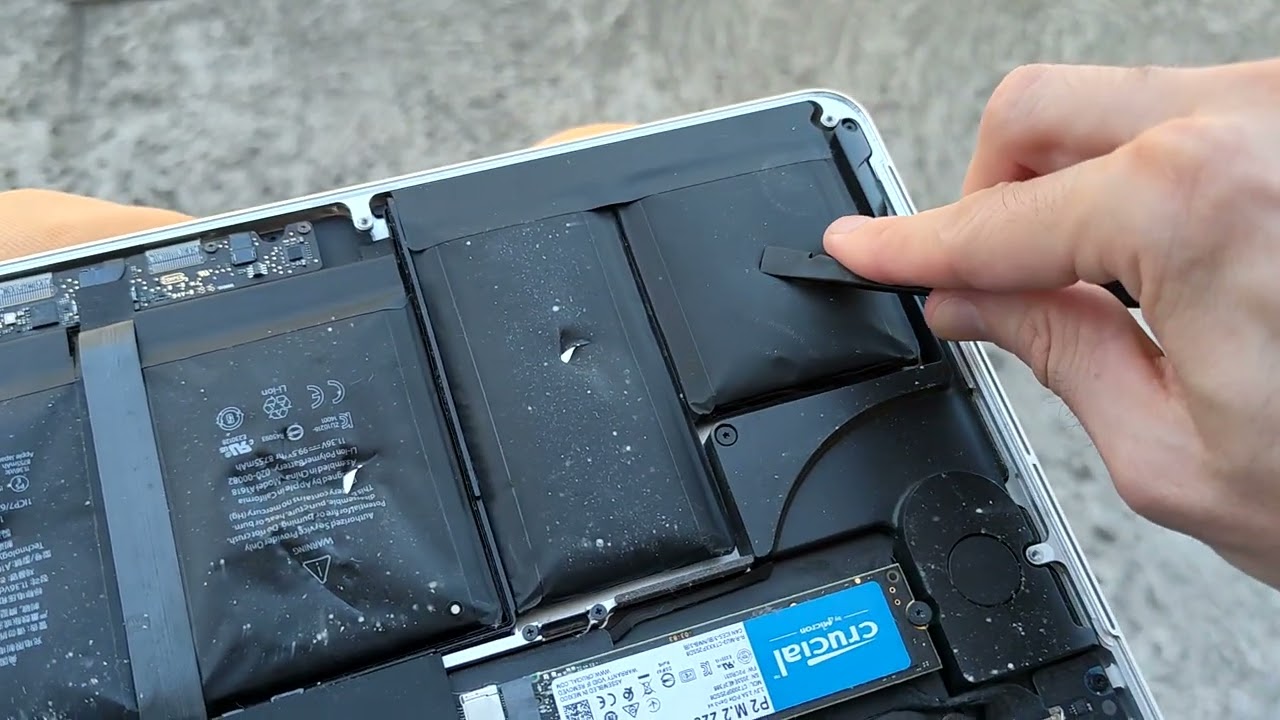
If you have ever noticed that your MacBook no longer sits flat on your desk, or if your trackpad has suddenly become stiff and difficult to click, you might be witnessing a slow-motion hardware emergency. For many residents living in the UAE, these symptoms are all too common. While we often blame old age or overcharging, there is a silent culprit lurking in the air. In this guide, we dive into the science of battery swelling: why humidity is killing your MacBook battery, and what you can do to protect your premium tech from the intense Dubai climate.
A swollen battery is more than just a cosmetic nuisance; it is a physical manifestation of a chemical failure inside your machine. When the sleek aluminum chassis of a MacBook Pro or Air begins to warp, it is because the Lithium-ion polymer cells inside are expanding with gas. Understanding why this happens and how the local environment accelerates the process is the first step toward preventing a permanent “death sentence” for your laptop.
What Exactly is Battery Swelling?
To understand the science of battery swelling: why humidity is killing your MacBook battery, we first need to look at how these batteries are built. Unlike the hard-cased batteries of the past, MacBooks use “pouch” cells. These pouches are designed to be thin and flexible, but they lack a rigid exterior.
The Chemical Breakdown for MacBook Battery Swelling
Inside each battery pouch, a delicate chemical reaction moves lithium ions between a cathode and an anode. However, as a battery ages or suffers from stress, a process called electrolyte oxidation can occur. This reaction produces gases like carbon dioxide and carbon monoxide as a byproduct. Because the battery pouch is airtight, these gases have nowhere to go, causing the battery to “inflate” like a balloon.
The Danger of Expansion for MacBook Battery Swelling
As the battery swells, it exerts tremendous pressure on the surrounding components. It can push against the bottom of the trackpad, bend the logic board, or even crack the internal casing. In extreme cases, the pressure can cause the screen to delaminate or the aluminum top case to split open entirely.
The Role of Dubai Humidity in Battery Failure
You might wonder why MacBooks in the UAE seem to suffer from this issue more frequently than those in cooler, drier climates. The answer lies in the intersection of heat and moisture.
1. Accelerated Chemical Reactions for MacBook Battery Swelling
Heat is the primary catalyst for almost all chemical degradation. In Al Barsha and across Dubai, ambient temperatures can remain high even indoors. When your MacBook’s internal cooling system is already fighting the external heat, the battery’s internal temperature can easily exceed safe operating limits. This heat triggers the electrolyte oxidation process much earlier in the battery’s lifecycle.
2. Moisture and Seal Integrity for MacBook Battery Swelling
While MacBooks are precision-engineered, they are not hermetically sealed. High humidity means the air is saturated with water vapor. Over time, this moisture can interact with the microscopic traces on the battery’s control board. If moisture causes even a tiny amount of corrosion or a minor short circuit, it can lead to “thermal runaway,” where the battery generates its own heat, leading to rapid swelling.
3. The “Sauna Effect” in Bags for MacBook Battery Swelling
Many professionals in Dubai carry their laptops in bags while moving between air-conditioned offices and the humid outdoors. This transition creates condensation. If you put a warm MacBook into a bag in a humid environment, you are essentially placing it in a sauna. This trapped moisture is a leading reason why humidity is killing your MacBook battery.
Warning Signs You Should Not Ignore
Because the swelling happens slowly, many users don’t notice it until the damage is significant. Keep an eye out for these early indicators:
- The “Wobble” Test: Place your MacBook on a perfectly flat glass or marble surface. If it rocks back and forth, the bottom case is likely bulging.
- Trackpad Resistance: If your trackpad becomes hard to press or loses its “clicky” feel, the battery is likely pushing against it from underneath.
- Keyboard “Tenting”: In severe cases, the middle of the keyboard might appear slightly higher than the edges.
- Unexpected Shutdowns: If your laptop dies at 20% or 30% charge, the internal cells are likely failing and expanding.
Milaaj Mobile and Laptop Repair Al Barsha: Your Battery Safety Experts
A swollen battery is a safety hazard that requires immediate professional attention. Attempting to “poke” or “deflate” a battery at home is incredibly dangerous and can lead to a fire. When you need a safe, reliable solution, Milaaj mobile and laptop repair Al Barsha is the trusted destination for Apple hardware in Dubai.
Why Choose Milaaj for MacBook Battery Replacement?
- Speed Repairing for Urgent Cases: A swollen battery is an emergency. Our speed repairing protocol ensures that we prioritize these cases to prevent further damage to your screen or trackpad.
- Low Price & Transparent Service: We offer a low price for genuine-grade battery replacements, providing you with a much more affordable option than a full top-case replacement at official retail outlets.
- Unmatched Convenience: Located in the heart of Al Barsha, we are easy to reach. If your MacBook is too warped to carry, use our MacBook pickup and delivery service.
- Part Quality You Can Trust: We use only Original-grade components with high-capacity cells that are tested to withstand the local climate.
- Expert Diagnostics: We don’t just swap the battery; we check your charging port and logic board to ensure no other components were damaged by the expansion.
FAQs About MacBook Battery Swelling
1. Is a swollen battery dangerous?
Yes. While they rarely explode spontaneously, a swollen battery is a fire risk if it is punctured or if it continues to expand. You should stop using the device and keep it unplugged until it is repaired.
2. Can I prevent battery swelling by leaving my MacBook plugged in?
Actually, keeping your battery at 100% all the time in a hot environment can accelerate swelling. It is better to use features like “Optimized Battery Charging” which keeps the charge at 80% when you are stationary.
3. Will my MacBook work normally after a battery replacement?
In 99% of cases, yes. As long as the battery hasn’t cracked the logic board or the trackpad, a simple replacement will make your MacBook feel brand new again.
4. How does humidity actually get inside the laptop?
Air is pulled through your laptop by the cooling fans. In a humid environment, that air carries moisture. While most of it passes through, some can condense on the cooler metal surfaces inside, including the battery casing.
5. Why is the battery the first thing to fail in the heat?
Batteries rely on delicate chemical balances. While your CPU and GPU are made of solid-state silicon that can handle high heat, the liquid or gel electrolytes in a battery are much more sensitive to thermal changes.
Summary: MacBook Battery Swelling
Understanding the science of battery swelling: why humidity is killing your MacBook battery is crucial for anyone living in the Middle East. Our unique combination of high temperatures and coastal humidity creates a “perfect storm” for Lithium-ion failure. By keeping your laptop in a cool, dry environment and acting quickly at the first sign of a bulge, you can save your MacBook from a catastrophic failure.
Don’t wait for your screen to crack or your keyboard to pop. At the first sign of a wobble or a stiff trackpad, seek professional help. Your MacBook is a high-performance machine, and it deserves a healthy heart to keep you productive.
Is your MacBook starting to bulge or acting strangely in the heat? Don’t risk a fire or further damage! Contact Milaaj today for a professional battery health check and a fast, high-quality replacement!
Other Services:
- Need other Mac Book repairs? Check out Milaaj’s MacBook repair services in Dubai.
- Looking to upgrade? Learn about selling your used laptop in Dubai.
- Data loss concerns? Visit Milaaj’s data recovery services.
- For Apple users, check Apple trade-in options in Dubai.
📍 Visit Any Milaaj Branch in Dubai
🔹 Bur Dubai
Milaaj Mobile and Laptop Repair Dubai
📞 055 258 8477
🔗 Google Maps
🔹 Al Barsha
Milaaj Mobiles and Laptop Repair Al Barsha
📞 052 596 2846
🔗 Google Maps
🔹 Al Barsha 3
Milaaj Mobiles and Gaming Store
📞 052 3405 814
🔗 Google Maps
🔹 Al Nuaimiya
Milaaj Mobiles and Laptops Ajman
📞 055 788 9654
🔗 Google Maps
Shop Locations: Al Barsha | Bur Dubai | Reef Mall, Salah Al Din | Al Nuaimiya, Ajman
Email: support@milaaj.com
Operating Hours: Monday – Sunday




Leave a Reply