

Understanding the MacBook Neo data recovery process is essential in today’s fast-paced digital world. In 2026, the MacBook Neo has redefined expectations for entry-level laptops. With its vibrant design and efficient A18 Pro chip, it has become a popular choice among students and professionals in Dubai. However, even advanced devices are not immune to damage. A sudden power surge or an accidental spill in a café in Al Barsha can leave your MacBook completely unresponsive. In such moments, the biggest concern is your data. Important files, photos, and projects can feel trapped inside the device.
Many users immediately ask if they can remove the hard drive. In older laptops, this was easy. But modern Apple devices are more compact and integrated. This makes data recovery more complex than before. This guide explains the MacBook Neo data recovery process in simple terms. It also helps you understand whether the SSD is permanent and what steps you should take to recover your data safely.
Is the MacBook Neo SSD Soldered? The Technical Truth
To understand your recovery options, we have to look at the “bones” of the MacBook Neo. Apple designed this machine to be a marvel of integration, which unfortunately has major implications for DIY data recovery.
The A18 Pro Architecture for MacBook Neo data recovery
Unlike older laptops where the storage was a separate, swappable component, the MacBook Neo follows the path of the iPad and iPhone. The NAND flash storage (where your data lives) is soldered directly onto the logic board. In 2026, this integration is necessary to achieve the Neo’s 1.23 kg weight and silent, fanless operation. There is no “drive” to unscrew; the storage is part of the motherboard itself.
The Role of the Secure Enclave for MacBook Neo data recovery
Furthermore, the data on that soldered chip is encrypted by the Secure Enclave within the A18 Pro chip. This means that even if someone were to physically desolder the storage chips and move them to another board, the data would remain unreadable without the original processor’s unique security keys. This “soldered and encrypted” reality is why traditional recovery methods often fail on modern Macs.
How Data Recovery Works on a “Dead” Mac in 2026
If the SSD is soldered and the computer won’t turn on, is all hope lost? Not necessarily. While the MacBook Neo data recovery process is more difficult, professional technicians have specialized tools to bypass these hurdles.
1. Reviving the Logic Board for MacBook Neo data recovery
The most effective way to recover data from a soldered SSD is to make the logic board work againcat least long enough to transfer the files. Often, a “dead” Mac isn’t actually dead; it just has a “short” in a minor power circuit or a failed capacitor. A technician can perform micro-soldering to fix the power rail, allowing the A18 Pro chip to boot up and decrypt your data.
2. Apple’s Data Migration Tool for MacBook Neo data recovery
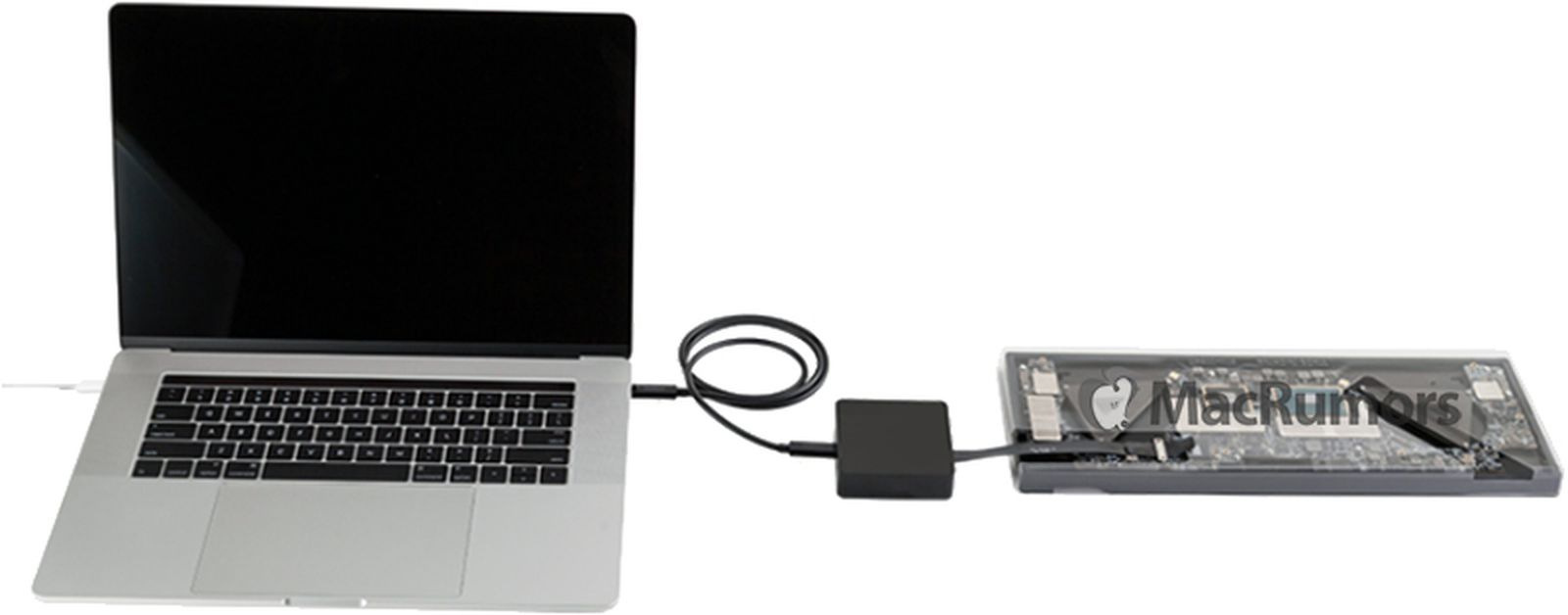
For authorized service providers, Apple sometimes includes a “Lifeboat” port or specialized software protocols that allow a secondary Mac to access the storage of a non-booting board through the USB-C 3.0 port. However, this only works if the core storage controller is still functional.
3. Target Disk Mode & Share Disk for MacBook Neo data recovery
If your MacBook Neo is “mostly dead” (for example, the screen is broken but the internals are fine), you can use a second Mac and a high-speed cable to boot the Neo into Share Disk mode. This treats your dead laptop like an external hard drive, allowing you to drag and drop your files onto a working machine.
Milaaj Mobile and Laptop Repair Al Barsha: Your Data Recovery Experts
When your MacBook Neo goes dark, you don’t just need a repair; you need a team that understands the delicate balance of 2nm architecture and encrypted storage. Milaaj mobile and laptop repair Al Barsha is Dubai’s leading destination for complex Apple logic board repairs and data retrieval.
Why Milaaj is the Trusted Choice for MacBook Neo Owners:
- Low Price for Complex Recovery: Data recovery can often cost thousands. We offer a low price for diagnostics and logic board-level data retrieval, ensuring you aren’t overpaying for your own information.
- Speed Repairing (Same-Day Assessment): We know that every hour without your data feels like a week. Our speed repairing protocol means we prioritize “dead” devices, often providing a recovery status within 24 hours.
- Unmatched Convenience: Located in Al Barsha 1, we are the go-to hub for residents and business owners. If you can’t make it to us, our MacBook pickup and delivery service ensures your MacBook gets to our lab safely and returns to you fixed.
- Superior Part Quality: If your Neo needs a component replacement to boot up, we use only Original Grade parts. This ensures the power stability required to keep your data safe during the transfer process.
- Apple-Certified Technicians: Our team is trained in the specific nuances of the A18 Pro chip and macOS Tahoe. We handle your device with the precision required for modern silicon-based hardware.
Proactive Steps: How to Never Lose Data Again
While the MacBook Neo data recovery process is effective, the best strategy is to never need it in the first place. In the era of soldered storage, your backup habits are your only true safety net.
- Enable iCloud Drive: With the MacBook Neo’s tight integration, iCloud is seamless. Ensure your Desktop and Documents folders are synced to the cloud. Even if your logic board is crushed, your files stay safe.
- Time Machine is Mandatory: Keep a cheap external SSD at home. Plug it in once a week, and let Time Machine create a “snapshot” of your entire system.
- Watch for Warning Signs: If your Neo starts freezing, getting unusually hot, or showing “Disk Full” errors despite having space, these are early warnings. Back up immediately and bring it to Milaaj for a health check.
FAQs About MacBook Neo data recovery
1. Can I upgrade the storage on my MacBook Neo later?
No. Because the NAND flash is soldered to the board, the storage configuration you choose at purchase (256GB or 512GB) is permanent. Always opt for more storage than you think you’ll need.
2. Is my data safe if I get a logic board replacement?
If you replace the logic board, your old data is gone unless it was backed up. This is why we always attempt logic board repair first to save your original data—before suggesting a replacement.
3. What is the most common cause of a “dead” MacBook Neo?
In Dubai, it is often liquid damage or heat-related component failure. The fanless design of the Neo makes it silent, but it also means you should avoid using it on soft surfaces like beds that can trap heat.
4. How long does data recovery take?
Simple file transfers take an hour. Complex logic board repairs to access the data can take 1 to 3 days depending on the severity of the damage.
5. Does opening the MacBook Neo void the warranty?
If your device is still under Apple’s 1-year warranty, a third-party repair may void it. However, if Apple tells you your data is “unrecoverable,” our specialist technicians at Milaaj can often find a way to save it where the official stores cannot.
Summary: MacBook Neo data recovery
The MacBook Neo is a beautiful, powerful, and affordable entry into the Mac ecosystem, but its design comes with a trade-off: repairability requires expertise. The soldered SSD means that you cannot simply “swap the drive” when things go wrong. Instead, you rely on the skill of micro-soldering experts to bring the board back to life.
In 2026, data is more valuable than hardware. If your MacBook Neo has stopped turning on, don’t panic and don’t attempt a “DIY” fix that could permanently damage the encrypted storage chips. Trust the experts who have the tools and the experience to handle Apple’s most integrated laptop yet.
Is your MacBook Neo showing a black screen, or are you unable to access your important files? Contact Milaaj today for a professional data recovery consultation and let us help you get your digital life back!
Other Services:
- Need other Mac Book repairs? Check out Milaaj’s MacBook repair services in Dubai.
- Looking to upgrade? Learn about selling your used laptop in Dubai.
- Data loss concerns? Visit Milaaj’s data recovery services.
- For Apple users, check Apple trade-in options in Dubai.
📍 Visit Any Milaaj Branch in Dubai
🔹 Bur Dubai
Milaaj Mobile and Laptop Repair Dubai
📞 055 258 8477
🔗 Google Maps
🔹 Al Barsha
Milaaj Mobiles and Laptop Repair Al Barsha
📞 052 596 2846
🔗 Google Maps
🔹 Al Barsha 3
Milaaj Mobiles and Gaming Store
📞 052 3405 814
🔗 Google Maps
🔹 Al Nuaimiya
Milaaj Mobiles and Laptops Ajman
📞 055 788 9654
🔗 Google Maps
Shop Locations: Al Barsha | Bur Dubai | Reef Mall, Salah Al Din | Al Nuaimiya, Ajman
Email: support@milaaj.com
Operating Hours: Monday – Sunday




Leave a Reply