

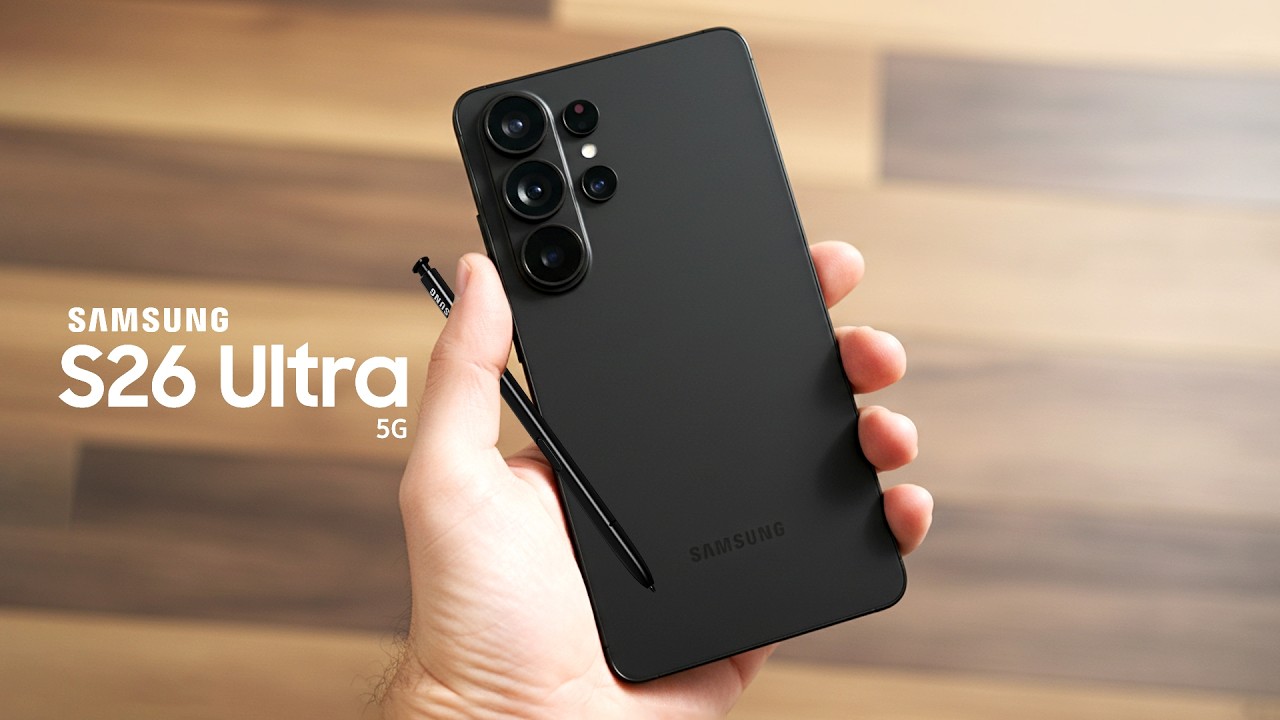
The release of the Samsung Galaxy S26 Ultra in early 2026 introduced a highly talked-about feature called the Integrated Privacy OLED. This technology lets users enable a “Private Mode.” It narrows viewing angles to protect sensitive information. As a result, people sitting next to you on the Dubai Metro cannot easily see your messages or banking apps. However, new technology can bring early issues. Some users in Al Barsha and across the UAE report screens that look dim, washed out, or flicker when tilted. If you are facing these problems, this Samsung S26 Ultra 2026 Guide: Fixing Privacy Display and Viewing Angle Glitches will help you understand the causes and possible solutions.
In a fast-paced city like Dubai, your smartphone is your life. Between navigating the busy streets and handling confidential business Zoom calls, you need your display to be perfect. When the privacy layer malfunctions, it doesn’t just protect your data it ruins your user experience. This guide will walk you through the technical reasons behind these glitches and provide actionable steps to restore your Dynamic AMOLED 3X to its full, vibrant glory.
Understanding the 2026 Privacy Display Technology
To effectively use this Samsung S26 Ultra 2026 Guide: Fixing Privacy Display and Viewing Angle Glitches, we must first understand the “magic” behind the screen. Unlike the stick-on privacy filters of the past, the S26 Ultra uses a dual-layer light control system integrated directly into the pixel stack.
The Micro-Louver Layer for Samsung S26 Ultra 2026 Guide
Inside the display, Samsung has embedded a layer of microscopic vertical louvers. When you toggle “Privacy Mode” in One UI 8.1, the display shifts the light path. In theory, this makes the screen crystal clear from the front but completely black from a 30-degree angle. However, if the software synchronization between the Snapdragon 8 Elite Gen 5 and the display driver fails, you get “angle glitches” where the screen looks blurry even when you are looking at it dead-on.
The 3000-Nit Brightness Conflict
The S26 Ultra is capable of a staggering 3000 nits of peak brightness. The privacy layer, by design, absorbs some of this light. A common glitch in 2026 involves the “Auto-Brightness” sensor fighting with the “Privacy Toggle.” This conflict often results in a flickering effect or a screen that suddenly turns too dark to read while you are outdoors in the bright Dubai sun.
Common Viewing Angle Glitches and Their Causes
If you’ve noticed that your screen looks “oily” or the colors shift to a weird blue tint when you tilt the phone slightly, you are experiencing a viewing angle glitch. These are the most frequent issues we see in the Samsung S26 Ultra 2026 Guide: Fixing Privacy Display and Viewing Angle Glitches.
1. The “Oil Slick” Effect for Samsung S26 Ultra 2026 Guide
This happens when the refractive index of the privacy layer becomes misaligned with the top glass. It usually occurs after the phone has been exposed to extreme heat a common occurrence if you leave your phone on a car dashboard in the UAE. The heat causes the adhesives to expand slightly, creating a rainbow-like shimmer on the screen.
2. Digital “Ghosting” in Private Mode for Samsung S26 Ultra 2026 Guide
Sometimes, when “Privacy Mode” is active, you might see faint shadows of your previous apps. This isn’t traditional screen burn-in; it’s a synchronization error in the LTPO 4.0 backplane. The pixels aren’t refreshing fast enough to accommodate the narrowed light path, leading to a “ghosting” effect that makes text hard to read.
3. Touch Sensitivity Drops for Samsung S26 Ultra 2026 Guide
Because the privacy layer is so close to the capacitive touch layer, hardware glitches can sometimes make the edges of the screen unresponsive. If you find yourself tapping the “Back” button multiple times with no result, your privacy display might be physically pressing against the touch digitizer.
5 Steps to Fix Your S26 Ultra Display at Home
Before you rush to a service center, follow these steps from our Samsung S26 Ultra 2026 Guide: Fixing Privacy Display and Viewing Angle Glitches to see if a software reset can solve the problem.
1. Recalibrate the Vision Booster
Samsung’s Vision Booster technology is designed to fight glare. Sometimes, it gets “stuck” in a high-contrast mode that interferes with the privacy louvers. Navigate to Settings > Display > Brightness and toggle “Extra Brightness” off and on again. This often forces the display driver to recalibrate the light path.
2. Reset the “Side Panel” Privacy Toggle
If your viewing angles are stuck in “Narrow” mode even when the feature is off, try a soft reset of the Side Panel. Go to Settings > Display > Edge Panels, turn them off, restart your phone, and turn them back on. This refreshes the software hook that controls the privacy layer.
3. Update to the Latest 2026 Security Patch
In March 2026, Samsung released a specific firmware update aimed at “Display Stability.” If you haven’t updated your S26 Ultra in a few weeks, this patch contains the updated drivers for the Snapdragon 8 Elite ISP, which directly manages the display’s color accuracy at wide angles.
4. Check for “Screen Protector” Interference
Many third-party screen protectors are not compatible with the S26 Ultra’s integrated privacy tech. If the protector has its own polarizing filter, it will “clash” with the internal louvers, creating a moiré pattern or extreme dimness. Remove any non-Samsung-certified protectors to see if the viewing angle improves.
5. Disable “Eye Comfort Shield” Temporarily
The blue-light filter changes the color temperature of the pixels. At extreme viewing angles, this can make the S26 Ultra look yellowish or dim. Turn this off to see if your display’s “Narrow Mode” functions more consistently.
Milaaj Mobile and Laptop Repair Al Barsha: The Display Experts
If you have tried every software fix in the Samsung S26 Ultra 2026 Guide: Fixing Privacy Display and Viewing Angle Glitches and your screen still flickers or looks distorted, it is time for a professional hardware diagnostic. The S26 Ultra’s display is a “bonded” unit, meaning the privacy layer and the OLED are one piece. Milaaj mobile and laptop repair Al Barsha is the leading destination for specialized Samsung repairs in Dubai.
Why Milaaj is the Best Choice for Your S26 Ultra:
- Low Price for Premium Displays: We know that a 2026 flagship screen is a major investment. We offer a low price guarantee by utilizing direct supply chains, ensuring you get the best value without compromising on technology.
- Speed Repairing for Dubai’s Pace: We understand you can’t be without your phone. Our technicians provide same-day screen replacements and calibration, often getting your S26 Ultra back to you in just 2 to 3 hours.
- Ultimate Convenience: Located right in the heart of Al Barsha, we are minutes away from major residential hubs. If you are too busy, we offer free pickup and delivery across Dubai from the Marina to JVC.
- Unmatched Part Quality: We use only original Samsung Service Pack displays. This is vital for the S26 Ultra, as “compatible” screens often lack the hardware-level privacy toggle and the 3000-nit peak brightness capability.
- Specialized Calibration Equipment: Replacing the screen is only half the battle. We use 2026-spec digital calibration tools to sync the new display with your phone’s motherboard, ensuring Face Unlock and the Fingerprint Sensor work perfectly.
How to Protect Your S26 Ultra Display in the UAE
Once your screen is fixed, maintenance is the key to longevity. Dubai’s environment is unique, and it requires a unique approach to tech care.
Avoid Heat Soak for Samsung S26 Ultra 2026 Guide
The privacy layer is sensitive to thermal expansion. If you are at an outdoor brunch or a beach club, don’t leave your phone in direct sunlight. Use a “thermal-reflective” pouch or simply keep it in the shade. Excessive heat is the number one cause of the “Oil Slick” viewing angle glitch.
Use Certified Cases for Samsung S26 Ultra 2026 Guide
The S26 Ultra is a large phone. Cases that “squeeze” the frame too tightly can put pressure on the edges of the display, causing the privacy louvers to warp slightly. Stick to high-quality cases that offer “raised lip” protection without compressing the sides of the device.
FAQs About Samsung S26 Ultra 2026 Guide
1. Does “Privacy Mode” drain my battery faster?
Yes, slightly. Because the louvers absorb some light, the phone has to push the LEDs a bit harder to maintain the same perceived brightness. If you are low on juice, turning off “Privacy Mode” can save about 5-8% of battery life over a day.
2. Why does my screen look blue from the side?
All OLEDs have some degree of “blue shift” at angles, but the S26 Ultra’s privacy layer can exaggerate this. If it is a faint blue, it is normal. If it is a deep, dark blue that obscures the image, it is a calibration glitch.
3. Can I replace just the privacy layer?
Unfortunately, no. The privacy technology is “sandwiched” between the OLED pixels and the Gorilla Glass Armor. If the layer fails, the entire display assembly must be replaced.
4. Is the S26 Ultra screen more fragile than the S25?
The S26 Ultra uses Gorilla Glass Armor 2, which is more scratch-resistant. However, the internal “Privacy” hardware makes the display stack more complex, meaning high-impact drops are more likely to cause internal visual glitches even if the top glass doesn’t crack.
5. Will a software update fix my viewing angle?
If the issue is a “color shift” or “flickering,” a software update often fixes it. If the issue is a physical “rainbow” effect or dead spots, it is likely a hardware problem caused by heat or pressure.
Summary: Samsung S26 Ultra 2026 Guide
The Samsung S26 Ultra is a true marvel of 2026 engineering. Its advanced privacy features make it a valuable tool for professionals in the UAE. These innovations help users protect sensitive data while staying productive. By following this Samsung S26 Ultra 2026 Guide: Fixing Privacy Display and Viewing Angle Glitches, you can maintain smooth performance. This also ensures your device continues to support both productivity and personal privacy.
Don’t let a minor glitch or a dim screen ruin your experience with the world’s most advanced smartphone. Whether it’s a simple recalibration or a professional screen refresh, your S26 Ultra deserves to look as brilliant as the city you live in. Keep your software updated, your phone cool, and your viewing angles sharp.
Is your Samsung S26 Ultra screen flickering or showing weird colors at an angle? Contact Milaaj today for a professional display diagnostic and get your flagship back to 100% perfection!
Other Services:
- Need other mobile repairs? Check out Milaaj’s Samsung repair services in Dubai.
- Looking to upgrade? Learn about selling your used laptop in Dubai.
- Data loss concerns? Visit Milaaj’s data recovery services.
📍 Visit Any Milaaj Branch in Dubai
🔹 Bur Dubai
Milaaj Mobile and Laptop Repair Dubai
📞 055 258 8477
🔗 Google Maps
🔹 Al Barsha
Milaaj Mobiles and Laptop Repair Al Barsha
📞 052 596 2846
🔗 Google Maps
🔹 Al Barsha 3
Milaaj Mobiles and Gaming Store
📞 052 3405 814
🔗 Google Maps
🔹 Al Nuaimiya
Milaaj Mobiles and Laptops Ajman
📞 055 788 9654
🔗 Google Maps
Shop Locations: Al Barsha | Bur Dubai | Reef Mall, Salah Al Din | Al Nuaimiya, Ajman
Email: support@milaaj.com
Operating Hours: Monday – Sunday
Leave a Reply