

For years, smartphone users have faced a frustrating problem whenever their devices needed a hardware repair. Whether it was a cracked screen, a worn-out battery, or a faulty charging port, handing your phone to a repair shop often meant leaving your private data on the device. As a result, many people worried about the security of their personal messages and media files.
Previously, WhatsApp did not offer a simple sign-out option on your primary phone. Instead, users had only two practical choices. They could either delete the app or completely reset the smartphone to factory settings. However, both options were inconvenient because they required extra time and effort to restore everything afterward.
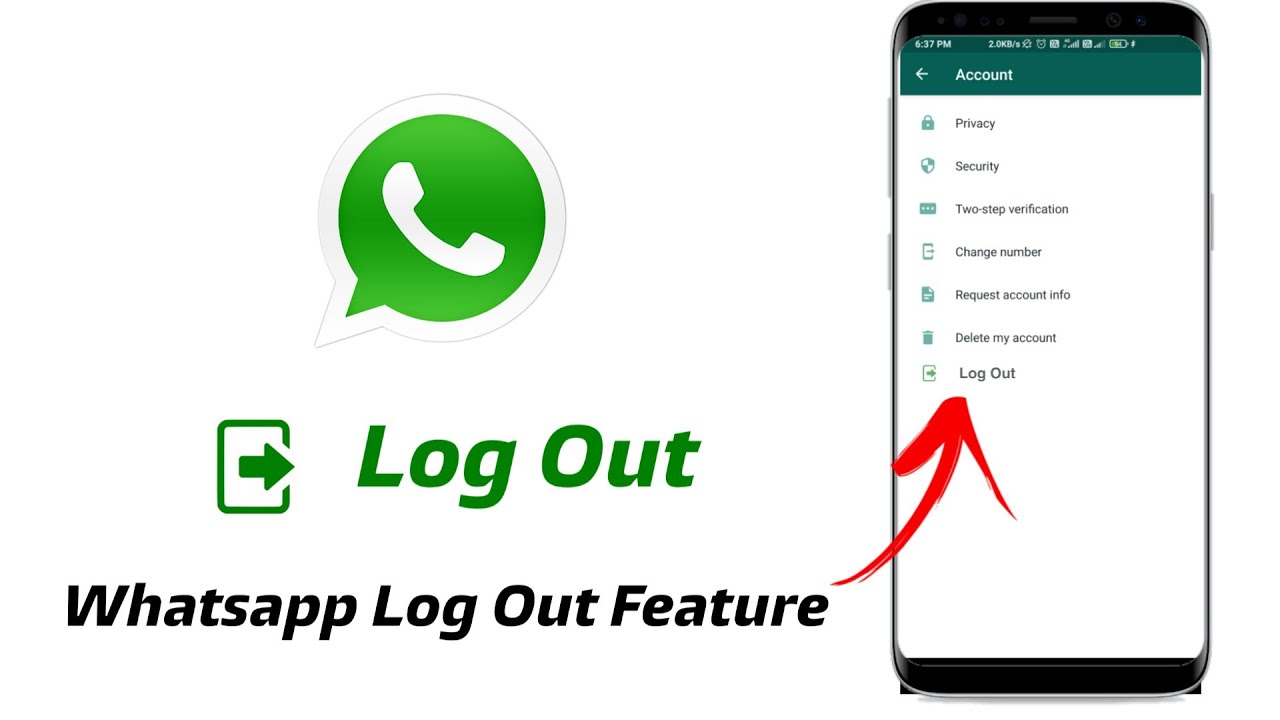
Fortunately, WhatsApp has introduced a long-awaited logout feature. Now, users can sign out of their accounts on a specific smartphone without deleting the app or erasing their local chat history. In addition, this feature gives users greater control over their privacy before sending a phone for repair.
However, this new feature also raises an important question. Should you log out of WhatsApp before handing your phone to a technician? The answer depends on the type of repair and the level of access required. Therefore, understanding when to log out can help protect your personal information without creating unnecessary inconvenience.
In this guide, we’ll explain how the new WhatsApp logout feature works, when you should use it, and the additional steps you can take to keep your data safe before any smartphone repair. Ultimately, these simple precautions can give you peace of mind while your device is being serviced.
What Is the New Native Logout Option and how Does It Work?
For years, WhatsApp linked your account directly to your smartphone and mobile number. As a result, signing out of your account was not a simple option. If you wanted to take a break or keep your conversations private, your choices were limited.
Previously, you had to uninstall the app, clear its data from your phone’s settings, or rely on linked devices through a desktop browser. However, none of these options offered a quick and convenient way to sign out. Instead, they often required extra steps to restore your account later.
Fortunately, recent WhatsApp updates have introduced a dedicated logout feature. Now, the platform supports a more flexible multi-device experience. As a result, users can sign out of a specific smartphone without uninstalling the app or deleting their local chat history.
When you tap the logout option, WhatsApp ends the active session on that device. Consequently, the app immediately stops displaying new messages, notifications, photos, and videos. In addition, anyone using the phone can no longer access your conversations without signing in again.
To use WhatsApp again, you’ll need to verify your identity. Depending on your settings, this may require an SMS verification code, Face ID, or a fingerprint scan. Therefore, your personal messages remain protected while your device is being repaired or temporarily used by someone else.
Ultimately, the new WhatsApp logout feature gives users greater control over their privacy. Moreover, it provides a simple and secure way to protect sensitive conversations without resetting the phone or removing the app.
The Big Dilemma: Data Privacy vs. Diagnostic Testing
When you hand your smartphone over to an independent technician, a natural tension arises between maintaining your personal data privacy and allowing the technician to thoroughly complete their job. To understand why this choice matters, you need to look at what happens during a standard physical hardware repair.
Why Technicians Need Device Access
A professional smartphone repair involves much more than replacing a damaged part. Instead, technicians must complete a series of tests to confirm that the repair was successful. For example, after replacing a cracked OLED display, a worn-out lithium-ion battery, or a front-facing camera, they need to verify that every related feature works correctly. Next, technicians test the touchscreen across the entire display to ensure it responds accurately. In addition, they check the ambient light sensor, proximity sensor, microphone, earpiece, speakers, cameras, and charging functions. As a result, they can confirm that the repaired device performs as expected before returning it to you.
However, these diagnostic checks require temporary access to the phone’s interface. If the device is completely locked or important functions cannot be accessed, testing becomes much more difficult. Consequently, technicians may be unable to verify that every hardware component is working properly. Therefore, allowing limited access during the repair process helps technicians complete essential quality checks. Ultimately, this ensures you receive your smartphone in full working condition and reduces the chance of returning later for an issue that could have been identified during testing.
The Risk of Leaving Accounts Active
On the other hand, leaving your primary messaging accounts signed in can create a genuine privacy concern. Your chat history often contains sensitive personal information. For example, it may include family photos, financial conversations, work-related documents, or account details. Although most professional repair technicians handle customer devices with complete integrity, protecting your personal data is always a smart decision. After all, your smartphone stores much of your private life in one place.
Therefore, leaving your messaging apps fully accessible while your phone is out of your possession can understandably make you feel uncomfortable. Instead, taking simple privacy precautions before a repair helps reduce unnecessary risks. As a result, you can hand over your device with greater confidence while keeping your personal information better protected.
Should You Log Out Before a Smartphone Repair?
The short answer is: it depends entirely on the specific type of physical fix your phone requires. Because the WhatsApp logout feature is here, you can now make a strategic, tailored decision based on what is physically wrong with your device.
Scenario A: Minor External Hardware Fixes
If you are visiting a workshop to replace a shattered rear glass panel, fix a jammed physical volume button, or swap out a damaged charging port, your phone’s software environment is largely irrelevant to the fix. The technician does not need to delve into your applications to verify if a volume button clicks or if a charging cable transfers current safely. In these clear-cut situations, utilizing the native sign-out tool is a fantastic idea. It gives you absolute peace of mind that your private chat logs are completely locked behind a verification wall while the physical chassis is being worked on.
Scenario B: Complex Micro-Soldering and Logic Board Fixes
If your smartphone has suffered from severe liquid submersion, unexpected power surges, or an internal short-circuit on the motherboard, the diagnostic path is completely different. Technicians handling advanced logic board repairs frequently need to test system stability under real-world operating conditions. They may need to see how the phone processes incoming notifications, manages background memory, or handles wireless cellular handshakes.
If you have signed out of your profiles entirely, you might inadvertently mask software glitches or network registration issues that are tied directly to how your device handles live application data. For deep hardware overhauls, keeping the device configuration as natural as possible helps the specialist ensure the repair holds up over time.
Crucial Steps to Follow Before Handing Over Your Device
If you decide to drop your smartphone off at a service center, you should never do so completely unprepared. Follow this comprehensive preparation checklist to ensure your personal data remains completely safe, regardless of whether you choose to sign out of your applications or leave them active.
- Execute a Complete Local Cloud Backup: Before you step foot inside any service center, navigate to your chat settings and trigger a manual, immediate backup to iCloud or Google Drive. Ensure the progress bar reaches 100%. In the rare event that a complex hardware fix accidentally compromises your phone’s memory storage, your entire archive of messages, voice notes, and shared media files will remain safely stored in the cloud.
- Enable Native App Locks: If you choose not to use the absolute sign-out option, you should still utilize secondary security walls. Go into your privacy settings and toggle on the native biometric lock feature. This forces the application to demand a Face ID scan, Touch ID footprint, or unique passcode every single time someone taps the app icon, providing an excellent middle-ground security barrier.
- Remove Your Micro-SIM or eSIM Profiles: If your physical phone needs to stay at a workshop overnight, pop open the tray and take your physical SIM card with you. You can easily slide it into a spare backup phone to keep receiving crucial phone calls and automated two-factor authentication (2FA) SMS text codes while your primary device is on the operating table.
Professional Tech Services: Milaaj Mobile and Laptop Repair Al Barsha
Finding a repair partner who respects your digital privacy as much as they care about physical craftsmanship is essential. If you are located in Dubai, you can bypass the stress entirely by bringing your malfunctioning tech to Milaaj mobile and laptop repair Al Barsha. Strategically located to serve retail clients and corporate professionals alike, this elite independent service center has earned an outstanding reputation for combining technical excellence with strict data privacy protocols.
Service Center: Milaaj Mobile and Laptop Repair Al Barsha
Core Competencies: Smart Device Diagnostics, High-End Smartphone Restorations, Advanced Data Privacy Protection
Service Area: Al Barsha and Surrounding Dubai Communities
When you trust this local team with your broken hardware, you benefit from a customer-centric repair model designed around four foundational pillars:
- Unmatched Service Convenience: The service center is incredibly straightforward to visit, offering a welcoming environment where you can speak directly with the specialist working on your device. They clearly explain the diagnostic process, ensuring you know exactly what hardware tests will be run.
- Rapid Speed Repairing Workflows: Nobody wants to live without their primary smartphone for days on end. The workshop prioritizes fast turnaround times, keeping an extensive inventory of common replacement modules on hand so that screen switches and battery swaps can often be completed while you wait.
- Premium Component Part Quality: A repair is only as good as the components used. The team avoids cheap, unstable counterfeit parts that cause system warnings or fail after a few weeks. They source top-tier, high-grade replacement screens, batteries, and charging flex cables to ensure your device performs just like it did the day you bought it.
- Transparent Low Price Guarantee: Elite technical work does not have to come with an exorbitant price tag. You will receive an upfront, honest quote with zero hidden diagnostic fees or surprise add-ons, ensuring you get premium craftsmanship that fits comfortably within your budget.
How to Correctly Use the WhatsApp Logout Tool When Ready
If you decide to sign out of WhatsApp before handing over your phone, the process is quick and straightforward. Fortunately, the new logout feature is designed to be simple on both Android and iPhone devices. As a result, you can protect your privacy in less than a minute. First, open WhatsApp on your primary smartphone. Next, tap the Settings icon. On iPhones, you’ll find it in the bottom navigation bar. On Android devices, tap the three-dot menu and select Settings. Then, open the Account section to access your account options. If the latest version of WhatsApp is available on your device, you’ll see a dedicated Log Out option. Before continuing, make sure you’ve updated the app to the latest version if the feature isn’t visible. Now, tap Log Out.
Immediately, a confirmation message will appear on your screen. It explains that your local chat history will remain stored on the device, while message synchronization and notifications will stop. After that, confirm your choice to complete the logout process.Once you sign out, WhatsApp returns to its welcome screen. Consequently, no new messages or notifications will appear until you sign in again. When you collect your repaired smartphone, simply enter your phone number and complete the verification process. Within minutes, you’ll regain access to your WhatsApp account and continue using the app as usual. Ultimately, using the WhatsApp logout feature before a repair gives you greater peace of mind. Moreover, it helps protect your personal conversations while still allowing technicians to complete the necessary hardware tests.
Frequently Asked Questions (FAQs)
Will using the new logout option delete my local text conversations?
No, it will not. The primary benefit of this updated framework is that it signs you out of active server communication without purging your local database. Your existing chats remain securely cached on your smartphone storage disk, completely hidden from view until you input your official verification credentials again.
What happens to incoming messages while I am signed out during a hardware fix?
Any messages, voice notes, or photos sent to you while your phone is signed out will be held securely on the platform’s cloud routing servers. The moment you pick up your smartphone from the technician, re-authenticate your profile, and establish a fresh connection, those pending messages will download automatically to your inbox.
Does signing out remove my active WhatsApp Web or desktop linked sessions?
No, it operates independently. Signing out of your primary smartphone terminates that specific device token. However, if you have active linked sessions on an office laptop, a home tablet, or a desktop browser, those linked devices will often remain authorized, allowing you to stay connected with friends and family while your phone is being repaired.
How do I know if my smartphone has received this specific application update?
Open your device’s respective App Store or Google Play Store, search for the application, and verify if an update button is visible. Because features roll out in staggered phases across different geographic regions, keeping your app updated to the absolute latest version ensures you get access to the account control button as soon as it becomes available for your device model.
📍 Visit Any Milaaj Branch in Dubai
🔹 Bur Dubai
Milaaj Mobile and Laptop Repair Dubai
📞 055 258 8477
🔗 Google Maps
🔹 Al Barsha
Milaaj Mobiles and Laptop Repair Al Barsha
📞 052 596 2846
🔗 Google Maps
🔹 Al Barsha 3
Milaaj Mobiles , Laptops and Watches Repair Service
📞 052 3405 814
🔗 Google Maps
🔹 Al Nuaimiya
Milaaj Mobiles and Laptops Ajman
📞 055 788 9654
🔗 Google Maps
Email: support@milaaj.com
Operating Hours: Monday Sunday



Leave a Reply