

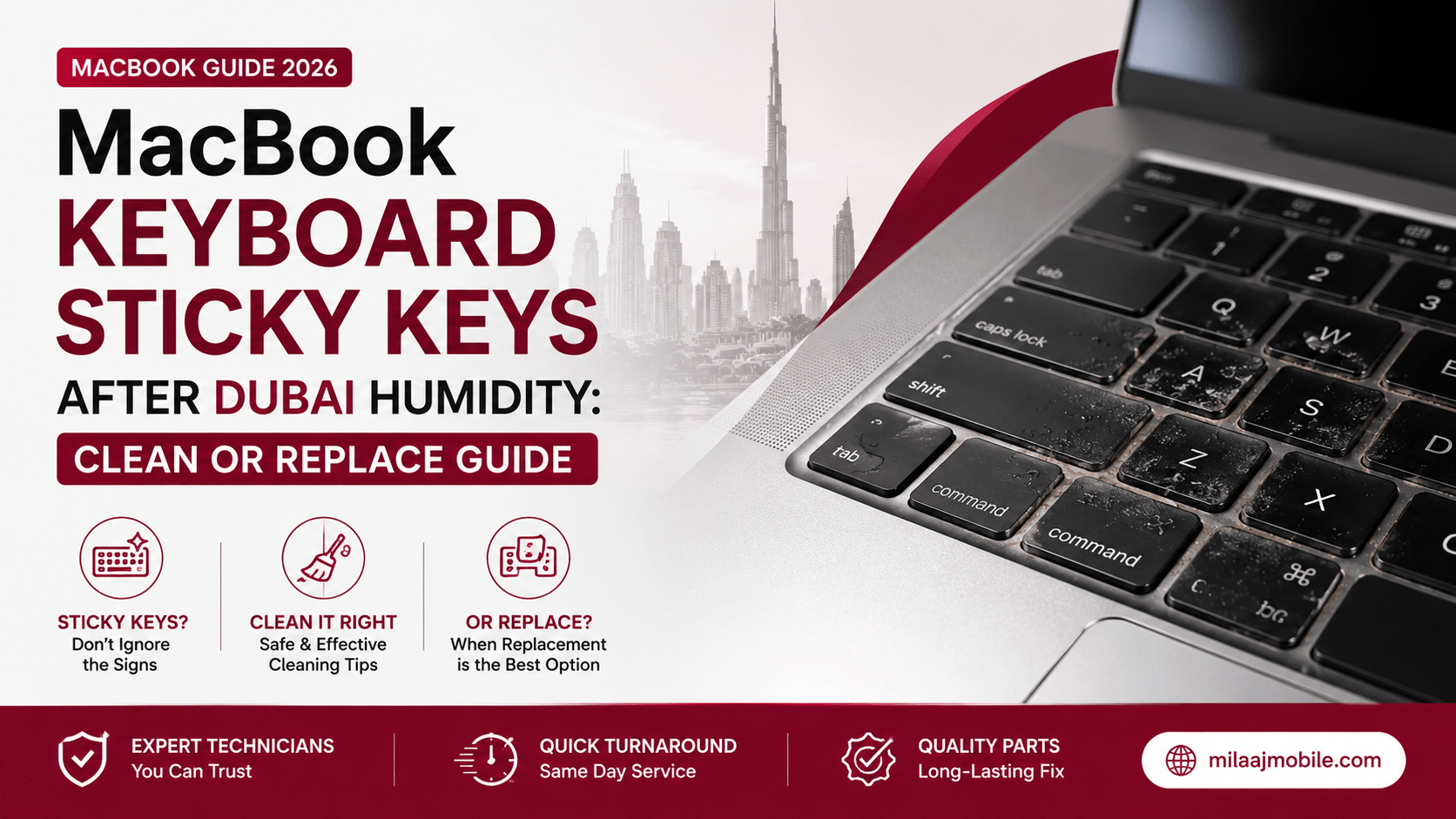
You sit down at your favorite coffee shop in Downtown Dubai or open your laptop at home, ready to crush a work project, only to find that typing feels terrible. The spacebar requires an uncomfortable amount of pressure, the “E” key repeats three times every time you touch it, and several letter keys feel completely mushy.
If you are dealing with MacBook keyboard sticky keys after Dubai humidity: clean or replace guide solutions become an immediate priority to rescue your typing comfort and daily productivity.
Living in the UAE means managing unique weather shifts. While we enjoy air-conditioned comfort indoors, stepping outside exposes our devices to coastal moisture and extreme heat. That sharp contrast creates fine condensation traps inside delicate laptop mechanisms.
In this complete troubleshooting guide, we will break down how humidity affects Apple’s scissor and butterfly switches, walk you through safe DIY cleaning methods, explain when a full keyboard assembly replacement is necessary, and detail professional repair options across Dubai.
How Dubai Humidity Wrecks Your MacBook Keyboard
To understand how to fix sluggish key switches, it helps to look at the physical environment in Dubai and how it interacts with compact laptop design.
The Condensation and Dust Trap
When you carry your cold MacBook from a chilled room into humid outdoor air near Dubai Marina or Jumeirah, moisture instantly condenses on the cold metal chassis and keycap surfaces. Moisture does not just rest on top of the keycaps; it seeps beneath the plastic covers and settles around the scissor-switch stabilizers.
When that moisture mixes with fine desert dust, skin oils, and microscopic crumbs, it forms a sticky, paste-like residue. This gummy buildup coats the plastic pivots, preventing keycaps from springing back up smoothly.
Silicone Dome Degradation and Contact Corrosion
Beneath every keycap sits a small silicone rubber dome that gives keys their tactile snap. Moisture trapped underneath this dome reduces its elasticity over time, making keys feel soft or spongy. Furthermore, persistent dampness can reach the underlying flexible printed circuit board (FPC), causing copper oxidation that leads to double-typing or dead keys.
Identifying Your Keyboard Type: Scissor vs. Butterfly Switches
How you troubleshoot your keyboard depends heavily on which MacBook generation you own:
- Magic Keyboard (Scissor Switch – 2020 to Present): Found on M1, M2, M3, M4, and M5 MacBook Air and MacBook Pro models. These keycaps feature sturdy plastic scissor clips that offer better key travel and tolerate light cleaning much better than older designs.
- Butterfly Switch (2015 to 2019): Found on older 12-inch MacBooks, Retina MacBook Airs, and Touch Bar Pros. These ultra-thin switches are notoriously fragile. Dust and moisture easily jam the mechanism, and popping keycaps off without specialized tools can snap the microscopic retaining hooks underneath.
Caution: If you own a 2015–2019 MacBook with butterfly switches, avoid snapping off keycaps yourself. The tiny plastic tabs break easily, turning a simple cleaning job into an expensive key replacement.
Safe DIY Cleaning: How to Fix Sticky Keys at Home
If your keys feel sluggish rather than completely dead, you can perform a safe DIY cleaning at your desk before booking a technical repair.
Step 1: Use Compressed Air at a 75-Degree Angle
Apple recommends using compressed air to clear debris from jammed key switches. Hold your MacBook vertically at roughly a 75-degree angle, rather than laying it flat on a table.
- Aim the straw nozzle about half an inch away from the keyboard surface.
- Spray compressed air across the sticky keys in a left-to-right, zigzag motion.
- Rotate your laptop 90 degrees to the right and repeat the process.
- Rotate 90 degrees to the left and spray one last time to push out loosened dust.
Step 2: Precision Cleaning with 99% Isopropyl Alcohol
For stubborn moisture or sticky spills:
- Shut down your MacBook completely and unplug all power adapters.
- Lightly dampen a lint-free microfiber cloth or cotton swab with 99% high-purity isopropyl alcohol. Never use standard rubbing alcohol, as it contains water that worsens internal corrosion.
- Gently wipe around the edges of jammed keycaps, allowing the alcohol to dissolve sticky residue. High-purity alcohol evaporates quickly without leaving conductive film behind.
When Cleaning Fails: Deciding Between Clean vs. Replace
Knowing when simple cleaning is enough and when a full keyboard assembly replacement is necessary helps you manage your repair budget effectively:
| Symptom / Behavior | Likely Cause | Recommended Action |
| Key feels slightly stiff but registers every keystroke | Surface dust or mild moisture buildup | Safe DIY compressed air & alcohol swab cleaning |
| Key presses down normally but fails to output letters on screen | Oxidized underlying FPC circuit membrane | Component repair or internal flex replacement |
| Key presses register twice per tap (Double-typing) | Degraded spring dome or worn scissor mechanism | Switch mechanism repair or full keyboard swap |
| Multiple key rows dead after liquid exposure or heavy humidity | Shorted internal circuit layer across the top case | Complete keyboard assembly replacement |
If multiple keys remain unresponsive or produce erratic typing input after cleaning, moisture has likely damaged the underlying circuit layer, requiring professional hardware attention.
MacBook Keyboard Sticky Keys After Dubai Humidity: Clean or Replace Guide Cost Breakdown
When evaluating options for a MacBook keyboard sticky keys after Dubai humidity: clean or replace guide situation, pricing across Dubai varies depending on whether your laptop requires targeted key mechanism servicing or a complete top-case assembly replacement.
Detailed Repair Cost Breakdown in Dubai (AED)
| Service Scope / MacBook Model | What Is Included | Typical Dubai Cost (AED) | Turnaround Time |
| Professional Keyboard Deep Clean | Complete ultrasonic keycap cleaning & debris removal | AED 150 – AED 250 | 1 – 2 Hours |
| Individual Keycap & Switch Repair | Replacing broken scissor mechanisms or worn keycaps | AED 200 – AED 350 | Same-Day (1 Hour) |
| Standalone Keyboard Replacement | Installing a fresh OEM keyboard unit into original chassis | AED 450 – AED 750 | 2 – 4 Hours |
| Complete Top Case Swap (Main Dealer) | Replacing keyboard, aluminum top case, trackpad, & battery | AED 1,400 – AED 2,200+ | 3 – 5 Business Days |
Standalone Keyboard Swap vs. Complete Top Case Replacement
Understanding how repair centers fix MacBook keyboards can save you substantial time and money:
  REPAIR PATH A: Standalone Keyboard Swap (Specialized Local Center)
  [Targeted Fix] --> Removes rivets to install a new OEM keyboard unit.
  [Cost Factor]  --> AED 450 - 750 (Protects budget, retains original battery).

  REPAIR PATH B: Full Top Case Assembly (Main Dealer Approach)
  [Complete Swap]--> Replaces keyboard, aluminum housing, trackpad, & battery.
  [Cost Factor]  --> AED 1,400 - 2,200+ (High cost for simple key faults).
Authorized dealer protocols often require replacing the entire top case assembly including the aluminum palm rest, trackpad, and glued-in battery even if only a few keys are sticking. In contrast, specialized local technicians can remove the internal fastening rivets to replace just the underlying keyboard module, delivering a brand-new typing experience at a fraction of the cost.
Why Choose Milaaj Mobile and Laptop Repair Al Barsha?
When you require a fast, reliable, and cost-effective fix for your MacBook, selecting an experienced local specialist guarantees expert care. For top-quality keyboard servicing, Milaaj mobile and laptop repair Al Barsha provides specialized hardware repairs tailored to your budget and daily schedule.
Low Price Guarantee with Honest Diagnostic Options
We believe in practical, transparent repair solutions. Our technicians inspect your device to determine if a simple deep cleaning will solve the issue before recommending a full replacement, saving you unnecessary expense.
Express Speed Repairing
We understand that your MacBook is essential for your daily workflow, studies, and creative tasks. With our speed repairing workflow, diagnostic checks and standalone keyboard replacements are completed quickly, getting your laptop back in working order the very same day.
Unmatched Convenience Across Dubai
Located in Al Barsha near Mall of the Emirates, our service center is easy to visit. If you cannot drop by in person, our free pickup and delivery service collects your MacBook from your home or office anywhere in Dubai and returns it fully serviced.
Top Part Quality & Tactile Warranty Protection
We install genuine, OEM-grade replacement keyboards that match Apple’s original tactile feedback, spacing, and backlighting brightness. Every repair is backed by a comprehensive warranty for complete peace of mind.
Proactive Habits to Protect Your Keyboard from Dubai Moisture
Adopting simple daily care habits helps keep your keyboard typing smoothly regardless of local weather conditions:
- Use a Quality Laptop Sleeve During Commutes: Keep your laptop inside a padded, moisture-resistant sleeve when moving between air-conditioned offices and outdoor heat to reduce sudden condensation.
- Avoid Silicon Keyboard Covers While Typing: Thin silicone keyboard skins trap internal heat generated by the processor while holding moisture against the keycaps, accelerating gumminess.
- Store Laptops in Air-Conditioned Spaces: Avoid leaving your laptop inside a parked car or on a balcony table where humidity can build up inside the chassis.
- Wipe Surfaces After Outdoor Use: If you use your laptop outdoors near coastal areas, gently wipe down the keys with a dry microfiber cloth before closing the lid.
Frequently Asked Questions (FAQs)
Can humidity permanently destroy a MacBook keyboard?
Yes. Prolonged exposure to humidity causes moisture to combine with internal dust, corroding underlying copper circuit traces on the keyboard membrane and leading to permanent key unresponsiveness.
Is it safe to remove keycaps on M1, M2, M3, M4, or M5 MacBooks at home?
While modern Magic Keyboards are sturdier than older butterfly switches, keycap retainers can still snap if lifted incorrectly. If you are uncomfortable using specialized prying tools, rely on compressed air or professional cleaning.
Why do my keys feel sticky even though I never spilled a drink?
High humidity mixed with skin oils and ambient dust creates a sticky paste beneath keycaps, mimicking the effects of a sugary drink spill even without a direct liquid accident.
How long does a professional MacBook keyboard replacement take?
At a specialized service center, a standalone keyboard replacement typically takes between 2 and 4 hours, allowing you to pick up your fully repaired laptop on the same day.
Final Thoughts: Restoring Your Typing Comfort
Struggling with a MacBook keyboard sticky keys after Dubai humidity: clean or replace guide issue can disrupt your work, but it does not mean your laptop is permanently ruined. By trying safe DIY compressed air cleaning first or relying on specialized local technicians for standalone keyboard replacements, you can restore smooth, responsive typing quickly and affordably.
If your keys are sticking, repeating, or completely unresponsive, book a professional hardware inspection today to bring your MacBook back to peak performance!
Other Services:
- Need other AirPods repairs? Check out Milaaj’s macbook repair services in Dubai.
- Looking to upgrade? Learn about selling your used device in Dubai.
- For Apple users, check Apple trade-in options in Dubai.
📍 Visit Any Milaaj Branch in Dubai
🔹 Bur Dubai
Milaaj Mobile and Laptop Repair Dubai
📞 055 258 8477
🔗 Google Maps
🔹 Al Barsha
Milaaj Mobiles and Laptop Repair Al Barsha
📞 052 596 2846
🔗 Google Maps
🔹 Al Barsha 3
Milaaj Mobiles and Gaming Store
📞 052 3405 814
🔗 Google Maps
🔹 Al Nuaimiya
Milaaj Mobiles and Laptops Ajman
📞 055 788 9654
🔗 Google Maps
Shop Locations: Al Barsha | Bur Dubai | Reef Mall, Salah Al Din | Al Nuaimiya, Ajman
Email: support@milaaj.com
Operating Hours: Monday – Sunday

Leave a Reply