

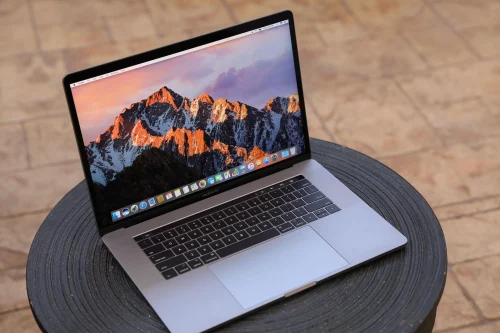
There is no feeling quite like the slow-motion panic of watching a cup of coffee or a glass of water tip over onto your MacBook Air. In an instant, your sleek productivity machine becomes a potential paperweight. If you’re facing MacBook Air liquid damage repair, it’s because the MacBook Air features such a compact, tightly packed design, so liquid can travel quickly to the most sensitive component of all: the logic board.
If you have just experienced a spill, the next few hours are critical. This guide will walk you through the immediate steps to take, the science of why liquid is so destructive, and how Liquid Damage Repair for MacBook Air can breathe new life into a device you thought was gone forever.
The Golden Hour: Immediate Steps After a Spill
When liquid hits your keyboard, it’s not just “wet” it’s a ticking clock. To maximize the chances of a successful Liquid Damage Repair for MacBook Air, you must act within the “Golden Hour” to prevent permanent electrical shorts.
1. Kill the Power Immediately
Do not wait to save your work. Hold down the power button for a full 10 seconds until the screen goes black. If your MacBook is plugged in, pull the charger out immediately. Electricity and liquid are a lethal combination; cutting the power stops the active short-circuiting that fries microchips.
2. The “Tent” Position for MacBook Air liquid damage repair
Open your MacBook Air to a 90-degree angle and place it face-down on a towel, forming a “tent” shape. Consequently, gravity will pull the liquid away from the logic board and out through the keyboard or screen vents rather than allowing it to pool deeper into the chassis.
3. Skip the Rice Myth for MacBook Air liquid damage repair
Despite popular internet lore, a bag of rice will not save your MacBook. Rice does not have the “drawing power” to pull moisture out from under the BGA (Ball Grid Array) chips on a logic board. In fact, rice dust can mix with the liquid to create a sticky, corrosive paste that makes professional cleaning much harder.
Why Liquid is a Logic Board Killer
It isn’t actually the water itself that kills your laptop; it’s what happens when the water meets electricity and oxygen.
Short Circuits and Resistance for MacBook Air liquid damage repair
Liquid is conductive. When it bridges two pins on the logic board say, a 12V power rail and a sensitive 1V data line it sends a surge of high voltage where it doesn’t belong. This can instantly “pop” a capacitor or blow a hole in the A-Series or M-Series processor.
The Silent Threat: Electrolytic Corrosion
Even if your MacBook Air works for a day or two after drying out, the danger isn’t over. As the liquid evaporates, it leaves behind minerals and salts. These minerals, combined with the electrical current from the battery, trigger electrolytic corrosion. This green or white “fuzz” slowly eats through the copper traces and solder joints, eventually causing the device to fail weeks later.
Professional Logic Board Recovery Techniques
Surface-level drying is rarely enough for a modern MacBook. Professionals use advanced laboratory equipment to ensure the logic board is truly clean and functional.
Ultrasonic Cleaning for MacBook Air liquid damage repair
The cornerstone of Liquid Damage Repair for MacBook Air is the ultrasonic bath. The logic board is submerged in a specialized chemical solution while high-frequency sound waves create millions of microscopic bubbles. These bubbles “implode” against the board, reaching deep underneath chips to scrub away corrosion that no manual cleaning could ever touch.
Micro-Soldering and Component-Level Repair
If a specific chip or resistor has been destroyed by a short circuit, technicians use micro-soldering under high-powered microscopes. Rather than replacing the entire expensive logic board, they can swap out individual components, saving you thousands of dirhams in the process.
Milaaj Mobile and Laptop Repair Al Barsha: Your MacBook Rescue Team
When your digital life is on the line, you need a name you can trust. Milaaj mobile and laptop repair Al Barsha has built a reputation as the premier destination for complex Apple repairs in Dubai. We don’t just “dry” your phone; we perform forensic-level restoration to ensure your MacBook Air stays reliable for years to come.
Why Residents Trust Milaaj for Liquid Damage:
- Speedy Repairing: We understand that every hour counts with liquid damage. Our express diagnostic team prioritizes “wet” units to stop corrosion in its tracks.
- Low Price Guarantee: Apple often quotes the price of a whole new laptop for a liquid-damaged logic board. We offer a “Repair over Replace” philosophy, giving you high-end service at a fraction of the cost.
- Ultimate Convenience: Located right in the heart of Al Barsha near Mall of the Emirates, we offer free pickup and delivery. You don’t even have to leave your home to start the rescue process.
- Unmatched Part Quality: If we need to replace a trackpad, battery, or keyboard as part of the restoration, we use only OEM-grade or original components to maintain that “Apple feel.”
- Data Recovery Focus: Our first priority is your data. Even if the MacBook cannot be fully revived, we use specialized tools to bypass the damaged circuits and pull your precious files from the SSD.
FAQs: MacBook Air liquid damage repair
1. Can a MacBook Air logic board really be repaired after a spill?
Yes! In most cases, if the device is powered off quickly and brought to a professional within 24–48 hours, ultrasonic cleaning and micro-soldering can restore it to 100% functionality.
2. How much does MacBook liquid damage repair cost in Dubai?
Prices vary based on the extent of the damage. A deep chemical cleaning starts at a low price, while complex board-level repairs depend on the components needed. At Milaaj, we provide a free upfront quote.
3. How long does the repair process take?
For liquid damage, we typically require 24 to 72 hours. This time allows for deep cleaning, specialized drying, and rigorous stress-testing to ensure no hidden corrosion remains.
4. Is the data on my MacBook Air safe after it gets wet?
If you have a modern MacBook Air (2018 or later), the storage is soldered to the logic board. This makes professional Liquid Damage Repair for MacBook Air essential, as the board must be functional for the data to be accessible.
5. What if I spilled something other than water (like soda or juice)?
Sugary and acidic liquids are far more dangerous because they leave behind sticky residues that accelerate corrosion. These cases require immediate professional attention to prevent the “sugar” from destroying the circuit traces.
Summary: MacBook Air liquid damage repair
A spill on your MacBook Air is a crisis, but it doesn’t have to be a catastrophe. By following the “Power Off and Flip” rule and avoiding the “Rice Trap,” you give your laptop a fighting chance. However, the only way to ensure the long-term survival of your logic board is through professional intervention.
Trust the experts at Milaaj to handle your hardware with the precision it deserves. From ultrasonic cleaning to expert micro-soldering, we have the tools and the talent to get you back to work. Don’t let a small spill turn into a big loss bring your MacBook to us today!
Other Services:
- Need other Mac Book repairs? Check out Milaaj’s MacBook repair services in Dubai.
- Looking to upgrade? Learn about selling your used laptop in Dubai.
- Data loss concerns? Visit Milaaj’s data recovery services.
- For Apple users, check Apple trade-in options in Dubai.
📍 Visit Any Milaaj Branch in Dubai
🔹 Bur Dubai
Milaaj Mobile and Laptop Repair Dubai
📞 055 258 8477
🔗 Google Maps
🔹 Al Barsha
Milaaj Mobiles and Laptop Repair Al Barsha
📞 052 596 2846
🔗 Google Maps
🔹 Al Barsha 3
Milaaj Mobiles and Gaming Store
📞 052 3405 814
🔗 Google Maps
🔹 Al Nuaimiya
Milaaj Mobiles and Laptops Ajman
📞 055 788 9654
🔗 Google Maps
Shop Locations: Al Barsha | Bur Dubai | Reef Mall, Salah Al Din | Al Nuaimiya, Ajman
Email: support@milaaj.com
Operating Hours: Monday – Sunday

Leave a Reply