

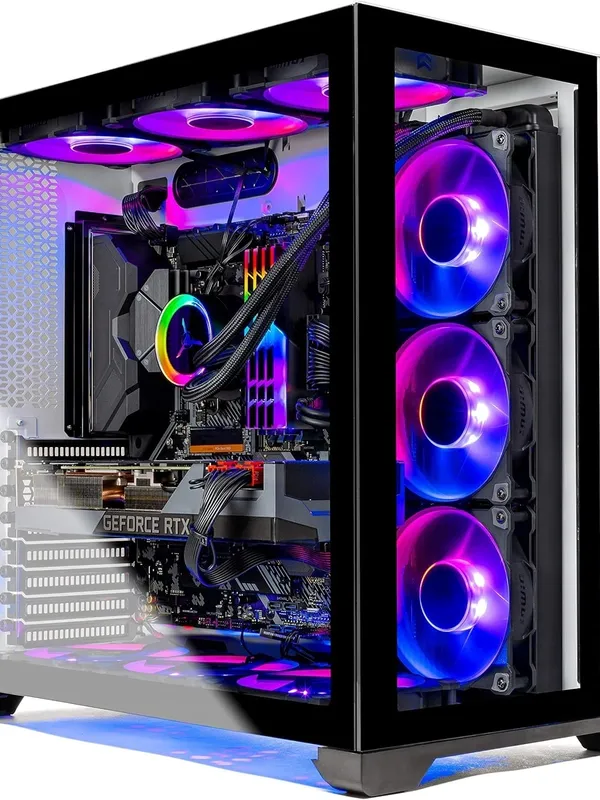
Nothing ruins a gaming marathon in Al Barsha quite like a sudden drop in FPS or a PC that sounds like a jet engine taking off. That’s when you might need Gaming PC Repair Al Barsha services to get back in the game. You’re in the middle of an intense match, and suddenly stutter. Your high-end GPU is struggling, the frame rates are diving, and your chassis feels hot enough to fry an egg. In the heat of Dubai, these issues aren’t just annoying; they are a cry for help from your hardware.
If you’re facing performance lag or your system is shutting down unexpectedly, you likely need professional Gaming PC Repair Al Barsha. Whether it’s thermal throttling or a dusty cooling system, getting your rig back to peak performance requires more than just a quick reboot. This guide will help you identify the culprits behind your PC’s struggles and how to secure a fast repair that keeps your win streak alive.
Why Your Gaming PC is Overheating and Lagging
A gaming PC is a high-performance machine that generates a massive amount of heat. When that heat isn’t managed correctly, the system protects itself by “throttling” or slowing down. This is the primary cause of that frustrating performance lag you see during gameplay.
1. Dust Accumulation: The Silent Performance Killer
In Al Barsha’s dusty environment, your intake fans act like high-powered vacuums. Over time, a thick layer of dust settles on your heatsinks, fan blades, and mesh filters. This layer acts as insulation, trapping heat inside your CPU and GPU. Consequently, your fans have to spin faster, creating more noise while providing less cooling.
2. Dried Out Thermal Paste for Gaming PC Repair Al Barsha
The thermal paste between your processor and its cooler is vital for heat transfer. Over 1–2 years, this paste can dry up and crack. When it loses its conductivity, your CPU temperature spikes almost instantly under load. Replacing this is a delicate task that is best handled during a professional Gaming PC Repair Al Barsha.
3. Poor Airflow and Cable Management for Gaming PC Repair Al Barsha
If your internal cables look like a bird’s nest, they are likely blocking the path of cold air. Proper airflow requires a clear “wind tunnel” from the front intake to the rear exhaust. If hot air gets trapped near the motherboard, every component suffers.
Signs You Need Professional Hardware Maintenance
Don’t wait until your PC refuses to turn on. Watch for these red flags that indicate your system is in the “danger zone”:
- Loud Fan Noise: Your fans are constantly at 100% even when you’re just browsing.
- Blue Screen of Death (BSOD): Random crashes during intensive tasks like 4K gaming or video editing.
- Thermal Throttling: You notice your clock speeds dropping significantly after 30 minutes of play.
- Hot to the Touch: The top or side panel of your case feels abnormally hot.
Milaaj Mobile and Laptop Repair Al Barsha: Your Gaming PC Experts
When your rig is down, you don’t just want a fix; you want a specialist who understands high-end hardware. Milaaj mobile and laptop repair Al Barsha is the premier destination for gamers who demand technical excellence and speed. We treat every custom build with the precision it deserves, ensuring your Gaming PC Repair Al Barsha is handled by experts.
Why Choose Milaaj for Your Gaming Rig?
- Speed Repairing: We know that “downtime” is not an option. Our technicians prioritize gaming systems, often offering same-day diagnostics and cleaning to get you back in the game fast.
- Low Price & Transparency: Professional repair shouldn’t cost as much as a new GPU. We offer competitive, fixed rates with no hidden fees, providing the best value in Dubai.
- Ultimate Convenience: Located right in the heart of Al Barsha, we offer free pickup and delivery. We’ll collect your tower, fix it in our ESD-safe lab, and bring it back to your doorstep.
- Unmatched Part Quality: If your fan is rattling or your AIO liquid cooler has failed, we only use genuine-grade replacement parts from top-tier brands like Corsair, NZXT, and ASUS.
- Deep Cleaning & Re-pasting: Our service includes a full internal teardown, ultrasonic fan cleaning, and application of high-performance thermal compounds like Thermal Grizzly.
How to Prevent Overheating in the Dubai Heat
While our team is always ready to help, a few maintenance habits can keep your Gaming PC Repair Al Barsha visits to a minimum:
- Elevate Your Tower: Never place your PC directly on a carpet. Carpets trap heat and act as a magnet for dust. Use a hard desk surface or a specialized PC stand.
- Regular Air Dusting: Every 3 months, use a can of compressed air to blow out your dust filters and GPU fans.
- Check Your Fan Curves: Use software like MSI Afterburner to ensure your fans are ramping up correctly before the temperature hits 80°C.
- Ambient Temperature: Try to keep your gaming room cool. If the intake air is already 30°C, your cooling system has very little “thermal headroom” to work with.
FAQs About Gaming PC Repair Al Barsha
1. How often should I get my gaming PC professionally cleaned?
In Dubai, we recommend a deep professional cleaning every 6 to 12 months. This ensures that fine desert dust doesn’t build up in hard-to-reach places like the PSU or under the GPU shroud.
2. Why is my PC lagging even though my internet is fast?
This is often due to thermal throttling. When your CPU gets too hot, it slows itself down to prevent permanent damage, leading to frame drops and stuttering that look like “lag” but are actually hardware-related.
3. Can you fix liquid cooling (AIO) systems?
Yes. If your pump has failed or the liquid has permeated over time, we can replace the AIO unit or troubleshoot the fan headers to ensure your liquid cooling is functioning at 100%.
4. Is it safe to transport my gaming PC for repair?
Absolutely. At Milaaj, we use specialized anti-static packaging and secure transport methods. We always recommend removing heavy GPUs before long-distance transit, a step our pickup team can assist with.
5. Will I lose my game data during a repair?
Most hardware repairs—like cleaning or fan replacement do not affect your data. However, if the lag is caused by a failing SSD, we will prioritize data retrieval before performing any hardware swaps.
Summary: Gaming PC Repair Al Barsha
A gaming PC is a significant investment, and its performance depends entirely on its ability to stay cool. If you’re fighting against performance lag and rising temperatures, the solution is closer than you think. Secure professional Gaming PC Repair Al Barsha today to ensure your hardware lives a long, high-FPS life.
Trust the team at Milaaj to handle your rig with the care and expertise it deserves. From precision re-pasting to expert cable management, we are dedicated to helping you dominate the leaderboard.
Is your PC running hot? Contact Milaaj mobile and laptop repair Al Barsha today for a free thermal check and get your system running at peak performance!
Other Services:
- Need other PC repairs? Check out Milaaj’s PC repair services in Dubai.
- Overheating issues? Explore MacBook repair in Dubai for similar cooling solutions.
- Looking to upgrade? Learn about selling your used laptop in Dubai.
- Data loss concerns? Visit Milaaj’s data recovery services.
- For Apple users, check Apple trade-in options in Dubai.
📍 Visit Any Milaaj Branch in Dubai
🔹 Bur Dubai
Milaaj Mobile and Laptop Repair Dubai
📞 055 258 8477
🔗 Google Maps
🔹 Al Barsha
Milaaj Mobiles and Laptop Repair Al Barsha
📞 052 596 2846
🔗 Google Maps
🔹 Al Barsha 3
Milaaj Mobiles and Gaming Store
📞 052 3405 814
🔗 Google Maps
🔹 Al Nuaimiya
Milaaj Mobiles and Laptops Ajman
📞 055 788 9654
🔗 Google Maps
Shop Locations: Al Barsha | Bur Dubai | Reef Mall, Salah Al Din | Al Nuaimiya, Ajman
Email: support@milaaj.com
Operating Hours: Monday – Sunday
Leave a Reply