

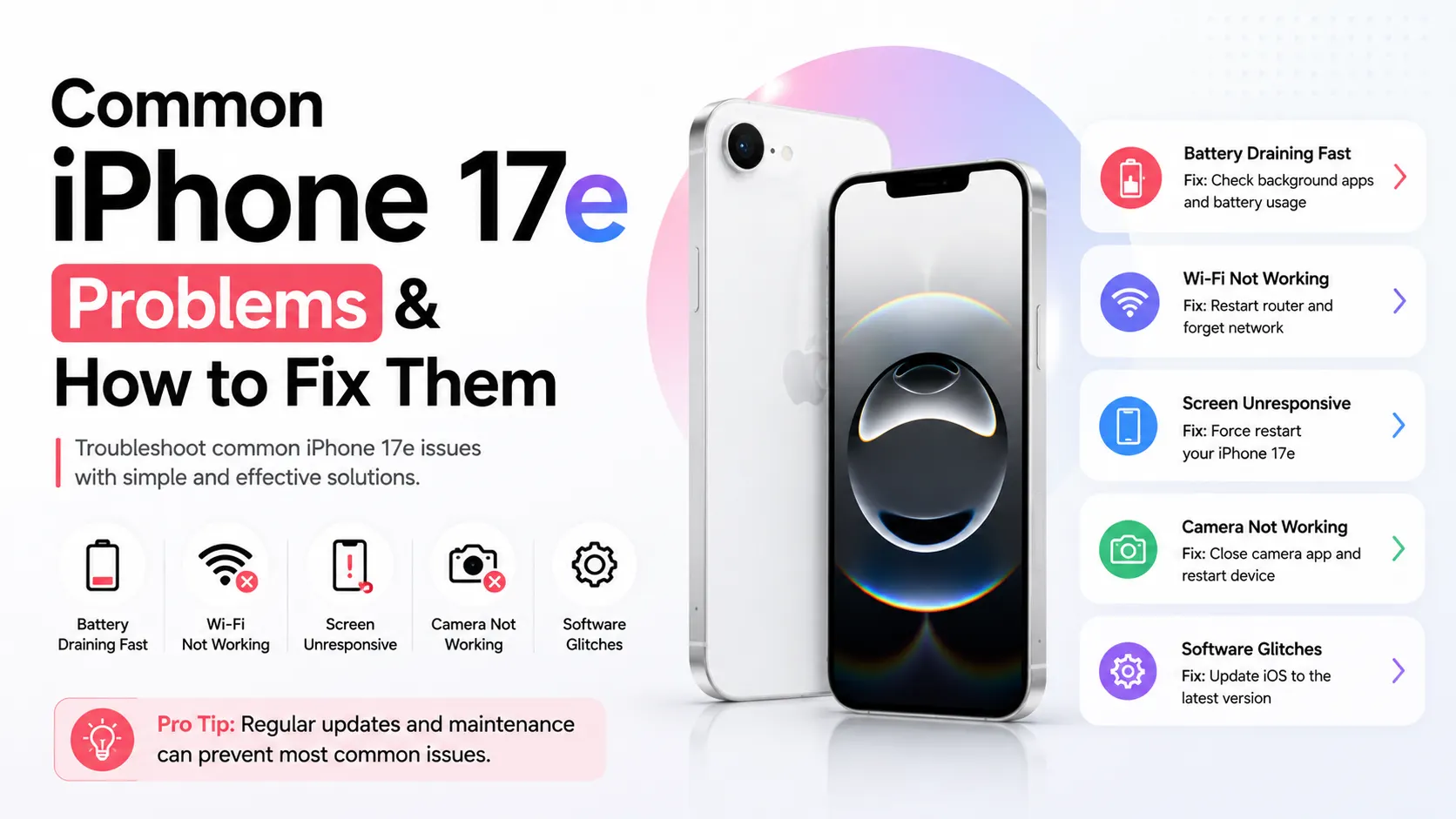
The iPhone 17e delivers impressive performance with its A19 chip, longer battery life, MagSafe support, and Apple Intelligence. However, like any new smartphone, some users may experience software bugs, charging issues, battery drain, connectivity problems, or accidental hardware damage.
The good news is that many of these issues can be resolved with simple troubleshooting, while others may require professional repair. In this guide, we’ll cover the most common iPhone 17e problems, explain what causes them, and show you the best fixes. If you’re in Dubai, we’ll also explain when it’s worth visiting a repair specialist instead of trying DIY solutions.
Quick Answer
Most iPhone 17e problems are caused by iOS 26 software bugs, charging accessories, accidental drops, battery settings, or network issues. Restarting the device, updating iOS, checking battery health, and using certified accessories solve many problems, while damaged hardware usually requires professional repair.
Key Takeaways
- Most iPhone 17e issues are software-related.
- Install every iOS update promptly.
- MagSafe and USB-C charging issues are often accessory-related.
- Battery drain usually improves after software optimization.
- Screen or camera damage requires professional repair.
- Dubai’s heat can affect battery performance and device temperature.
Battery Draining Faster Than Expected
During the first few days after setup, your iPhone indexes photos, apps, Apple Intelligence features, and background data. This temporary activity can increase battery usage.
Battery drain may also occur because of:
- Apple Intelligence processing
- Background App Refresh
- High screen brightness
- Location Services
- Poor mobile signal
- iOS 26 optimization after updates
How to Fix It
- Update to the latest iOS 26 release.
- Enable Low Power Mode.
- Disable unnecessary background activity.
- Reduce screen brightness.
- Check Battery Usage in Settings.
If battery life continues to deteriorate after several weeks, the battery may need professional testing. Reports of battery-related issues have also appeared across parts of the iPhone 17 lineup, with software updates addressing some cases.
iPhone 17e Charging Slowly or Not Charging
Although the iPhone 17e supports USB-C and MagSafe, charging problems can still occur.
Common causes include:
- Dust inside the USB-C port
- Damaged charging cable
- Non-certified charger
- Software bugs
- Dirty MagSafe ring
Try These Fixes
- Clean the charging port carefully.
- Use an Apple-certified charger.
- Restart the phone.
- Update iOS.
- Test another charging cable.
If wired and wireless charging both fail, the charging port or internal charging circuit may require repair.
iPhone 17e Overheating
Some warmth is normal while:
- Installing updates
- Charging
- Gaming
- Recording 4K video
- Using Apple Intelligence
However, excessive heat should not continue for long.
Reduce Heat
- Remove the phone case while charging.
- Close heavy background apps.
- Avoid direct sunlight.
- Pause gaming during charging.
- Install the latest iOS updates.
Dubai’s high summer temperatures can make overheating more noticeable, especially if the phone is left in a parked car or used outdoors.
Wi-Fi, Bluetooth or 5G Connectivity Issues
A small number of users across the iPhone 17 family have reported intermittent Wi-Fi, Bluetooth, and cellular connectivity issues, many of which appear to be software-related.
Possible Fixes
- Toggle Airplane Mode.
- Restart your router.
- Forget and reconnect to Wi-Fi.
- Reset Network Settings.
- Install the latest iOS update.
Touchscreen Not Responding
A frozen or unresponsive display may result from:
- Software glitches
- Screen damage
- Water exposure
- Faulty display connector
Fixes
- Force restart the phone.
- Remove thick screen protectors.
- Update iOS.
- Check for physical damage.
If only part of the screen responds to touch, professional display replacement may be needed.
iPhone 17e Camera Problems
The iPhone 17e features a powerful 48MP Fusion camera, but users may occasionally experience:
- Blurry photos
- Camera app freezing
- Focus issues
- Black camera screen
Try These Solutions
- Clean the camera lens.
- Restart the Camera app.
- Update iOS.
- Reset camera settings.
If the camera remains unusable after software troubleshooting, the camera module may require replacement.
Apps Crashing or Freezing
New iOS versions occasionally create compatibility issues with third-party apps.
Fixes
- Update affected apps.
- Restart your iPhone.
- Reinstall problematic apps.
- Keep iOS updated.
Speaker or Microphone Issues
Dust and debris often affect audio quality.
Common symptoms include:
- Low speaker volume
- Distorted sound
- Microphone not working during calls
Cleaning the speaker grills carefully and updating iOS often resolves software-related issues.
Face ID Not Working
Face ID may stop working after:
- Screen replacement
- Camera damage
- Software bugs
Try:
- Restarting the device.
- Cleaning the TrueDepth camera.
- Re-registering Face ID.
Hardware faults should only be repaired by experienced technicians.
Accidental Screen Damage
Although Ceramic Shield 2 improves durability, drops can still crack the display.
Signs include:
- Cracked glass
- Green lines
- Flickering display
- Black spots
- Touch failure
Professional screen replacement restores full functionality while maintaining display quality.
iOS 26 Issues on iPhone 17e
Because the iPhone 17e ships with iOS 26, some early users have reported software-related issues after updates. Most are temporary and can be resolved with Apple’s latest patches or simple troubleshooting. Apple has already released updates such as iOS 26.5.1, which fixes a wired charging issue affecting some iPhone 17e devices after they shut down.
Common iOS 26 Problems
- Faster-than-normal battery drain after updating
- Occasional overheating during indexing after installation
- Apps freezing or crashing until developers release compatible updates
- Lag or stuttering animations
- Wi-Fi or Bluetooth connectivity issues
- Charging problems after specific iOS versions (fixed in newer updates)
How to Fix iOS 26 Issues
- Update to the latest available iOS 26 version.
- Restart your iPhone after major updates.
- Update all apps from the App Store.
- Allow 24–48 hours after a major update for background indexing to finish.
- Reset network settings if Wi-Fi or Bluetooth problems continue.
- If problems persist after updating, back up your device and reinstall iOS using Finder or Apple Devices/iTunes.
If software updates don’t resolve the issue, there could be an underlying hardware problem such as a weak battery, charging port fault, or logic board issue. In that case, professional diagnostics are recommended.
When Should You Visit an iPhone Repair Shop in Dubai?
Seek professional help if:
- Your iPhone won’t turn on.
- Charging has stopped completely.
- Face ID no longer works.
- The display is cracked or unresponsive.
- The battery drains unusually fast after troubleshooting.
- The camera remains faulty.
- Water damage is suspected.
For expert diagnostics and repairs, you can visit Milaaj or book an appointment through iPhone Repair in Dubai. If your device is no longer worth repairing or you’re planning to upgrade, you can also sell your iPhone in Dubai for a competitive cash offer.
Frequently Asked Questions
Does the iPhone 17e have any common problems?
There are no major hardware defects unique to the iPhone 17e. Most reported issues involve battery optimization, charging, connectivity, or iOS 26 software behavior.
Why is my iPhone 17e battery draining quickly?
Background indexing after setup, Apple Intelligence features, location services, and software updates can temporarily increase battery usage.
Is overheating normal on the iPhone 17e?
Some warmth is expected during charging, gaming, or software updates. Persistent overheating should be inspected.
Can software updates fix iPhone 17e problems?
Yes. Apple regularly releases iOS updates that improve stability, battery performance, connectivity, and bug fixes.
Where can I repair an iPhone 17e in Dubai?
If troubleshooting doesn’t resolve the issue, professional diagnostics and genuine replacement parts are recommended for reliable repairs.
Final Thoughts on iPhone 17e Issues & Fixes
The iPhone 17e is a significant upgrade over its predecessor, offering faster performance, more storage, improved durability, and Apple Intelligence support. While occasional software bugs or everyday hardware problems can occur, most issues are easy to diagnose and resolve.
If your iPhone 17e continues to experience charging problems, display damage, battery issues, or camera faults, professional repair can restore it to peak performance. If you’re considering upgrading your iPhone, selling your current iPhone is another practical option to offset the cost of a newer model.
📍 Visit Any Milaaj Branch in Dubai
🔹 Bur Dubai
Milaaj Mobile and Laptop Repair Dubai
📞 055 258 8477
🔗 Google Maps
🔹 Al Barsha
Milaaj Mobiles and Laptop Repair Al Barsha
📞 052 596 2846
🔗 Google Maps
🔹 Al Barsha 3
Milaaj Mobiles , Laptops and Watches Repair Service
📞 052 3405 814
🔗 Google Maps
🔹 Al Nuaimiya
Milaaj Mobiles and Laptops Ajman
📞 055 788 9654
🔗 Google Maps
Email: support@milaaj.com
Operating Hours: Monday Sunday


Leave a Reply