

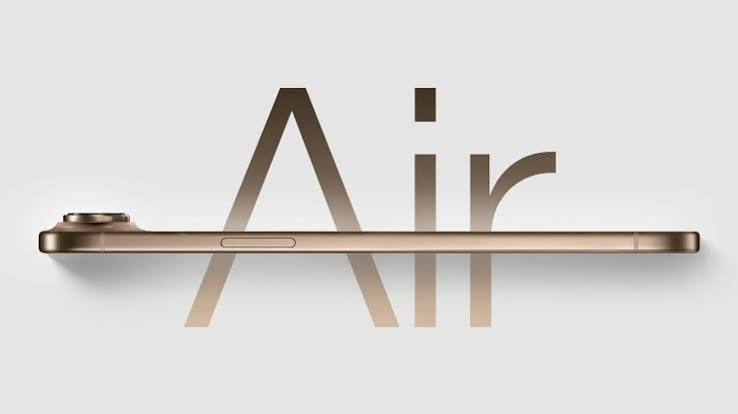
Apple completely redefined smartphone aesthetics when it introduced its slimmest phone yet. The ultra-slim design feels weightless in your hand and slips effortlessly into your pocket, making it a true marvel of modern hardware engineering. However, creating a chassis that measures only a few millimeters thick requires major structural compromises. Tech enthusiasts and daily users across the UAE are learning this lesson the hard way. A growing number of people are noticing that the charging assembly on this device is surprisingly delicate. Facing an iPhone 17 Air USB-C port repair Dubai why the ultra thin design makes it fragile issue is becoming a common headache for owners who use their devices heavily throughout the day.
When a phone gets this thin, the physical port loses the deep structural reinforcement that protected older, thicker smartphone generations. Simple everyday habits can quickly damage your device. Tripping over a charging cable, plugging in a cable at a slight angle, or letting fine desert dust settle inside the slot can instantly disrupt your connection. In this comprehensive guide, we explore the engineering reasons behind this structural fragility. We also offer helpful troubleshooting tips to use at home and explain what it takes to safely fix a compromised charging flex assembly.
The Engineering Conflict: Aesthetics vs. Physical Durability
To understand why this model is so fragile, we must look at how modern devices are built. When engineers shave millimeters off a phone frame, they cannot simply shrink the universal Type-C connector plug. The physical opening must remain standard to fit your existing cables. As a result, the metal wall surrounding the internal port assembly becomes incredibly thin.
Reduced Structural Anchor Points
In older, thicker phones, the charging block was anchored firmly to a heavy sub-frame with multiple vertical screws. This design absorbed the physical leverage when you wiggled a cable. In this ultra-thin profile, there is no room for bulky metal brackets. The port relies on tiny, micro-soldered anchor tabs fastened directly to a flexible printed circuit. Without heavy physical reinforcement, inserting a cable with too much force puts intense mechanical strain directly on these delicate solder joints.
The Multi-Layer Charging Flex Assembly
The modern Type-C port does not just transfer electricity to your battery. It acts as a primary communication hub. This single port manages fast charging protocols, coordinates high-speed USB data transfers, and routes signals to the lower microphones and speakers. Because everything is packed into a tight, slim area, any physical flex at the base of the phone can tear the traces on the main ribbon cable. This leaves you with a dead phone that refuses to start up or communicate with external accessories.
Accelerated Component Fatigue
Because the frame lacks a deep structural recess, the external metal shell of the port is closer to the surface. This layout exposes the interior pins to increased daily wear and tear. Constant mechanical pressure from inserting and removing your charger causes the internal pins to fatigue and lose their spring tension much faster than they would in a standard smartphone frame.
Clear Warning Signs Your Charging Port Is Failing
A charging port rarely stops working overnight without warning. Usually, the internal connections degrade slowly over several weeks. Catching these early red flags can save you from getting stuck with a completely dead battery during a busy workday.
- Intermittent Charging States: You plug in your cable, but the charging lightning bolt icon constantly blinks on and off. You have to twist the cord or prop it up at a specific angle to keep the power flowing.
- Excessive Heat Around the Base: Your phone gets alarmingly hot near the lower speaker grilles while charging. This heat indicates high electrical resistance, which happens when internal pins are bent or cracked.
- Slow Data Transfers: When you connect your phone to a laptop, the computer fails to recognize the device, or file transfers freeze midway. This means the data pins inside the port are damaged, even if the power pins can still draw electricity.
- Loose Cable Fit: Your premium braided cable no longer snaps firmly into place. Instead, it feels loose, sags downward, or slides completely out of the port with a gentle nudge.
Quick Troubleshooting Steps to Try Before Seeking Repair
Before concluding that your thin charging assembly is permanently broken, you should rule out simple blockages. The high coastal humidity and fine sand particles in the UAE can combine to form a dense debris layer inside your charging slot.
<Sequence>
{/* Reason: Procedural step-by-step cleaning and testing workflow where order is critical to prevent short circuits or physical damage to internal pins. */}
  <Step title="Power Down Your Device Completely" subtitle="Safety First">
    Turn off your device before inserting any tool into the port. This safety step eliminates the risk of accidentally short-circuiting the sensitive data pins with static electricity.
  </Step>
  <Step title="Inspect the Slot with Bright Light" subtitle="Visual Diagnosis">
    Shine a bright desk lamp or flashlight directly into the opening. Look for compressed pocket lint, fine desert dust, or small debris packed tightly at the very back of the port wall.
  </Step>
  <Step title="Gently Clear Out Debris" subtitle="Mechanical Cleaning">
    Use a non-conductive tool, like a thin wooden toothpick or a specialized plastic anti-static brush. Carefully insert it into the slot and sweep around the center tongue assembly. Avoid metal needles, which can permanently bend the delicate internal pins.
  </Step>
  <Step title="Test with an Authentic Apple Cable" subtitle="Cross Verification">
    Plug in a verified, original Apple Type-C cable connected to a certified wall adapter. Cheap, aftermarket cables often have slight manufacturing variances that fail to make proper contact inside an ultra-slim port.
  </Step>
</Sequence>
The Hazards of Delaying Hardware Repairs
Many users try to live with a loose port by propping their phone against a book or twisting the cable just right. However, ignoring an unstable electrical connection can cause serious damage to your high-end phone.
When internal power pins are loose or cracked, electricity can arc across the tiny gaps inside the port. This arcing creates micro-sparks that burn the protective coating on the contacts. Over time, these small electrical surges can travel up the ribbon cable and damage the primary power management chip on your main logic board. Fixing a blown power chip is far more complex and expensive than simply replacing a worn-out charging port assembly.
Expert Hardware Restoration in Al Barsha with Milaaj
Opening an ultra-thin flagship phone requires specialized tools and steady, experienced hands. Because the internal components are packed closely together, amateur repair attempts can easily puncture the battery, crack the display, or tear the delicate 5G antenna lines. For residents looking for a reliable, professional fix, Milaaj mobile and laptop repair Al Barsha provides world-class hardware restoration services tailored specifically for slim smartphones.
Highly Competitive Low Pricing
Fixing a modern, premium device should not have to break your budget. Our service center maintains direct relationships with elite component suppliers. This allows us to provide highly competitive, low pricing structures. You get top-tier engineering and durable results without facing the steep markup costs found at standard flagship retail outlets.
Rapid Repair Speeds and Total Convenience
We know how vital your phone is to your personal and professional life. You cannot afford to part with it for days at a time. Our workshop in Al Barsha keeps essential parts in stock. This allows our technicians to offer rapid turnaround times, often replacing a damaged Type-C flex cable while you wait in our comfortable service lounge.
Premium Grade Replacement Parts
Using cheap, low-grade replacement ports can ruin your device’s performance. It can disable fast charging, cause dropped calls, and slow down data sync speeds. We use only premium-grade replacement components that match factory dimensions perfectly. This ensures your phone retains its original high-speed charging capabilities and clear microphone audio.
Frequently Asked Questions (FAQ)
Can using a third-party car charger damage my thin phone’s USB-C port?
Yes, it can. Many cheap car chargers lack proper voltage regulation circuits. When your car’s engine cranks, it can send sudden electrical surges down the wire. In a tightly packed, ultra-thin device, these small power spikes can easily burn out the sensitive data lines inside the charging block.
Is it better to switch entirely to wireless charging if my physical port is acting up?
Wireless charging is a great alternative, but it does not fix the underlying physical damage. A cracked or shorted pin inside the port can still cause subtle power leaks or heat accumulation over time. Additionally, wireless charging generates more heat, which can put extra strain on an already stressed, slim chassis.
Why does my phone’s microphone sound muffled during phone calls?
The primary microphone is actually soldered directly onto the exact same ribbon flex cable as your charging port. If your port bends, warps, or suffers from internal liquid corrosion, it often breaks the audio traces running right next to it. This structural damage results in muffled or completely silent call audio.
How do technicians replace the port without breaking the slim screen?
Replacing the port requires a precision teardown. Technicians use specialized heating platforms to soften the factory structural adhesive holding the back glass. Next, they use automated suction matrices to carefully lift the panel without bending the frame. Once inside, they remove the lower speaker and Taptic Engine to safely swap the old charging flex assembly for a new one.
How can I protect my phone’s charging port from bending in the future?
The easiest protection is using a high-quality magnetic USB-C adapter tip. This small adapter stays inside your port permanently, protecting the internal pins from daily wear and tear. When you need to charge, the cable snaps magnetically onto the outside of the tip, completely removing mechanical strain from the phone’s internal assembly.
If your phone is struggling to hold a charge or the cable feels loose, you can watch this helpful tutorial on How to Diagnose and Clean Smartphone USB-C Ports Safely to learn how to check your device for common blockages. This guide shows you exactly what the internal pins look like under a microscope, helping you understand how easy it is for dust or physical force to disrupt your connection.
📍 Visit Any Milaaj Branch in Dubai
🔹 Bur Dubai
Milaaj Mobile and Laptop Repair Dubai
📞 055 258 8477
🔗 Google Maps
🔹 Al Barsha
Milaaj Mobiles and Laptop Repair Al Barsha
📞 052 596 2846
🔗 Google Maps
🔹 Al Barsha 3
Milaaj Mobiles , Laptops and Watches Repair Service
📞 052 3405 814
🔗 Google Maps
🔹 Al Nuaimiya
Milaaj Mobiles and Laptops Ajman
📞 055 788 9654
🔗 Google Maps
Email: support@milaaj.com
Operating Hours: Monday Sunday

Leave a Reply