

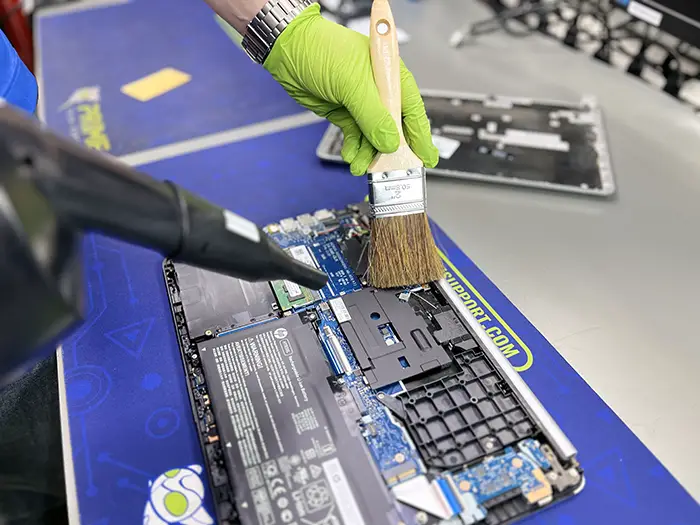
Modern laptops in 2026 are incredibly powerful, slim, and compact. Devices like the MacBook Neo and high-performance gaming systems like the ASUS ROG series are built to handle demanding tasks with ease. However, there’s one thing many users overlook, regular laptop deep cleaning & maintenance.
In a place like Dubai, this becomes even more important. Fine dust, heat, and humidity quietly build up inside your device over time. You may not notice it immediately, but gradually your laptop starts running hotter, slower, and less efficiently.
If you want your laptop to stay fast, cool, and reliable, deep cleaning isn’t optional it’s essential.
Why Laptop Deep Cleaning & Maintenance is Critical
Laptops today use compact chip designs and tightly packed internal components. That means even a small amount of dust or heat buildup can affect performance.
The Hidden Impact of Dust Build-Up
Dubai’s fine dust doesn’t just sit on the surface. It gets pulled inside through cooling vents and settles on fans, heat sinks, and internal circuits.
Over time, this creates a layer that traps heat. As a result:
- Your laptop runs hotter than usual
- Fans spin louder and constantly
- Performance drops during heavy tasks
Eventually, this leads to thermal throttling, where your system slows itself down to prevent damage.
Heat + Humidity = Internal Damage
Humidity adds another layer of risk. When dust mixes with moisture, it can create a thin conductive layer on internal components.
This can lead to:
- Random system crashes
- Boot failures
- Long-term motherboard damage
Regular laptop deep cleaning & maintenance helps remove this buildup before it turns into a costly repair.
The 3 Pillars of Proper Laptop Maintenance
Deep cleaning is not just about blowing air into vents. A proper maintenance routine focuses on key internal areas.
1. Thermal System Cleaning & Optimization
This is the most important step.
Over time, thermal paste dries out and cooling systems lose efficiency. During a deep clean:
- Dust is removed from fans and heat sinks
- Old thermal paste is replaced
- Cooling performance is restored
This helps your laptop maintain stable temperatures even under heavy use.
2. Ports, Hinges & External Components
Small areas like charging ports and hinges are often ignored—but they matter.
Dust buildup can cause:
- Loose charging connections
- Port damage
- Stiff or damaged hinges
Cleaning and maintaining these parts ensures long-term durability.
3. Battery Health & Internal Safety
Heat directly affects battery life.
During maintenance:
- Battery condition is checked
- Swelling risks are identified early
- Performance is calibrated
This prevents unexpected shutdowns and extends battery lifespan.
5 Signs Your Laptop Needs Deep Cleaning
Not sure if your laptop needs maintenance? Look for these warning signs:
- Loud fan noise even during light use
- Laptop heating up quickly within minutes
- Slow performance after some time (thermal throttling)
- Unexpected shutdowns or restarts
- Charging issues or loose ports
If you notice even one of these, it’s time for a proper laptop deep cleaning & maintenance.
Step-by-Step: What Happens During a Professional Deep Clean
A proper deep cleaning process goes beyond basic cleaning. Here’s what it typically includes:
- Full internal inspection and disassembly
- Dust removal using anti-static tools
- Fan and cooling system cleaning
- Thermal paste replacement
- Port cleaning and optimization
- Hinge and body inspection
- Basic system performance check
This process restores both performance and reliability.
DIY vs Professional Laptop Cleaning
You can do basic cleaning at home like:
- Wiping the keyboard and screen
- Using compressed air lightly on vents
However, internal cleaning requires care. Opening your laptop without proper tools can damage sensitive components.
That’s why many users prefer professional services like Milaaj Mobile and Laptop Repair for safe and complete maintenance.
How Often Should You Clean Your Laptop in Dubai?
Because of the environment, cleaning frequency matters.
- Regular users: every 10–12 months
- Gamers or heavy users: every 6–8 months
- Outdoor or travel users: every 6 months
Sticking to a schedule helps avoid major performance issues later.
Extra Tips to Keep Your Laptop Cool
In addition to deep cleaning, a few habits can make a big difference:
- Always use your laptop on a hard surface
- Avoid blocking air vents
- Keep it away from direct sunlight
- Use a cooling pad if needed
- Close unused apps to reduce heat load
These small steps support your overall laptop maintenance routine.
Why Choose Professional Laptop Maintenance?
A proper deep clean doesn’t just fix current issues, it prevents future ones.
With expert service, you get:
- Better cooling performance
- Faster system speed
- Longer hardware lifespan
- Reduced risk of major repairs
If your laptop is already slowing down or overheating, combining cleaning with a laptop repair service can fully restore performance.
FAQs: Laptop Deep Cleaning & Maintenance
Does deep cleaning really improve laptop performance?
Yes. Removing dust and refreshing thermal paste improves cooling, which allows your CPU and GPU to perform at full capacity.
Can I clean my laptop without opening it?
You can clean the exterior and vents, but internal dust buildup requires opening the device for proper cleaning.
How much does laptop deep cleaning cost in Dubai?
It depends on the laptop type and condition, but it’s much cheaper than replacing damaged components caused by overheating.
Is overheating always caused by dust?
Not always. It can also be due to old thermal paste, heavy software usage, or failing hardware. Cleaning is the first step to diagnose the issue.
When should I get professional help?
If your laptop is overheating, shutting down, or making loud fan noise, it’s best to get it checked immediately.
Final Thoughts: Don’t Wait Until It Slows Down
Laptop performance doesn’t drop overnight, it happens gradually. By the time you notice serious lag or overheating, internal damage may already be starting.
Regular laptop deep cleaning & maintenance keeps your device running the way it should; fast, cool, and reliable.
If your laptop is already showing signs like overheating or slow performance, it’s a good time to get it checked. And if repair costs feel too high, you can also consider options to upgrade or sell your laptop instead of investing in major fixes.
📍 Visit Any Milaaj Branch in Dubai
🔹 Bur Dubai
Milaaj Mobile and Laptop Repair Dubai
📞 055 258 8477
🔗 Google Maps
🔹 Al Barsha
Milaaj Mobiles and Laptop Repair Al Barsha
📞 052 596 2846
🔗 Google Maps
🔹 Al Barsha 3
Milaaj Mobiles , Laptops and Watches Repair Service
📞 052 3405 814
🔗 Google Maps
🔹 Al Nuaimiya
Milaaj Mobiles and Laptops Ajman
📞 055 788 9654
🔗 Google Maps
Email: support@milaaj.com
Operating Hours: Monday Sunday



Leave a Reply